
Custom Disenchanter
Precision enchantment removal - keep what you want, remove what you don't.
About this Mod
⚒️ Custom Disenchanter
🪄 Overview
Custom Disenchanter is a next-generation Minecraft mod that completely redefines enchantment management.
Unlike the vanilla Grindstone, which removes all enchantments, this mod introduces a dedicated Disenchanter Block — allowing you to selectively extract enchantments from your items with full control.
✨ Features
- ✅ Selective Enchantment Removal — Remove specific enchantments without affecting others
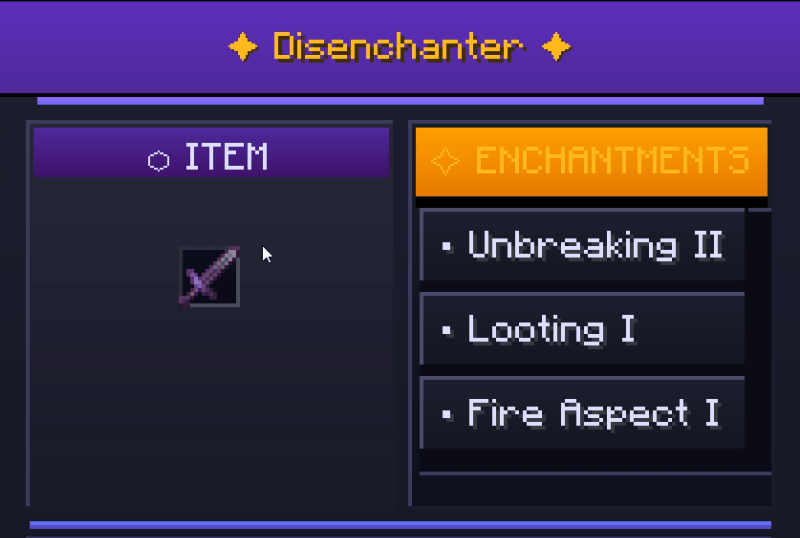
- 🧭 Intuitive GUI — Easy-to-use interface for managing your enchanted items
- 🎒 Custom Creative Tab — Access all disenchanter-related items quickly
- ⚙️ Full Capability Support — Inventory persists properly and supports hoppers
- 🌍 Multiplayer Ready — Works flawlessly in single-player and server environments
📜 Crafting Recipes
🔷 Recipe (Minecraft 1.17+)
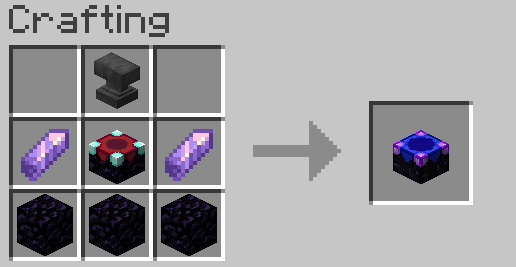
🔶 Recipe (Minecraft 1.16.5 & below)
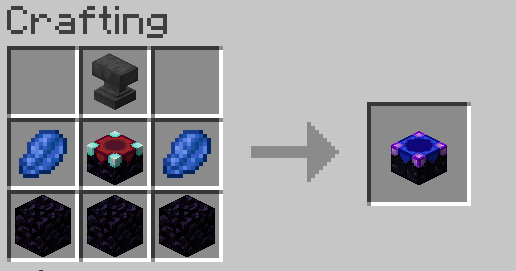
🧰 In-Game Preview
🎮 How to Use
- Craft or obtain a Disenchanter Block
- Place it in your world
- Right-click to open the interface
- ⚠️ Important: You must have at least one book in your inventory to store removed enchantments
- Insert your enchanted item
- Select the enchantment(s) to remove
- Retrieve your modified item and the book containing the extracted enchantment(s)
💬 Community & Support
Join our Discord community for help, feedback, and updates!

📜 License & Credits
Developed by OSAMA
All rights reserved.
Feel free to share and use in your modpacks with credit.
Available Versions
How to Install Custom Disenchanter on Your Server
Order Server
Order a Minecraft Java server with at least 3 GB RAM (4 GB recommended).
Set fabric Loader
In the panel under "Egg", select the fabric loader and matching Minecraft version (26.1.2).
Install Mod
Open the mod browser in the dashboard and search for "Custom Disenchanter". Click "Install" – done! Alternatively, upload the .jar via SFTP to the /mods folder.
Compatibility
Mod Loaders
Minecraft Versions
26.1.2, 26.1.1, 26.1 (+14 more)
Server-side
✓ RequiredRecommended RAM
4 GB(min. 3 GB)Frequently Asked Questions
Custom Disenchanter server crashes on startup – what to do?
Most common cause: wrong fabric version or insufficient RAM. Check the server log (latest.log) for "OutOfMemoryError" or "Mixin" errors. With Mado Hosting: ensure at least 3 GB RAM is allocated and the loader matches the mod version (26.1.2). You can switch loaders with one click in the panel.
Is Custom Disenchanter compatible with fabric and forge and quilt?
Custom Disenchanter officially supports fabric, forge, quilt for Minecraft 26.1.2, 26.1.1, 26.1. Note: Forge and Fabric mods are NOT cross-compatible – pick one loader and stick with it. The Mado dashboard automatically detects incompatible loader combinations.
Server lagging with Custom Disenchanter – how to optimize performance?
Recommended RAM: 4 GB (per 8 players). Use /spark profiler to check if Custom Disenchanter consumes the most tick time. Common fixes: reduce server view-distance to 8-10, install "performant" or "starlight" as supplementary mods on Forge. With Mado Hosting, your server runs on NVMe SSDs with dedicated CPU cores for minimal latency.
Rent Modded Server
Install Custom Disenchanter with just one click on your server.