
Custom Seeds
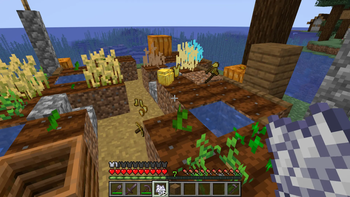
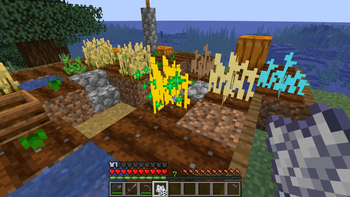
Adds 12 new seeds to Minecraft
Screenshots
About this Mod
What is this mod?
Tired of spending hours strip-mining just to get basic gear? This mod completely flips how you gather resources in your survival world.
Instead of mining, you can craft 12 unique Custom Seeds using raw base materials (like Raw Iron, Logs, or Diamonds) combined with a standard Wheat Seed. Plant them on farmland, wait for them to grow (or speed them up with Bone Meal), and right-click to harvest.
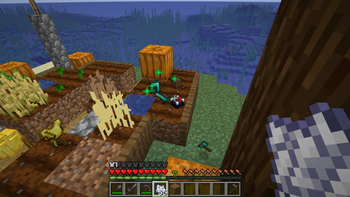
Instead of dropping boring crops, harvesting triggers a "Lucky 7" loot explosion! A fully grown Diamond Seed might drop a Diamond Sword, an Enchanting Table, and diamond armor. A Log Seed drops crafting tables, shields, and wooden gear.
🛠️ How to Craft
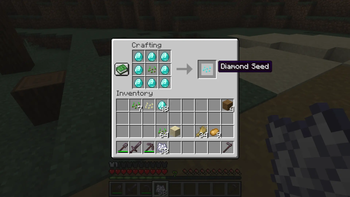
Crafting your custom seeds is super simple. Open a Crafting Table and place 1 Vanilla Wheat Seed right in the center slot. Then, surround it completely with 8 of the base material you want to grow.
- Example: 8 Raw Iron + 1 Wheat Seed = 1 Iron Seed.
- Example: 8 Diamonds + 1 Wheat Seed = 1 Diamond Seed.
- Note for Wood: The Log Seed accepts any combination of vanilla logs!
🌱 The 12 Craftable Seeds
You can craft seeds for:
Log, Cobblestone, Gravel, Dirt, Sand, Andesite, Coal, Raw Iron, Raw Gold, Diamond, Emerald, and Lapis.
⚠️ Key Mechanics & Rules
- The "Lucky 7" Drops: Harvesting a fully grown crop rolls up to 7 random items from its specific OP loot pool.
- No Seed Duping: To keep things somewhat balanced, a harvested crop will never drop the seed itself, and it will never drop the base block. You have to keep crafting to keep growing!
- High Stakes Death Penalty: Be careful out there! Dying instantly clears your inventory and aggressively destroys every single custom crop you have planted across your loaded chunks.
- Anti-Cheat: You can't break the system. Pistons will destroy the crops instead of moving them, water will not wash them away, and jumping on farmland will not trample the dirt beneath custom crops.
🎥 For Content Creators (YouTubers / Streamers)
We love seeing people use my work in videos! If you’re a creator and you use this mod for a challenge or a series, I just ask for one small favor:
Please include the official links to this page in your video description. It helps support my work and lets your viewers find the mod easily. To avoid copyright issues, simply including the official links to this page in your description is all you need to do!
Installation Guide
- Download the latest
.jarfile from the Versions tab. - This is a Fabric mod! Ensure you have Fabric Loader (0.18.5+) and the Fabric API installed for Minecraft 1.21.4.
- Drop the mod into your
modsfolder. - Launch your world, grab a hoe, and start planting!
Available Versions
How to Install Custom Seeds on Your Server
Order Server
Order a Minecraft Java server with at least 3 GB RAM (4 GB recommended).
Set fabric Loader
In the panel under "Egg", select the fabric loader and matching Minecraft version (1.21.4).
Install Mod
Open the mod browser in the dashboard and search for "Custom Seeds". Click "Install" – done! Alternatively, upload the .jar via SFTP to the /mods folder.
Compatibility
Mod Loaders
Minecraft Versions
1.21.4
Server-side
✓ RequiredRecommended RAM
4 GB(min. 3 GB)Frequently Asked Questions
Custom Seeds server crashes on startup – what to do?
Most common cause: wrong fabric version or insufficient RAM. Check the server log (latest.log) for "OutOfMemoryError" or "Mixin" errors. With Mado Hosting: ensure at least 3 GB RAM is allocated and the loader matches the mod version (1.21.4). You can switch loaders with one click in the panel.
Is Custom Seeds compatible with fabric?
Custom Seeds officially supports fabric for Minecraft 1.21.4. The Mado dashboard automatically detects incompatible loader combinations.
Server lagging with Custom Seeds – how to optimize performance?
Recommended RAM: 4 GB (per 8 players). Use /spark profiler to check if Custom Seeds consumes the most tick time. Common fixes: reduce server view-distance to 8-10, install "performant" or "starlight" as supplementary mods on Forge. With Mado Hosting, your server runs on NVMe SSDs with dedicated CPU cores for minimal latency.
Similar Mods




Rent Modded Server
Install Custom Seeds with just one click on your server.