
Custom Sense
Custom Sense lets you assign different mouse sensitivities to each item you hold. Get lower sensitivity for precise PvP aim and higher sensitivity for fast movement — automatically, without changing settings manually.
Screenshots
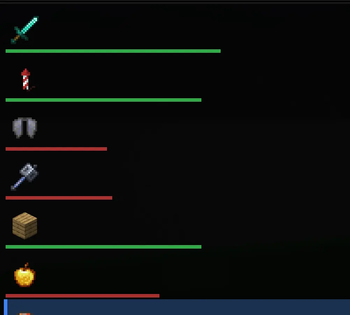
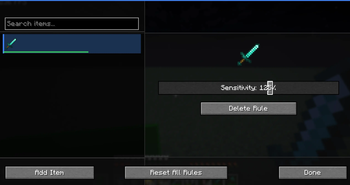
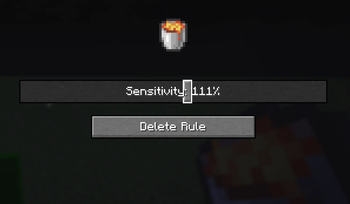


About this Mod
Custom Sense — Item-Based Sensitivity Control
Custom Sense is a lightweight, client-side Fabric mod that dynamically adjusts mouse sensitivity based on the item currently held in the player’s main hand.
Instead of relying on a single global sensitivity setting, the mod enables precise, per-item customization. This allows players to optimize their control for different gameplay scenarios without manually changing settings.
Core Functionality
The mod monitors the item held in the main hand and applies a corresponding sensitivity multiplier in real time.
If no custom rule exists for the current item, the system automatically falls back to the player’s default (vanilla) sensitivity.
Example Use Cases
Reduced sensitivity for swords to improve PvP accuracy
Further reduced sensitivity for bows or crossbows to maximize precision
Increased sensitivity for blocks or utility items to allow faster camera movement
Features
Per-item mouse sensitivity configuration
Real-time automatic sensitivity switching
In-game configuration interface with a clean, structured layout
“Add current item” functionality for fast rule creation
Persistent configuration using a JSON-based storage system
Optional HUD element displaying the currently active sensitivity
Design Philosophy
Minecraft’s default system applies a single sensitivity value across all contexts. This approach limits control in situations that require varying levels of precision and speed.
Custom Sense removes this limitation by introducing a flexible, item-based sensitivity system that adapts to the player’s current action.
Technical Overview
Client-side only (no server installation required)
Built specifically for Fabric 1.21.11
Lightweight and performance-efficient
Non-invasive implementation that preserves the player’s base sensitivity setting
Available Versions
How to Install Custom Sense on Your Server
Order Server
Order a Minecraft Java server with at least 3 GB RAM (4 GB recommended).
Set fabric Loader
In the panel under "Egg", select the fabric loader and matching Minecraft version (1.21.11).
Install Mod
Open the mod browser in the dashboard and search for "Custom Sense". Click "Install" – done! Alternatively, upload the .jar via SFTP to the /mods folder.
Compatibility
Mod Loaders
Minecraft Versions
1.21.11, 1.21.10, 1.21.9 (+8 more)
Server-side
✗ UnsupportedRecommended RAM
4 GB(min. 3 GB)Frequently Asked Questions
Custom Sense server crashes on startup – what to do?
Most common cause: wrong fabric version or insufficient RAM. Check the server log (latest.log) for "OutOfMemoryError" or "Mixin" errors. With Mado Hosting: ensure at least 3 GB RAM is allocated and the loader matches the mod version (1.21.11). You can switch loaders with one click in the panel.
Is Custom Sense compatible with fabric?
Custom Sense officially supports fabric for Minecraft 1.21.11, 1.21.10, 1.21.9. The Mado dashboard automatically detects incompatible loader combinations.
Server lagging with Custom Sense – how to optimize performance?
Recommended RAM: 4 GB (per 8 players). Use /spark profiler to check if Custom Sense consumes the most tick time. Common fixes: reduce server view-distance to 8-10, install "performant" or "starlight" as supplementary mods on Forge. With Mado Hosting, your server runs on NVMe SSDs with dedicated CPU cores for minimal latency.
Similar Mods



![[TaCZ] Timeless and Classics Zero](https://cdn.modrinth.com/data/SzzJttH8/fd27766d2bb8390d284696b1dbd358f87e081439_96.webp)


Rent Modded Server
Install Custom Sense with just one click on your server.