CustomCoords
Customise your coordinates so they mean something to you!
Screenshots
About this Mod
Coordinates are an essential part of the multiplayer experience. There's no other way to efficiently communicate the location of something to someone who doesn't share your knowledge. This information, being so essential, does not belong in the debug screen, along with information that is either useless or potentially oppositional to a positive user experience. As such, we the community have created a vast number of mods to display your coordinates through other means over the years. This mod's niche in this sea of coord mods is that of customisability, hence its namesake.
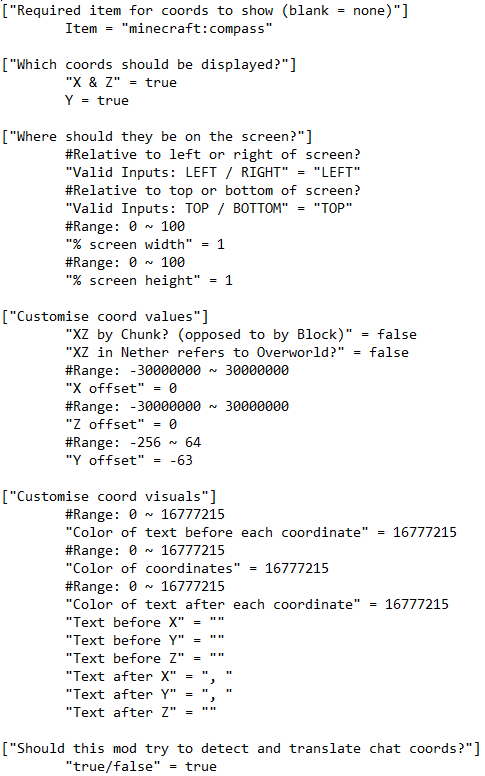
Originally being a backend function, coords struggle to hold meaning, especially after the introduction of -64 < y < 0. You can now be in control of that meaning. For example, you can change Y 0 to be sea level, so your Y-coord can communicate where you are regards to it. Importantly, this is only visual, so it doesn't effect how the game operates in the background.
/cc share and automatic chat coord interpretation allows you to communicate with others who don't share the same customisations as you, without any unwarranted confusion.
This mod also comes with integration with Xaero's minimap, the custom coords are shown in the info display.
This mod is still in development. Please be aware that it may not work as intended. Post any bugs, queries, or gripes to the Issue page.
FAQ:
The following features are currently planned for modification or introduction:
Available Versions
How to Install CustomCoords on Your Server
Order Server
Order a Minecraft Java server with at least 3 GB RAM (4 GB recommended).
Set forge Loader
In the panel under "Egg", select the forge loader and matching Minecraft version (1.18.2).
Install Mod
Open the mod browser in the dashboard and search for "CustomCoords". Click "Install" – done! Alternatively, upload the .jar via SFTP to the /mods folder.
Compatibility
Mod Loaders
Minecraft Versions
1.18.2
Server-side
✗ UnsupportedRecommended RAM
4 GB(min. 3 GB)Frequently Asked Questions
CustomCoords server crashes on startup – what to do?
Most common cause: wrong forge version or insufficient RAM. Check the server log (latest.log) for "OutOfMemoryError" or "Mixin" errors. With Mado Hosting: ensure at least 3 GB RAM is allocated and the loader matches the mod version (1.18.2). You can switch loaders with one click in the panel.
Is CustomCoords compatible with forge?
CustomCoords officially supports forge for Minecraft 1.18.2. The Mado dashboard automatically detects incompatible loader combinations.
Server lagging with CustomCoords – how to optimize performance?
Recommended RAM: 4 GB (per 8 players). Use /spark profiler to check if CustomCoords consumes the most tick time. Common fixes: reduce server view-distance to 8-10, install "performant" or "starlight" as supplementary mods on Forge. With Mado Hosting, your server runs on NVMe SSDs with dedicated CPU cores for minimal latency.
Similar Mods




Rent Modded Server
Install CustomCoords with just one click on your server.