
CustomDurability
A Fabric Mod that allows for changing the durabilities of all items!
Screenshots
About this Mod
Custom Durability
A Fabric Mod that allows for changing the durabilities of all items.
Overview
Change any item's durability with a Command!
Should work on Integrated Servers and Dedicated Servers.
Requires FAPI
Need on Client: ✅ Need on Server: ✅
Report any Issues on GitHub or my Discord Server
Haven't tested modded items, I'm mainly just targetting this mod for Vanilla, since it's what I wanted... it probably? should? work with modded items?

Commands
A bunch of commands to help you set the durability of an item using its ID or Tag, or bulk setting by using wildcards
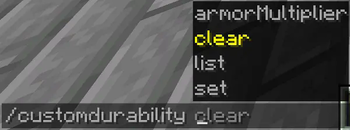
/cd armorMultiplier [True or False]- whether to use the vanilla armor multipliers for armor (more on this below)
/cd clear [Optional Item ID or Tag]:- sets all configured items back to their default vanilla durabilities
- without the optional argument, clears all configured durabilities.
- with the optional argument, clears that specified item or tag.
/cd list- lists all items, tags and their new durabilities.
/cd set item [Item ID or Tag] [Durability]- sets an item (or tag) to a durability
/cd set wildcard [String with Wildcards] [Durability]- adds items using wildcards to a temporary context (more on this below)
/cd context list- lists all items in your current context.
/cd context clear [Optional Item ID]- clears all items in your current context.
/cd context set item [Item ID or Tag] [Durability]- sets an item in your current context to a durability.
/cd context set all [Durability]- sets all items in your current context to a durability.
/cd context filter [TOOL / WEAPON / ARMOUR / OTHER]- filters items in your current context list based off of the given input (KEEPS the thing you inputted, look at example below)
/cd context confirm- applies all the item configurations in your current context into your main config.
/cd context cancel- cancels the current context.
Some Examples:
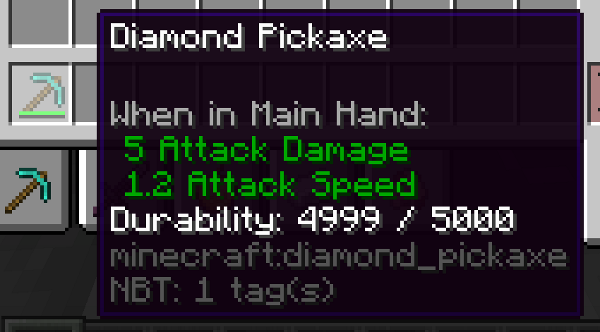
Setting a diamond pickaxe's durability to 5000:/cd set item diamond_pickaxe 5000
Setting all diamond tools durability to 5000:/cd set item #cd:tools/diamond 5000
An example attempt of setting all minecraft diamond tools to 5000 using wildcards:
cd set wildcard minecraft:*diamond* 5000
This then puts it into your temporary context, which would match with all diamond tools,
and diamond armor, which you don't want, you'd then have to either:
- click the tool filtering button
Keep all: [TOOL] [WEAPON] [ARMOUR] [OTHER] - run
/cd context filter TOOLto keep all tools and filter out armour - or just manually remove all the armour items.
Context
/cd set wildcard doesn't immediately put all the items it matches into your main config,
in order to not add things the wildcard wasn't supposed to get, it puts it in a temporary config that you can remove or edit the entries until you decide to
apply it to the main config, either through /cd context confirm or by clicking the button shown after running /cd set wildcard command (or shown in the /cd context list command).
✖ Armor Multiplier
The Armor Multiplier option is so that you can use a base vanilla value that will multiply
your inputted durability, so if you put 5 for boot armor, it would get multiplied by 13, so you'd get what, 65?
(this is how vanilla does it, and is why helmets, chestplates, leggings and boots don't share the same durability)
Default Multipliers:
- Helmet: 11
- Chestplate: 16
- Leggings: 15
- Boots: 13
🕮 Helpful Tags
I added some tags that should help with some of the more common items:
#cd:toolswoodstoneirongolddiamondnetherite
#cd:armorleatherchainmailirongolddiamondnetherite
You'd use these by for example doing:
- For Wooden Tools:
/cd set item #cd:tools/wood [durability] - For Leather Armor:
/cd set item #cd:armor/leather [durability]
Available Versions
How to Install CustomDurability on Your Server
Order Server
Order a Minecraft Java server with at least 3 GB RAM (4 GB recommended).
Set fabric Loader
In the panel under "Egg", select the fabric loader and matching Minecraft version (1.21).
Install Mod
Open the mod browser in the dashboard and search for "CustomDurability". Click "Install" – done! Alternatively, upload the .jar via SFTP to the /mods folder.
Compatibility
Mod Loaders
Minecraft Versions
1.21, 1.20.6, 1.20.5 (+6 more)
Server-side
✓ RequiredRecommended RAM
4 GB(min. 3 GB)Frequently Asked Questions
CustomDurability server crashes on startup – what to do?
Most common cause: wrong fabric version or insufficient RAM. Check the server log (latest.log) for "OutOfMemoryError" or "Mixin" errors. With Mado Hosting: ensure at least 3 GB RAM is allocated and the loader matches the mod version (1.21). You can switch loaders with one click in the panel.
Is CustomDurability compatible with fabric?
CustomDurability officially supports fabric for Minecraft 1.21, 1.20.6, 1.20.5. The Mado dashboard automatically detects incompatible loader combinations.
Server lagging with CustomDurability – how to optimize performance?
Recommended RAM: 4 GB (per 8 players). Use /spark profiler to check if CustomDurability consumes the most tick time. Common fixes: reduce server view-distance to 8-10, install "performant" or "starlight" as supplementary mods on Forge. With Mado Hosting, your server runs on NVMe SSDs with dedicated CPU cores for minimal latency.
Similar Mods



![[TaCZ] Timeless and Classics Zero](https://cdn.modrinth.com/data/SzzJttH8/fd27766d2bb8390d284696b1dbd358f87e081439_96.webp)


Rent Modded Server
Install CustomDurability with just one click on your server.