
Custom Message Blocker
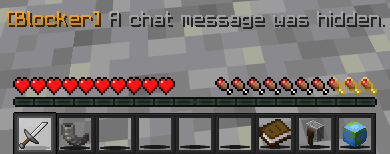
The mod included in this project is a little mod I've been working on that adds the ability to not show certain chat messages. They can be messages which contain a word you don't want to see, or an EXACT word you don't want to see.
Screenshots
About this Mod
Custom Message Blocker
Tired of certain words or phrases cluttering your chat? Custom Message Blocker lets you automatically hide certain chat messages containing (or exactly matching) phrases you don't want to see.
Features
- Custom filter rules — Add as many blocked phrases as you want
- Two modes:
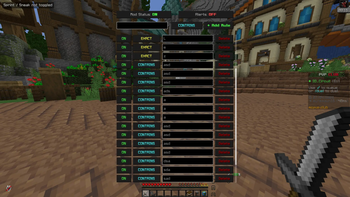
CONTAINS— blocks any message that includes your phrase anywhereEXACT— blocks only messages where your phrase is the actual message sent
- On/off switch — disable the entire mod if you wish.
- Optional alerts — get a subtle action bar notification when a message is blocked, so you know filtering is working
- In-game config GUI — manage all your rules visually, no config file editing required
- Keybind & command support — open settings with
\(rebindable) or/blockerconfig - 100% client-side — works on any server
How to Use
- Press
\(default keybind) or run/blockerconfigto open the GUI - Type a phrase you want blocked and choose
CONTAINSorEXACTmode - Click + Add Rule
- Done!
Requirements
- Minecraft 1.21+
- Fabric Loader 0.15.0+
- Fabric API
- Java 21+
Available Versions
How to Install Custom Message Blocker on Your Server
Order Server
Order a Minecraft Java server with at least 3 GB RAM (4 GB recommended).
Set fabric Loader
In the panel under "Egg", select the fabric loader and matching Minecraft version (1.21.11).
Install Mod
Open the mod browser in the dashboard and search for "Custom Message Blocker". Click "Install" – done! Alternatively, upload the .jar via SFTP to the /mods folder.
Compatibility
Mod Loaders
Minecraft Versions
1.21.11, 1.21.10, 1.21.9 (+9 more)
Server-side
✗ UnsupportedRecommended RAM
4 GB(min. 3 GB)Frequently Asked Questions
Custom Message Blocker server crashes on startup – what to do?
Most common cause: wrong fabric version or insufficient RAM. Check the server log (latest.log) for "OutOfMemoryError" or "Mixin" errors. With Mado Hosting: ensure at least 3 GB RAM is allocated and the loader matches the mod version (1.21.11). You can switch loaders with one click in the panel.
Is Custom Message Blocker compatible with fabric?
Custom Message Blocker officially supports fabric for Minecraft 1.21.11, 1.21.10, 1.21.9. The Mado dashboard automatically detects incompatible loader combinations.
Server lagging with Custom Message Blocker – how to optimize performance?
Recommended RAM: 4 GB (per 8 players). Use /spark profiler to check if Custom Message Blocker consumes the most tick time. Common fixes: reduce server view-distance to 8-10, install "performant" or "starlight" as supplementary mods on Forge. With Mado Hosting, your server runs on NVMe SSDs with dedicated CPU cores for minimal latency.
Similar Mods






Rent Modded Server
Install Custom Message Blocker with just one click on your server.