
CustomSaveDirs
A client-side mod allows you use custom directories for reading and saving singleplayer worlds.
Screenshots
About this Mod
Mod Synopsis
This is a lightweight mod run on client-side, which allows you use custom directories for singleplayer worlds' reading and saving instead of the hard-coded ${GAME_DIR}/saves by the game. No game relaunching required when setting the directories.
How to Use This Mod
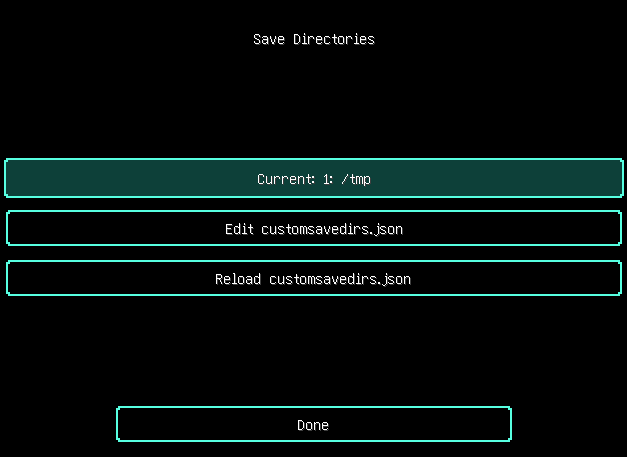
After loading this mod, click “Options...” button in Main Menu, and then “Configure Save Directories...”(If you did not see the button, it shows that the button is pushed away by buttons added by other mods, try to increase the window's height).
When ${GAME_DIR}/config/customsavedirs.json does not exist, the text in the highest button in the screen should be “Current: Default”. Then you can click “Edit customsavedirs.json” button, a text editor will be opened after clicking. Edit for the directories you want to let this mod read. Absolute and relative paths are supported. For example, if you want this mod to read “/tmp” “saves” “../../saves” 3 directories, you need to write the following content to ${GAME_DIR}/config/customsavedirs.json:
[
  "/tmp",
  "saves",
  "../../saves"
]
After saving customsavedirs.json, click “Reload customsavedirs.json” in the game. Click “Current: 0: /tmp” button to switch to next valid directory declared in customsavedirs.json(“valid directory” here stands for a string that is capable to successfully create a Path object by java.nio.file.FileSystems.getDefault().getPath(xxx) or java.nio.file.Path.of(xxx) in Java), switch to “1: saves” in this example. And note that first valid directory's index is 0 rather than 1 in customsavedirs.json.
If you want the game load the worlds under default save directory again, just delete customsavedirs.json or change its content to [], then click “Reload customsavedirs.json”.
The save directory will be changed to index 0 or the game default after game relaunching.
When changing directory with singleplayer world opening, the directory will be applied after the world is saved and quitted. For example, open “New World” when using “0: /tmp”, and change it to “2: ../../saves” with the world opening, and then save and quit, the saving directory of that world will still be /tmp, “New World” under ../../saves will not be affected.
Notice
Fabric API run on Fabric or Legacy Fabric API run on Legacy Fabric is strongly recommended in order to apply language files in this mod's JAR. Without them, you can still launch the game, but texts related to this mod will be shown as fallback English texts or translation keys.
Some mods storing there config files on folder names only instead of worlds' full paths will behave abnormally with this mod loading.
Available Versions
How to Install CustomSaveDirs on Your Server
Order Server
Order a Minecraft Java server with at least 3 GB RAM (4 GB recommended).
Set babric Loader
In the panel under "Egg", select the babric loader and matching Minecraft version (25w14craftmine).
Install Mod
Open the mod browser in the dashboard and search for "CustomSaveDirs". Click "Install" – done! Alternatively, upload the .jar via SFTP to the /mods folder.
Compatibility
Mod Loaders
Minecraft Versions
25w14craftmine, 1.21.5, 1.21.4 (+81 more)
Server-side
✗ UnsupportedRecommended RAM
4 GB(min. 3 GB)Frequently Asked Questions
CustomSaveDirs server crashes on startup – what to do?
Most common cause: wrong babric version or insufficient RAM. Check the server log (latest.log) for "OutOfMemoryError" or "Mixin" errors. With Mado Hosting: ensure at least 3 GB RAM is allocated and the loader matches the mod version (25w14craftmine). You can switch loaders with one click in the panel.
Is CustomSaveDirs compatible with babric and fabric and forge and legacy-fabric and neoforge?
CustomSaveDirs officially supports babric, fabric, forge, legacy-fabric, neoforge for Minecraft 25w14craftmine, 1.21.5, 1.21.4. Note: Forge and Fabric mods are NOT cross-compatible – pick one loader and stick with it. The Mado dashboard automatically detects incompatible loader combinations.
Server lagging with CustomSaveDirs – how to optimize performance?
Recommended RAM: 4 GB (per 8 players). Use /spark profiler to check if CustomSaveDirs consumes the most tick time. Common fixes: reduce server view-distance to 8-10, install "performant" or "starlight" as supplementary mods on Forge. With Mado Hosting, your server runs on NVMe SSDs with dedicated CPU cores for minimal latency.
Similar Mods






Rent Modded Server
Install CustomSaveDirs with just one click on your server.