
Cutscene Engine
A professional cinematic scene creation system for Minecraft
Screenshots


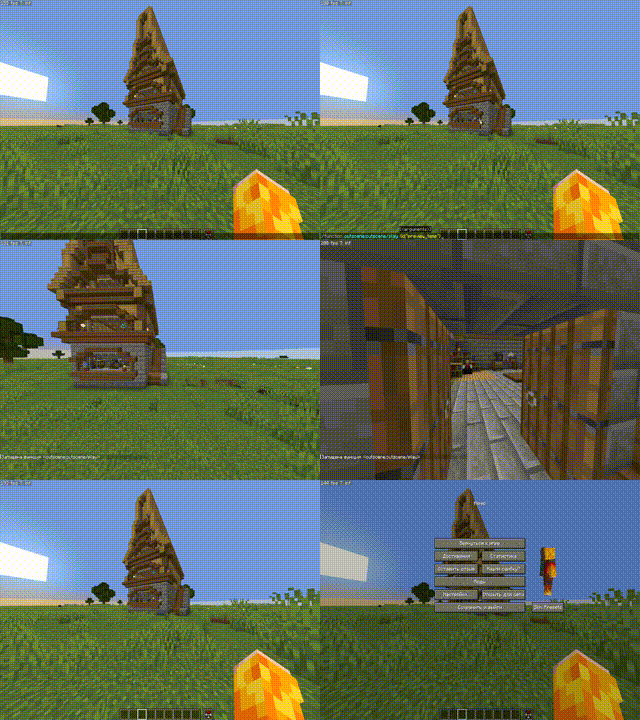


About this Mod
🎬 Cutscene Engine
Professional cinematic scene creation system for Minecraft
📖 Description
Cutscene Engine is an advanced data pack that allows you to create smooth cinematic scenes directly in-game without the need for external tools. Ideal for creators of adventure maps, RPG servers, and story-driven projects.
✨ Main Features
🛠️ Visual Editor
- Intuitive Interface — Control with the mouse wheel and right-click
- Add Camera Points — Create a camera path directly in the game
- Preview — Instantly check the result
- Motion Interpolation — Automatically create smooth transitions between points
🎥 Camera System
- Smooth Motion — Interpolation between keypoints
- Duration Adjustment — From 10 ticks to any value
- Spectator Mode — Automatic control of the player's camera
- Save State — Restore position and game mode after a cutscene
💬 Message System (in dev)
- Title/Subtitle — Large titles on the screen
- Actionbar — Text above the hotbar
- Chat — Messages in Chat
- Font Settings — full support for JSON formatting (color, bold, italic, underline)
- Point Snapping — automatically displays text at the right moment
⚙️ Ending Settings
- Teleportation — player movement after a cutscene
- Game Mode — automatic mode change
- Final Title — ending message
🌐 Localization
- Russian and English — full bilingual support
- Dynamic Switching — change languages at any time
💾 Save System
- Workspace — temporary workspace for editing
- Save Cutscenes — export finished scenes with a unique ID
- Load — import saved cutscenes for editing
- Autosave — data loss protection
🎮 How to use
Creating a cutscene
- Open the editor:
/function _cutscene:editor_on
- Add camera points:
- Position yourself in the desired position
- Scroll the wheel to "➕ Add point"
- Right-click
- Adjust the settings:
- Select "⚙ Settings" in the menu
- Set the cutscene length
- Adjust the ending (teleport, game mode, title)
- Add messages:
- Select "💬 Messages" in the menu
- Adjust the Title, Subtitle, Actionbar, or Chat
- Apply text to the nearest point
- Render:
- Select "🎬 Render" to generate frames
- Use "▶ Preview" for verification
- Save:
- Open "⚙ Settings" → "💾 Save"
- Enter a unique ID for the cutscene
Play a cutscene
/function _cutscene:play_cutscene {id:"your_cutscene_id"}
🔧 Specifications
- Minecraft Versions: 1.21.8 - 1.21.10
- Performance: Optimized for minimal impact on TPS
🎯 Usage Examples
- Adventure Maps — intro and outro cutscenes
- RPG Servers — quest cutscenes
- Tutorial Maps — mechanic demonstrations
- Story Projects — cinematic cutscenes
📝 Commands
| Command | Description |
|---|---|
/function _cutscene:editor_on |
Open the editor |
/function _cutscene:play_cutscene {id:"..."} |
Play a cutscene |
/function cutscene:cutscene/list |
List of saved cutscenes |
/trigger cutscene_engine_localization set 1 |
Russian language |
/trigger cutscene_engine_localization set 2 |
English language |
🤝 Compatibility
- ✅ Works with other datapacks
- ✅ Does not require mods
- ✅ Multiplayer support
- ✅ Compatible with command blocks
🐛 Support
Found a bug or have a suggestion? Create an issue in the project repository!
Create cinematic masterpieces right in Minecraft! 🎬✨
Available Versions
How to Install Cutscene Engine on Your Server
Order Server
Order a Minecraft Java server with at least 3 GB RAM (4 GB recommended).
Set datapack Loader
In the panel under "Egg", select the datapack loader and matching Minecraft version (26.1.2).
Install Mod
Open the mod browser in the dashboard and search for "Cutscene Engine". Click "Install" – done! Alternatively, upload the .jar via SFTP to the /mods folder.
Compatibility
Mod Loaders
Minecraft Versions
26.1.2, 26.1.1, 26.1 (+6 more)
Server-side
✓ RequiredRecommended RAM
4 GB(min. 3 GB)Frequently Asked Questions
Cutscene Engine server crashes on startup – what to do?
Most common cause: wrong datapack version or insufficient RAM. Check the server log (latest.log) for "OutOfMemoryError" or "Mixin" errors. With Mado Hosting: ensure at least 3 GB RAM is allocated and the loader matches the mod version (26.1.2). You can switch loaders with one click in the panel.
Is Cutscene Engine compatible with datapack and fabric and forge and neoforge and quilt?
Cutscene Engine officially supports datapack, fabric, forge, neoforge, quilt for Minecraft 26.1.2, 26.1.1, 26.1. Note: Forge and Fabric mods are NOT cross-compatible – pick one loader and stick with it. The Mado dashboard automatically detects incompatible loader combinations.
Server lagging with Cutscene Engine – how to optimize performance?
Recommended RAM: 4 GB (per 8 players). Use /spark profiler to check if Cutscene Engine consumes the most tick time. Common fixes: reduce server view-distance to 8-10, install "performant" or "starlight" as supplementary mods on Forge. With Mado Hosting, your server runs on NVMe SSDs with dedicated CPU cores for minimal latency.
Similar Mods



Rent Modded Server
Install Cutscene Engine with just one click on your server.