
cyankeys
Move items with highly customizable hotkeys!
Screenshots
About this Mod
cyankeys
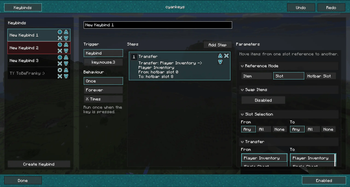
A client-side macro keybind mod, focused on making repeated inventory and action workflows faster.
Create named keybinds, assign them to keyboard or mouse inputs, and build small macro sequences for common tasks like moving items, dropping items, running client commands, or sending chat messages.
Features
- Create custom macro keybinds in-game
- Bind macros to keyboard keys or mouse buttons
- Transfer items between player inventory and containers
- Select items by item type, slot, or hotbar slot
- Drop selected items with a keybind
- Run client commands or send chat messages
- Choose trigger behavior like once, repeat, or toggle repeat
- Configure through ModMenu, with fallback keybinds for settings and enable/disable
Inventory Support
Supports common container layouts such as player inventory, chests, hoppers, droppers, furnaces, shulker boxes, crafting stations, and configurable custom grids.
Inventory actions are performed through normal screen-handler click operations on supported platforms instead of directly editing the client inventory.
Available Versions
How to Install cyankeys on Your Server
Order Server
Order a Minecraft Java server with at least 3 GB RAM (4 GB recommended).
Set fabric Loader
In the panel under "Egg", select the fabric loader and matching Minecraft version (26.1.2).
Install Mod
Open the mod browser in the dashboard and search for "cyankeys". Click "Install" – done! Alternatively, upload the .jar via SFTP to the /mods folder.
Compatibility
Mod Loaders
Minecraft Versions
26.1.2, 26.1.1, 26.1 (+1 more)
Server-side
✗ UnsupportedRecommended RAM
4 GB(min. 3 GB)Frequently Asked Questions
cyankeys server crashes on startup – what to do?
Most common cause: wrong fabric version or insufficient RAM. Check the server log (latest.log) for "OutOfMemoryError" or "Mixin" errors. With Mado Hosting: ensure at least 3 GB RAM is allocated and the loader matches the mod version (26.1.2). You can switch loaders with one click in the panel.
Is cyankeys compatible with fabric and neoforge and quilt?
cyankeys officially supports fabric, neoforge, quilt for Minecraft 26.1.2, 26.1.1, 26.1. The Mado dashboard automatically detects incompatible loader combinations.
Server lagging with cyankeys – how to optimize performance?
Recommended RAM: 4 GB (per 8 players). Use /spark profiler to check if cyankeys consumes the most tick time. Common fixes: reduce server view-distance to 8-10, install "performant" or "starlight" as supplementary mods on Forge. With Mado Hosting, your server runs on NVMe SSDs with dedicated CPU cores for minimal latency.
Similar Mods






Rent Modded Server
Install cyankeys with just one click on your server.