
DaiChangCraft
A Minecraft adventure mod that adds many props and several entities to the game.
Screenshots

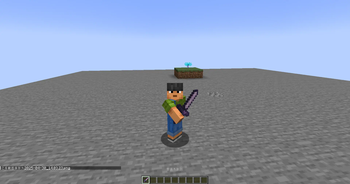
![Seraphina[Incomplete]](https://cdn.modrinth.com/data/vsQUVfVT/images/12931299ccd0cf13b63ccbb9a7c90a3d656ef41a_350.webp)

About this Mod
DCCraft
DCCraft is a Minecraft Forge mod that adds a variety of new features and content to the game.
Features
Custom Entities
- Seraphina: A powerful boss entity with complex AI and multiple attack patterns
- DCSteve: A custom Steve entity with special abilities
- Various custom project entities (arrows, projectiles, etc.)
Custom Items
- Forever Oath Sword: A powerful weapon with unique effects
- Mace: A melee weapon that deals area-of-effect damage
- Hexahedron and Regular Dodecahedron: Special tools
- Music Player: Built-in music playback functionality supporting NetEase Cloud Music
Custom Blocks
- BedRockGlass: A special glass block
- DCCraftingTable: An enhanced crafting table
Client-Side Features
- Dynamic Island HUD: A dynamic notification system similar to iPhone
- Module System: Enable or disable various client-side features
- Music Player: Play music directly within the game
- Notification System: Visually appealing notifications
- Target HUD: Displays information about targeted entities
Other Features
- Custom dimension: "Horizon of Existence"
- Multiple custom enchantments
- Custom potion effects
- Advanced rendering effects and shaders
Installation
- Ensure the correct version of Minecraft Forge is installed
- Place the DCCraft-RE mod file into the mods folder
- Launch the game
Usage
Music Player
- Press the designated key to open the music player interface
- Search and play music from NetEase Cloud Music
- Supports account login
Module System
- Press the designated key to open the module management interface
- Enable or disable various feature modules
- Each module may have independent settings
Dynamic Island HUD
- Automatically displays when important events occur
- Shows notifications for module enable/disable actions
- Displays system announcements
Configuration
The mod provides several configuration options; relevant configuration files can be found and modified in the config folder.
Dependencies
- GeckoLib 1.20.1
- Minecraft Forge (specific version)
Developer Information
This project is maintained by daichangs_mc, with source code hosted on Gitee.
License
Please refer to the LICENSE file in the project for detailed licensing information.
this description is made with deepseek

Available Versions
How to Install DaiChangCraft on Your Server
Order Server
Order a Minecraft Java server with at least 3 GB RAM (4 GB recommended).
Set forge Loader
In the panel under "Egg", select the forge loader and matching Minecraft version (1.20.1).
Install Mod
Open the mod browser in the dashboard and search for "DaiChangCraft". Click "Install" – done! Alternatively, upload the .jar via SFTP to the /mods folder.
Compatibility
Mod Loaders
Minecraft Versions
1.20.1
Server-side
✓ RequiredRecommended RAM
4 GB(min. 3 GB)Frequently Asked Questions
DaiChangCraft server crashes on startup – what to do?
Most common cause: wrong forge version or insufficient RAM. Check the server log (latest.log) for "OutOfMemoryError" or "Mixin" errors. With Mado Hosting: ensure at least 3 GB RAM is allocated and the loader matches the mod version (1.20.1). You can switch loaders with one click in the panel.
Is DaiChangCraft compatible with forge?
DaiChangCraft officially supports forge for Minecraft 1.20.1. The Mado dashboard automatically detects incompatible loader combinations.
Server lagging with DaiChangCraft – how to optimize performance?
Recommended RAM: 4 GB (per 8 players). Use /spark profiler to check if DaiChangCraft consumes the most tick time. Common fixes: reduce server view-distance to 8-10, install "performant" or "starlight" as supplementary mods on Forge. With Mado Hosting, your server runs on NVMe SSDs with dedicated CPU cores for minimal latency.
Similar Mods




![[TaCZ] Timeless and Classics Zero](https://cdn.modrinth.com/data/SzzJttH8/fd27766d2bb8390d284696b1dbd358f87e081439_96.webp)

Rent Modded Server
Install DaiChangCraft with just one click on your server.