
Dark Graph
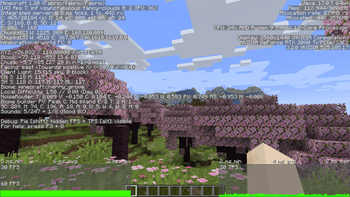
A client mod that changes the debug graphs to use a dark theme.
Screenshots
About this Mod
Dark Graph
A client mod that changes the debug graphs to use a dark theme. To access the frame time and Milliseconds per Tick (MSPT)/TPS graphs hold F3 then press 2, to switch to the network ping and bandwidth graphs hold F3 then press 3. The last open debug graph will stay open when you close the debug menu and you can select a graph either when opening the menu or while it is already open. Enter the keybind for the current open graph to toggle it off. For versions prior to 1.20.2 hold alt then press F3 to access the frame time and MSPT graphs.
When connected to a singleplayer world the bandwidth graph will be absent and the ping graph will be empty while listing 0ms ping. If you are connected to a dedicated server you will not see the MSPT graph as it is not sent to the client. If you would like to see it on your client you can install Server Tick on the server if it runs Fabric. Once you have done that all OPed players with Server Tick installed will be able to see it. You can also configure Server Tick to send it to all clients with the mod installed.
Inspiration
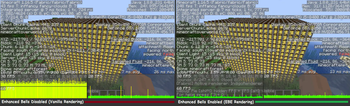
This mod was inspired by a mistake intentional design choice made by FoundationGames when making a promotional image for his mod Enhanced Block Entities.

Compatibility
This mod should work with almost any other mod unless if it modifies the part of the code this mod interfaces. Compatibility has been tested with other mods such as Sodium and Better F3. If you run into issues please report it on the issue tracker.
FAQ
Can you port to Forge?
- No, there are no plans to port to Forge at this time.
Can you port to another version?
- I will only port to newer versions of the game. All releases have their version limited to all minor releases of the current major version when released.
Available Versions
How to Install Dark Graph on Your Server
Order Server
Order a Minecraft Java server with at least 3 GB RAM (4 GB recommended).
Set fabric Loader
In the panel under "Egg", select the fabric loader and matching Minecraft version (1.21.11).
Install Mod
Open the mod browser in the dashboard and search for "Dark Graph". Click "Install" – done! Alternatively, upload the .jar via SFTP to the /mods folder.
Compatibility
Mod Loaders
Minecraft Versions
1.21.11, 1.21.10, 1.21.9 (+23 more)
Server-side
✗ UnsupportedRecommended RAM
4 GB(min. 3 GB)Frequently Asked Questions
Dark Graph server crashes on startup – what to do?
Most common cause: wrong fabric version or insufficient RAM. Check the server log (latest.log) for "OutOfMemoryError" or "Mixin" errors. With Mado Hosting: ensure at least 3 GB RAM is allocated and the loader matches the mod version (1.21.11). You can switch loaders with one click in the panel.
Is Dark Graph compatible with fabric and quilt?
Dark Graph officially supports fabric, quilt for Minecraft 1.21.11, 1.21.10, 1.21.9. The Mado dashboard automatically detects incompatible loader combinations.
Server lagging with Dark Graph – how to optimize performance?
Recommended RAM: 4 GB (per 8 players). Use /spark profiler to check if Dark Graph consumes the most tick time. Common fixes: reduce server view-distance to 8-10, install "performant" or "starlight" as supplementary mods on Forge. With Mado Hosting, your server runs on NVMe SSDs with dedicated CPU cores for minimal latency.
Rent Modded Server
Install Dark Graph with just one click on your server.