
Sword Art Onmine : Beginning
DASWORDARTONMINE is a overhaul mod for Minecraft 1.20.1 (Forge) that brings the iconic User Interface (UI) from the anime Sword Art Online directly into your game.
Screenshots
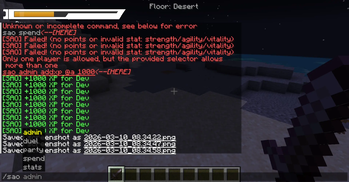
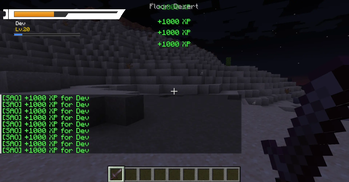
About this Mod
All text translated to English — titles ("Beginner", "Warrior", "Beater"...), menus, items, commands, chat messages, death screen, toast notifications.
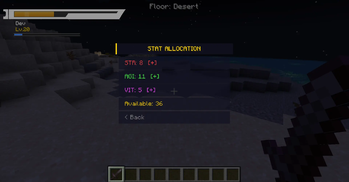
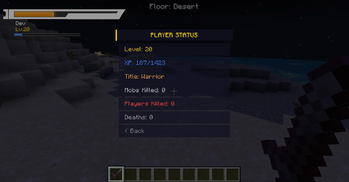
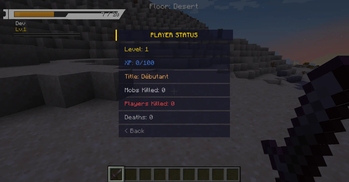
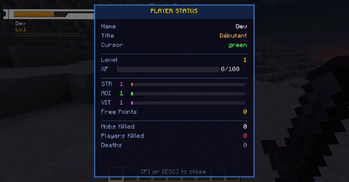
GUIs scaled down — The HUD now uses a configurable hudScale (default 0.75 = 25% smaller). The SAO menu and stats screen render at 0.85x scale. More compact and less intrusive.
Sword Skills removed — No more PacketUseSwordSkill, no more Z/X/C/V keybinds, no more "Sword Skills" section in the menu, no more skill cooldown in the capability. Only M (menu) and P (stats) keys remain.
Many new config options added:
hudScale (0.3–2.0), hudOffsetX, hudOffsetY — HUD position and size
hideVanillaArmor, hideVanillaHunger, hideVanillaXpBar, hideVanillaHotbar, hideVanillaCrosshair — hide each vanilla element individually
showHpText, showXpBarOnHud — toggle individual HUD elements
deathScreenShowXpLoss, deathScreenDelayTicks — death screen control
mobXpMultiplier, minXpPerKill — fine-tune XP gain
duelMaxDistance, duelRequestTimeout — duel settings
partyXpShareRadius, partyShowOnHud — party options
cursorPkThreshold — PK threshold for orange cursor
healingCrystalPercent, teleportCrystalCooldown, healingCrystalCooldown — item tuning
enableTitleSystem, enableToastNotifications, enableXpPopup, enableLevelUpAnimation — individual feature toggles
Obviously i don't have texture + models for item.
I uploaded this next month.
DASWORDARTONMINE is overhaul mod for Minecraft 1.20.1 (Forge) that brings the iconic User Interface (UI) from the anime Sword Art Online directly into your game.
✨ Key Features
SAO Style HUD: The vanilla heart system has been completely removed and replaced with a sleek, high-definition Health Bar located in the top-left corner of the screen.
Dynamic Health Status: The HP bar reacts to your current health, changing colors dynamically just like in the anime:

    🟢 Green: High Health (> 50%)

    🟠 Orange: Mid Health (< 50%)

    🔴 Red: Critical Danger (< 25%)

Immersive Death Screen: Experience a dramatic "Game Over". The standard death screen is replaced with the iconic "You Are Dead" hexagonal prompt, overlaid with a dramatic red atmospheric filter.

Seamless Respawn: No more "Title Screen" buttons. Simply click once anywhere on the screen to respawn immediately and get back into the action.
⚙️ Technical Info
Loader: Forge

Version: 1.20.1

Side: Client-side and Server-side.
Link Start!
Available Versions
How to Install Sword Art Onmine : Beginning on Your Server
Order Server
Order a Minecraft Java server with at least 3 GB RAM (4 GB recommended).
Set forge Loader
In the panel under "Egg", select the forge loader and matching Minecraft version (1.20.1).
Install Mod
Open the mod browser in the dashboard and search for "Sword Art Onmine : Beginning". Click "Install" – done! Alternatively, upload the .jar via SFTP to the /mods folder.
Compatibility
Mod Loaders
Minecraft Versions
1.20.1
Server-side
✗ UnsupportedRecommended RAM
4 GB(min. 3 GB)Frequently Asked Questions
Sword Art Onmine : Beginning server crashes on startup – what to do?
Most common cause: wrong forge version or insufficient RAM. Check the server log (latest.log) for "OutOfMemoryError" or "Mixin" errors. With Mado Hosting: ensure at least 3 GB RAM is allocated and the loader matches the mod version (1.20.1). You can switch loaders with one click in the panel.
Is Sword Art Onmine : Beginning compatible with forge?
Sword Art Onmine : Beginning officially supports forge for Minecraft 1.20.1. The Mado dashboard automatically detects incompatible loader combinations.
Server lagging with Sword Art Onmine : Beginning – how to optimize performance?
Recommended RAM: 4 GB (per 8 players). Use /spark profiler to check if Sword Art Onmine : Beginning consumes the most tick time. Common fixes: reduce server view-distance to 8-10, install "performant" or "starlight" as supplementary mods on Forge. With Mado Hosting, your server runs on NVMe SSDs with dedicated CPU cores for minimal latency.
Rent Modded Server
Install Sword Art Onmine : Beginning with just one click on your server.