
Dash - Dashboard
A modern web admin dashboard for Minecraft servers with live stats, console access, files, player tools, permissions, backups, and NeoDash multi-server management.
Screenshots
About this Mod
Dash
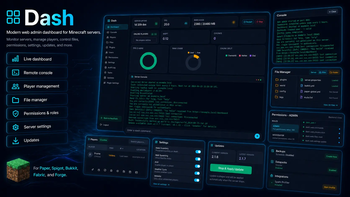
Dash is a modern web-based admin dashboard for Minecraft servers.
Manage your server directly from your browser with live performance stats, remote console access, player tools, file management, permissions, backups, audit logs, scheduled tasks, update controls, and optional NeoDash multi-server management.
🌐 NeoDash — Central Server Management
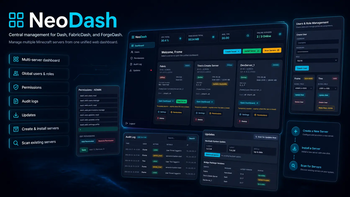
NeoDash is the central control panel for the Dash ecosystem.
While Dash, FabricDash, and ForgeDash run on individual Minecraft servers, NeoDash lets you manage multiple connected servers from one unified web dashboard.
➡️ NeoDash Repository: https://github.com/Framepersecond/NeoDash
NeoDash is perfect if you run more than one server, manage a server network, or want a clean central panel for controlling your Dash-connected servers.
With NeoDash, you can:
- View all connected servers in one dashboard
- See total CPU usage, RAM usage, average TPS, and online server count
- Open each server’s Dash panel from one place
- Start, stop, create, install, and scan servers
- Automatically install new Minecraft servers
- Scan your Linux host for existing Minecraft servers
- Manage global users and server assignments
- Control global roles and permissions
- View centralized audit logs
- Check NeoDash and bridge package updates
- Manage Dash, FabricDash, and ForgeDash bridge versions
- Use SSO bridge flows between NeoDash and Dash-connected servers
NeoDash is optional, but highly recommended for multi-server setups.
⚡ NeoDash Quick Install
NeoDash is installed separately on your Linux host.
Prerequisites
- Java 21+
- Linux host strongly recommended
- Docker optional
- Local permissions for server management and JVM attach workflows
Linux Install Command
curl -sSL https://raw.githubusercontent.com/Framepersecond/NeoDash/main/install.sh | bash
After installing NeoDash, open the NeoDash panel, create or scan your Minecraft servers, then connect Dash, FabricDash, or ForgeDash through the bridge settings.
🧩 Available Versions
| Project | Platform |
|---|---|
| Dash | Paper, Spigot, Bukkit, and compatible servers |
| FabricDash | Fabric servers |
| ForgeDash | Forge servers |
| NeoDash | Central management panel for Dash-connected servers |
Choose the version that matches your server platform.
✨ Why Dash?
Dash gives Minecraft server owners a clean web panel without needing a full external hosting panel.
Instead of switching between console windows, FTP tools, config files, server folders, and separate admin plugins, Dash brings the most important tools into one modern browser interface.
Monitor performance, run commands, manage players, browse files, edit settings, create backups, control permissions, and connect everything with NeoDash.
🚀 Features
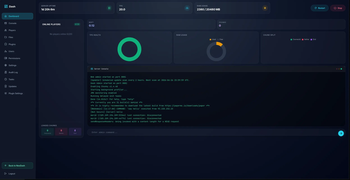
📊 Server Overview
See your server status at a glance.
- Server uptime
- TPS
- MSPT
- RAM usage
- Loaded chunks
- Online players
- Current Dash version
- Restart and stop controls
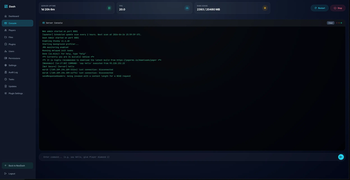
💻 Remote Console
Control your server without opening a terminal.
- View live console output
- Execute server commands
- Clear console output
- Permission-protected console access
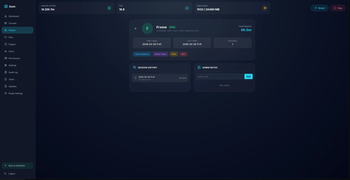
👥 Player Management
Manage players directly from the dashboard.
- View online players
- See ping, IP, world, and location
- Open player profiles
- View session history
- Add admin notes
- Kick or ban players
- View inventories
- Open ender chests
- Give items from the web panel
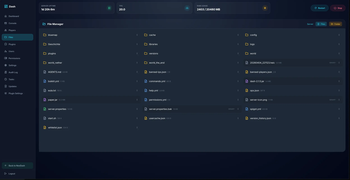
📁 File Manager
Manage server files from your browser.
- Browse folders and files
- Upload files
- Delete files
- Access configs, logs, plugins, worlds, and more
- Detect binary files
- Quickly manage important server files
🧩 Plugins & Mods
View installed plugins or mods inside Dash.
- See installed plugins/mods
- View enabled status
- Manage plugin files where supported
- Upload new plugin files where supported
🔐 Users, Roles & Permissions
Dash includes built-in access control for server teams.
- Create dashboard users
- Assign roles
- Generate invite codes
- Use admin and moderator ranks
- Create custom ranks
- Protect main admin accounts
- Manage NeoDash-linked users
- Control access with detailed permissions
Permission areas include:
- Dashboard stats
- Console access
- Server control
- Player moderation
- Inventory tools
- File management
- Plugin/mod management
- User management
- Settings
- Backups
⚙️ Server Settings
Change common server settings from the web panel.
- Gamerules
- Whitelist
- View distance
- Simulation distance
- MOTD
- Server icon
- Datapacks
- Backups
- Server config files
- Integrations
💾 Backups & Scheduled Tasks
Protect your server and automate useful actions.
- Create backups
- Configure backup limits
- Add scheduled console tasks
- Run recurring commands like
save-all - Prepare maintenance commands
📝 Audit Log
Track important admin activity.
Dash can log:
- Logins
- Commands
- File uploads
- File deletes
- File renames
- Settings changes
- Plugin setting changes
- Server start actions
This makes it easier to see what happened, when it happened, and who did it.
🔄 Updates
Dash and NeoDash include update pages to help manage versions.
- View current version
- View latest version
- Check update status
- Scan for updates
- Compare bridge package versions
- See whether Dash, FabricDash, or ForgeDash servers are up to date
📦 Installation
Paper / Spigot / Bukkit
- Download Dash.
- Place the
.jarfile into your server'spluginsfolder. - Restart your server.
- Open the Dash web panel using the configured port.
Fabric
- Download FabricDash.
- Place the
.jarfile into your server'smodsfolder. - Restart your server.
- Open the Dash web panel.
Forge
- Download ForgeDash.
- Place the
.jarfile into your server'smodsfolder. - Restart your server.
- Open the Dash web panel.
NeoDash
- Install NeoDash on your Linux host.
- Open the NeoDash web panel.
- Create a new server, install a server, or scan for existing servers.
- Connect Dash, FabricDash, or ForgeDash using the bridge settings.
🔐 Security Notice
Dash gives powerful access to your server, including console commands, file management, player moderation, settings, backups, and user permissions.
Only give dashboard access to trusted users.
Recommended:
- Use strong passwords
- Do not expose the panel publicly without protection
- Carefully manage permissions
- Only give admin access to people you trust
- Use NeoDash or a secure reverse proxy for larger setups
✅ Perfect For
Dash is great for:
- Private Minecraft servers
- SMP servers
- Modded servers
- Small communities
- Admin teams
- Developers testing servers
- Server owners who want a clean web panel
- Multi-server setups using NeoDash
🔗 Projects
Dash — Paper, Spigot, Bukkit, and compatible servers
https://github.com/Framepersecond/DashFabricDash — Fabric servers
https://github.com/Framepersecond/FabricDashForgeDash — Forge servers
https://github.com/Framepersecond/ForgeDashNeoDash — Central management panel for Dash-connected servers
https://github.com/Framepersecond/NeoDash
Summary
Dash turns Minecraft server management into a clean web experience.
Available Versions
How to Install Dash - Dashboard on Your Server
Order Server
Order a Minecraft Java server with at least 3 GB RAM (4 GB recommended).
Set bukkit Loader
In the panel under "Egg", select the bukkit loader and matching Minecraft version (26.1.2).
Install Mod
Open the mod browser in the dashboard and search for "Dash - Dashboard". Click "Install" – done! Alternatively, upload the .jar via SFTP to the /mods folder.
Compatibility
Mod Loaders
Minecraft Versions
26.1.2, 26.1.1, 26.1 (+12 more)
Server-side
✓ RequiredRecommended RAM
4 GB(min. 3 GB)Frequently Asked Questions
Dash - Dashboard server crashes on startup – what to do?
Most common cause: wrong bukkit version or insufficient RAM. Check the server log (latest.log) for "OutOfMemoryError" or "Mixin" errors. With Mado Hosting: ensure at least 3 GB RAM is allocated and the loader matches the mod version (26.1.2). You can switch loaders with one click in the panel.
Is Dash - Dashboard compatible with bukkit and fabric and neoforge and paper and purpur and spigot?
Dash - Dashboard officially supports bukkit, fabric, neoforge, paper, purpur, spigot for Minecraft 26.1.2, 26.1.1, 26.1. The Mado dashboard automatically detects incompatible loader combinations.
Server lagging with Dash - Dashboard – how to optimize performance?
Recommended RAM: 4 GB (per 8 players). Use /spark profiler to check if Dash - Dashboard consumes the most tick time. Common fixes: reduce server view-distance to 8-10, install "performant" or "starlight" as supplementary mods on Forge. With Mado Hosting, your server runs on NVMe SSDs with dedicated CPU cores for minimal latency.
Similar Mods






Rent Modded Server
Install Dash - Dashboard with just one click on your server.