
Dash's ToDo Mod
A simple minecraft mod that lets the user have a ToDo list.
Screenshots
About this Mod
📝 Simple ToDo List



Keep your Minecraft projects organized without ever leaving the game! Whether you are planning a massive megabase or just reminding yourself to smelt some iron, this mod provides a clean, integrated way to manage your tasks.
🚀 Features
- Integrated ToDo GUI: A dedicated interface to add, edit, and remove your goals easily.
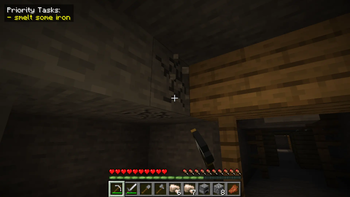
- Toggleable HUD: Keep your current tasks on-screen while you play, or hide them for full immersion.
- Smart Line Wrapping: No more cut-off text! Long tasks automatically wrap to fit the interface, keeping your list clean and readable.
- Icons! : Render you tasks list with icons by holding an item in your main hand and Ctrl + L-Clicking you task in the gui, then switching your hud mode to icons by using the new button in the gui!
- Lightweight & Fast: Designed to be performance-friendly and stay out of the way of your gameplay.
⌨️ Keybindings
Stay in control with these default hotkeys (you can rebind these in your standard Minecraft controls menu):
| Action | Key |
|---|---|
| Open ToDo Menu | N |
| Toggle HUD Visibility | H |
🛠️ How to Use
- Manage Tasks: Press 'N' to open the main menu. From here, you can add new objectives or check off completed ones.
- Visual Tracking: Your tasks will appear on your screen via the HUD.
- Icon Rendering: You can switch your task hud mode to icons for a more concise task list.
- Clean View: If you need a clear screen for a screenshot or combat, simply tap 'H' to toggle the HUD off.
📦 Installation
- Ensure you have the correct version of Fabric or Forge installed.
- Drop the
.jarfile into yourmodsfolder. - Launch the game and start crossing items off your list!
Made by Dash_Ketch
Available Versions
How to Install Dash's ToDo Mod on Your Server
Order Server
Order a Minecraft Java server with at least 3 GB RAM (4 GB recommended).
Set neoforge Loader
In the panel under "Egg", select the neoforge loader and matching Minecraft version (1.21.1).
Install Mod
Open the mod browser in the dashboard and search for "Dash's ToDo Mod". Click "Install" – done! Alternatively, upload the .jar via SFTP to the /mods folder.
Compatibility
Mod Loaders
Minecraft Versions
1.21.1
Server-side
✗ UnsupportedRecommended RAM
4 GB(min. 3 GB)Frequently Asked Questions
Dash's ToDo Mod server crashes on startup – what to do?
Most common cause: wrong neoforge version or insufficient RAM. Check the server log (latest.log) for "OutOfMemoryError" or "Mixin" errors. With Mado Hosting: ensure at least 3 GB RAM is allocated and the loader matches the mod version (1.21.1). You can switch loaders with one click in the panel.
Is Dash's ToDo Mod compatible with neoforge?
Dash's ToDo Mod officially supports neoforge for Minecraft 1.21.1. The Mado dashboard automatically detects incompatible loader combinations.
Server lagging with Dash's ToDo Mod – how to optimize performance?
Recommended RAM: 4 GB (per 8 players). Use /spark profiler to check if Dash's ToDo Mod consumes the most tick time. Common fixes: reduce server view-distance to 8-10, install "performant" or "starlight" as supplementary mods on Forge. With Mado Hosting, your server runs on NVMe SSDs with dedicated CPU cores for minimal latency.
Similar Mods






Rent Modded Server
Install Dash's ToDo Mod with just one click on your server.