
DCDServBack
DCDServback or in other words, Decrafted Server Backpacks is an updated fork of Servback by Octal-makes-code for 1.19 which adds server-sided backpacks, intended to be used for vanilla servers or servers utilizing PolyMC.
Screenshots
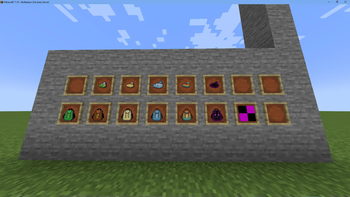
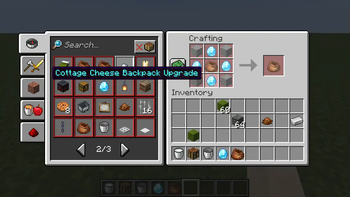
About this Mod
DCDServback is an updated fork of Servback by Octal-makes-code introducing support for some new features while adding new content.
Intended to be used for vanilla servers and servers running Polymer / PolyMC. This was updated mostly for our upcoming server so if some stuff seems unnecessary for your own use then it probably is.
Dependencies:
Nbt Crafting
- Polymer Resource Pack support with hand-made textures by me
- New recipes with forced progression
- More annoying ways to craft a backpack!
- Advancements
- Unique Backpack
- Replaced Bundle with Totem of Undying (don't worry it just looks like one), reason for this was pretty simple. If you put something into bundle by mistake, that item was gone forever.
This mod adds following content:
- Cookie Backpack (9 slots)
- Truffle Backpack (18 slots)
- Pancake Backpack (27 slots)
- Pierogi Backpack (36 slots)
- Strawberry Pierogi Backpack (45 slots)
- Public Backpack (27 slots, shared with entire server)
- Ender Backpack (27 slots)
- Chocolate, Dough, Cottage Cheese, Sour Cream Upgrade Augments
Available Versions
How to Install DCDServBack on Your Server
Order Server
Order a Minecraft Java server with at least 3 GB RAM (4 GB recommended).
Set fabric Loader
In the panel under "Egg", select the fabric loader and matching Minecraft version (1.19).
Install Mod
Open the mod browser in the dashboard and search for "DCDServBack". Click "Install" – done! Alternatively, upload the .jar via SFTP to the /mods folder.
Compatibility
Mod Loaders
Minecraft Versions
1.19
Server-side
✓ RequiredRecommended RAM
4 GB(min. 3 GB)Frequently Asked Questions
DCDServBack server crashes on startup – what to do?
Most common cause: wrong fabric version or insufficient RAM. Check the server log (latest.log) for "OutOfMemoryError" or "Mixin" errors. With Mado Hosting: ensure at least 3 GB RAM is allocated and the loader matches the mod version (1.19). You can switch loaders with one click in the panel.
Is DCDServBack compatible with fabric?
DCDServBack officially supports fabric for Minecraft 1.19. The Mado dashboard automatically detects incompatible loader combinations.
Server lagging with DCDServBack – how to optimize performance?
Recommended RAM: 4 GB (per 8 players). Use /spark profiler to check if DCDServBack consumes the most tick time. Common fixes: reduce server view-distance to 8-10, install "performant" or "starlight" as supplementary mods on Forge. With Mado Hosting, your server runs on NVMe SSDs with dedicated CPU cores for minimal latency.
Similar Mods


Rent Modded Server
Install DCDServBack with just one click on your server.