
Discord Webhook Wizard
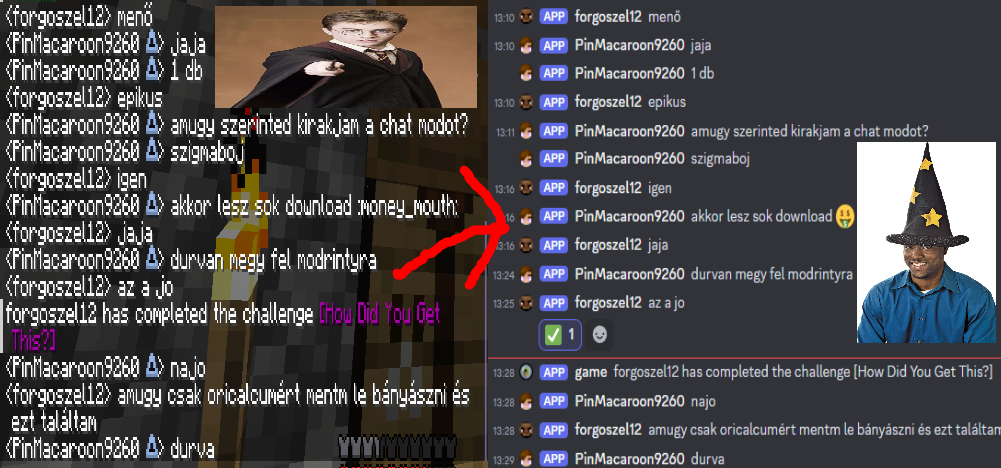
send game chat messages into your server's webhook
Screenshots
About this Mod
dchook
Send Minecraft chat messages to Discord server channels with ease! dchook is a
lightweight and simple mod for the fabric mod loader, and newer Minecraft versions (more supported versions coming soon).
Features
This mod offers:
- One-way chat message proxying or two-way if desired;
- Simple configuration;
- Straightforward features;
- Server-side, Discord Bot-less architecture.
Configurable and toggleable messages
Toggle server status messages such as: server staring, server started, server
stopping, server stopped.
Toggle whether users can make their messages unproxyable (ignored by the mod) by
applying two forward slashes (//) at the end of their chat messages.
Easy setup
Setting this mod up is just a matter of following the steps on the documentation page
"HELP, IT AINT WORKIN', WHAT AM I SUPPOSD' TO DO?"
Calm down, we'll go step by step.
Check the config file.
- Did I paste the URL to the right place?
- Is it the right URL?
- Did I delete an
=? - Did I put an extra space somewhere?
- Did I accidentally turn the mod off?
Check the console of the server.
- Did my server say something about the webhook not being a valid API endpoint?
- Did my server say something about the webhook not being found or not having
connection to Discord?
Still doesn't work? Well, I (pin, the one who made this mod) am also a "human",
so I make mistakes too. If you think I made one, report it to me! See the
sidebar for links!
Credits
- This mod uses
simple-config
for configuration file management. - This mod uses crafthead's API for player chat icons.
Available Versions
How to Install Discord Webhook Wizard on Your Server
Order Server
Order a Minecraft Java server with at least 3 GB RAM (4 GB recommended).
Set fabric Loader
In the panel under "Egg", select the fabric loader and matching Minecraft version (1.21.11).
Install Mod
Open the mod browser in the dashboard and search for "Discord Webhook Wizard". Click "Install" – done! Alternatively, upload the .jar via SFTP to the /mods folder.
Compatibility
Mod Loaders
Minecraft Versions
1.21.11, 1.21.10, 1.21.9 (+59 more)
Server-side
✓ RequiredRecommended RAM
4 GB(min. 3 GB)Frequently Asked Questions
Discord Webhook Wizard server crashes on startup – what to do?
Most common cause: wrong fabric version or insufficient RAM. Check the server log (latest.log) for "OutOfMemoryError" or "Mixin" errors. With Mado Hosting: ensure at least 3 GB RAM is allocated and the loader matches the mod version (1.21.11). You can switch loaders with one click in the panel.
Is Discord Webhook Wizard compatible with fabric and paper and quilt and spigot?
Discord Webhook Wizard officially supports fabric, paper, quilt, spigot for Minecraft 1.21.11, 1.21.10, 1.21.9. The Mado dashboard automatically detects incompatible loader combinations.
Server lagging with Discord Webhook Wizard – how to optimize performance?
Recommended RAM: 4 GB (per 8 players). Use /spark profiler to check if Discord Webhook Wizard consumes the most tick time. Common fixes: reduce server view-distance to 8-10, install "performant" or "starlight" as supplementary mods on Forge. With Mado Hosting, your server runs on NVMe SSDs with dedicated CPU cores for minimal latency.
Similar Mods






Rent Modded Server
Install Discord Webhook Wizard with just one click on your server.