
Dead Eye
A mod that accurately implements the time slowing effect "Dead Eye" from the Red Dead Redemption series. Formerly Deadeye Mod
Screenshots
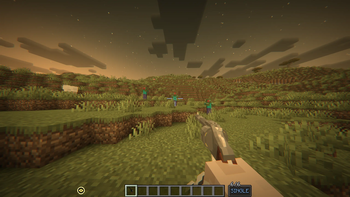
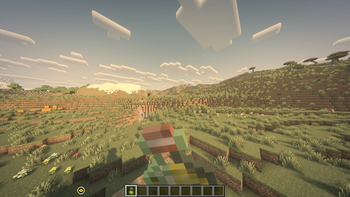
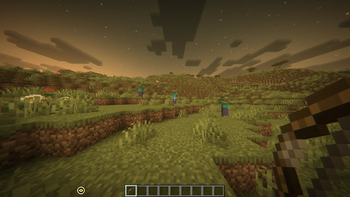
About this Mod


A mod that accurately implements the time slowing effect "Dead Eye" from the Red Dead Redemption series. Use it to be more fast and precise with your shots, or mark your targets which does the shooting for you with great accuracy.
Join our Discord server for help!

Weapon in the gif is from Red Dead Weaponry.
Text Description - Transcription for images below
Dead Eye (Previously Deadeye Mod)
A mod that accurately implements the time slowing effect "Dead Eye" from the Red Dead Redemption series.
Use it to be more fast and precise with your shots, or mark your targets which does the shooting for you with
great accuracy.
Features
- A very close to original implementation of Dead Eye mechanics, including visual and sound effects.
- Using bow and crossbows in Dead Eye to defeat your enemies with insane precision.
- Items such as cigars and tonics to replenish your Dead Eye core and meter. These can be sourced from tobacco crops around the world. Eating and sleeping helps refilling as well.
- Supports usage of weapons from popular mods such as Vic’s Point Blank, Timeless and Classics Zero and a few more. (See below)
- Many config options to personalize your experience.
Gun Mods
- Fully supports: Vic’s Point Blank, Timeless and Classics Zero, Just Enough Guns, Scorched Guns 2, Simple Animated Guns
- Marking and shooting targets with weapons from that mod.
- Reload the weapon instantly when Dead Eye is enabled. (Can be disabled in config)
- Improved weapon accuracy, spread and fire rate while Dead Eye is enabled.
- No weapon draw cooldown while Dead Eye is enabled.
Credits
Namefix
Creator, Programming & TexturesFrozern
tobacco crop textures


Available Versions
How to Install Dead Eye on Your Server
Order Server
Order a Minecraft Java server with at least 3 GB RAM (4 GB recommended).
Set fabric Loader
In the panel under "Egg", select the fabric loader and matching Minecraft version (1.21.1).
Install Mod
Open the mod browser in the dashboard and search for "Dead Eye". Click "Install" – done! Alternatively, upload the .jar via SFTP to the /mods folder.
Compatibility
Mod Loaders
Minecraft Versions
1.21.1, 1.20.1
Server-side
✓ RequiredRecommended RAM
4 GB(min. 3 GB)Frequently Asked Questions
Dead Eye server crashes on startup – what to do?
Most common cause: wrong fabric version or insufficient RAM. Check the server log (latest.log) for "OutOfMemoryError" or "Mixin" errors. With Mado Hosting: ensure at least 3 GB RAM is allocated and the loader matches the mod version (1.21.1). You can switch loaders with one click in the panel.
Is Dead Eye compatible with fabric and forge and neoforge?
Dead Eye officially supports fabric, forge, neoforge for Minecraft 1.21.1, 1.20.1. Note: Forge and Fabric mods are NOT cross-compatible – pick one loader and stick with it. The Mado dashboard automatically detects incompatible loader combinations.
Server lagging with Dead Eye – how to optimize performance?
Recommended RAM: 4 GB (per 8 players). Use /spark profiler to check if Dead Eye consumes the most tick time. Common fixes: reduce server view-distance to 8-10, install "performant" or "starlight" as supplementary mods on Forge. With Mado Hosting, your server runs on NVMe SSDs with dedicated CPU cores for minimal latency.
Rent Modded Server
Install Dead Eye with just one click on your server.