
Death Recovery Assistant
A client-side death recovery mod that saves your death location, inventory snapshot, and adds a waypoint, HUD, and visual beam to help you recover your items.
Screenshots
About this Mod
Death Recovery Assistant
Death Recovery Assistant is a client-side Minecraft utility mod that helps you find your death location and recover your lost items.
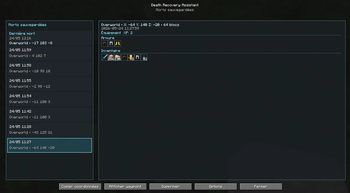
When you die, the mod saves your death position, dimension, inventory snapshot, armor, offhand item, XP level, and world/server context. You can then open a clean in-game interface to view your saved deaths, check what you lost, copy the coordinates, enable a waypoint, and follow a visual beam back to the death location.
Features
- Automatic death location saving
- Local death history
- Deaths filtered by world or server
- Saved inventory snapshot
- Vanilla-like item tooltips
- Visual grouping of identical item stacks
- Support for enchanted, damaged, renamed, and modded items when item data is available
- Optional HUD waypoint
- Optional world beam marker
- Optional recovery commands
- Client-side only: no server installation required
Waypoint and world marker
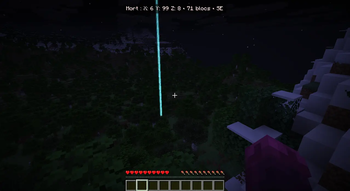
After selecting a saved death, you can enable a waypoint to help you find your way back.
The mod can display:
- a HUD with distance and direction
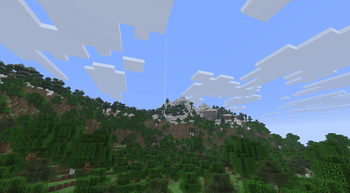
- a cyan beam marker in the world
- the saved death coordinates
- the dimension where the death happened
This makes it easier to recover your items without needing a server-side graves mod.
Saved inventory
Death Recovery Assistant saves a snapshot of your inventory when you die.
The interface can show:
- armor
- offhand item
- hotbar and inventory items
- item quantities
- enchantments
- durability
- custom names
- modded items when supported
Identical stacks are grouped visually to keep the interface clean. The original slot data is still preserved for recovery actions when available.
Recovery Commands
Recovery Commands are optional, disabled by default, and only work when the player already has the required Minecraft command permissions.
When enabled, Death Recovery Assistant can use normal Minecraft commands to help restore lost items or teleport you back to a saved death location.
This only works if you already have the required permissions. The mod does not bypass server permissions, does not bypass anti-cheat systems, and does not duplicate items.
On multiplayer servers, recovery actions only work if the server allows you to use the required commands.
Developer mode
Developer Mode is disabled by default.
It can show extra technical information useful for debugging item snapshots, restore commands, and compatibility issues. Normal players do not need it.
Client-side
This mod is fully client-side.
You can use it in:
- singleplayer
- LAN worlds
- multiplayer servers
The server does not need to install the mod.
Compatibility
This is the first public release of Death Recovery Assistant.
- Version: 1.0.1
- Minecraft: 26.1.2
- Loader: Fabric
- Environment: Client-side
- Server required: No
Known limitations
- Some special items, command blocks, or server-side-only data may not restore perfectly.
- Recovery Commands depend on Minecraft permissions and server rules.
- Some servers may block or restrict command-based recovery.
- This first release only supports Fabric for Minecraft 26.1.2.
Recommended use
Death Recovery Assistant is best used as a quality-of-life mod for survival players who want to recover their items more easily after dying, without needing a server-side graves mod.
Available Versions
How to Install Death Recovery Assistant on Your Server
Order Server
Order a Minecraft Java server with at least 3 GB RAM (4 GB recommended).
Set fabric Loader
In the panel under "Egg", select the fabric loader and matching Minecraft version (26.1.2).
Install Mod
Open the mod browser in the dashboard and search for "Death Recovery Assistant". Click "Install" – done! Alternatively, upload the .jar via SFTP to the /mods folder.
Compatibility
Mod Loaders
Minecraft Versions
26.1.2, 1.20.1
Server-side
✗ UnsupportedRecommended RAM
4 GB(min. 3 GB)Frequently Asked Questions
Death Recovery Assistant server crashes on startup – what to do?
Most common cause: wrong fabric version or insufficient RAM. Check the server log (latest.log) for "OutOfMemoryError" or "Mixin" errors. With Mado Hosting: ensure at least 3 GB RAM is allocated and the loader matches the mod version (26.1.2). You can switch loaders with one click in the panel.
Is Death Recovery Assistant compatible with fabric?
Death Recovery Assistant officially supports fabric for Minecraft 26.1.2, 1.20.1. The Mado dashboard automatically detects incompatible loader combinations.
Server lagging with Death Recovery Assistant – how to optimize performance?
Recommended RAM: 4 GB (per 8 players). Use /spark profiler to check if Death Recovery Assistant consumes the most tick time. Common fixes: reduce server view-distance to 8-10, install "performant" or "starlight" as supplementary mods on Forge. With Mado Hosting, your server runs on NVMe SSDs with dedicated CPU cores for minimal latency.
Similar Mods




Rent Modded Server
Install Death Recovery Assistant with just one click on your server.