
Death Swap
DeathSwap, a minigame where you swap positions with other players every 5 minutes and use this mechanic to kill them! [Compatible with 2-8 Players]
Screenshots
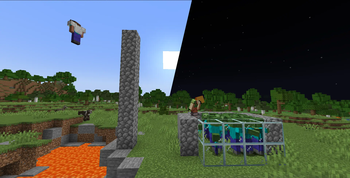
About this Mod
DESCRIPTION
This my version of the deathswap minigame created by SethBling and popularized by dream! In this minigame, players swap positions with each other every 5 minutes, and must use this mechannic to kill the others by environmental damage, by jumping into lava right before a swap for example. You only get to know when a swap is about to happen 5 seconds prior, so you must react quickly!
INSTALLATION/SETUP GUIDE
generate a new world, put the zip file in the datapacks folder located at:
world/datapacks
(or put the mod in the mods folder of the server)
execute /reload and run /function deathswap:start to begin! you can also run /function deathswap:config before starting to change settings according to your needs. The settings with their default values are given below:
| Setting | Default Value | Description |
|---|---|---|
| Permanent water buckets | true(1) | If players get a permanent water bucket |
| Permanent fire resistance | false(0) | If players get permanent fire resistance |
| Max death count | 5 | Maximum number of deaths before a player is eliminated and put into spectator mode |
| Allow nether | false(0) | Set to true to allow the nether dimension |
OTHER THINGS TO NOTE
- this datapack is compatible with 2-8 players
- the 5 minute timer is currently not configurable through the config menu, but you can change it in line number 70 of game/swap.mcfunction and line 11 of swap.mcfunction, but and you would also have to change line 12-16 and line 71-76 of start.mcfunction and game/swap.mcfunction respectively to adjust the timer according to the changes you've made (for assistance, feel free to join the server ↓)
- for feedback, bug reports, or other help, join the discord server from the links section of this page!
Available Versions
How to Install Death Swap on Your Server
Order Server
Order a Minecraft Java server with at least 3 GB RAM (4 GB recommended).
Set datapack Loader
In the panel under "Egg", select the datapack loader and matching Minecraft version (1.21.4).
Install Mod
Open the mod browser in the dashboard and search for "Death Swap". Click "Install" – done! Alternatively, upload the .jar via SFTP to the /mods folder.
Compatibility
Mod Loaders
Minecraft Versions
1.21.4, 1.21.3, 1.21.2 (+19 more)
Server-side
✓ RequiredRecommended RAM
4 GB(min. 3 GB)Frequently Asked Questions
Death Swap server crashes on startup – what to do?
Most common cause: wrong datapack version or insufficient RAM. Check the server log (latest.log) for "OutOfMemoryError" or "Mixin" errors. With Mado Hosting: ensure at least 3 GB RAM is allocated and the loader matches the mod version (1.21.4). You can switch loaders with one click in the panel.
Is Death Swap compatible with datapack and fabric and forge and neoforge and quilt?
Death Swap officially supports datapack, fabric, forge, neoforge, quilt for Minecraft 1.21.4, 1.21.3, 1.21.2. Note: Forge and Fabric mods are NOT cross-compatible – pick one loader and stick with it. The Mado dashboard automatically detects incompatible loader combinations.
Server lagging with Death Swap – how to optimize performance?
Recommended RAM: 4 GB (per 8 players). Use /spark profiler to check if Death Swap consumes the most tick time. Common fixes: reduce server view-distance to 8-10, install "performant" or "starlight" as supplementary mods on Forge. With Mado Hosting, your server runs on NVMe SSDs with dedicated CPU cores for minimal latency.
Similar Mods




Rent Modded Server
Install Death Swap with just one click on your server.