
Death Inventory Sorter
Clientside mod which remembers the layout of your inventory (main grid, armor, second arm) before death and after respawn returns the selected items to the same slots as they were before death.
Screenshots
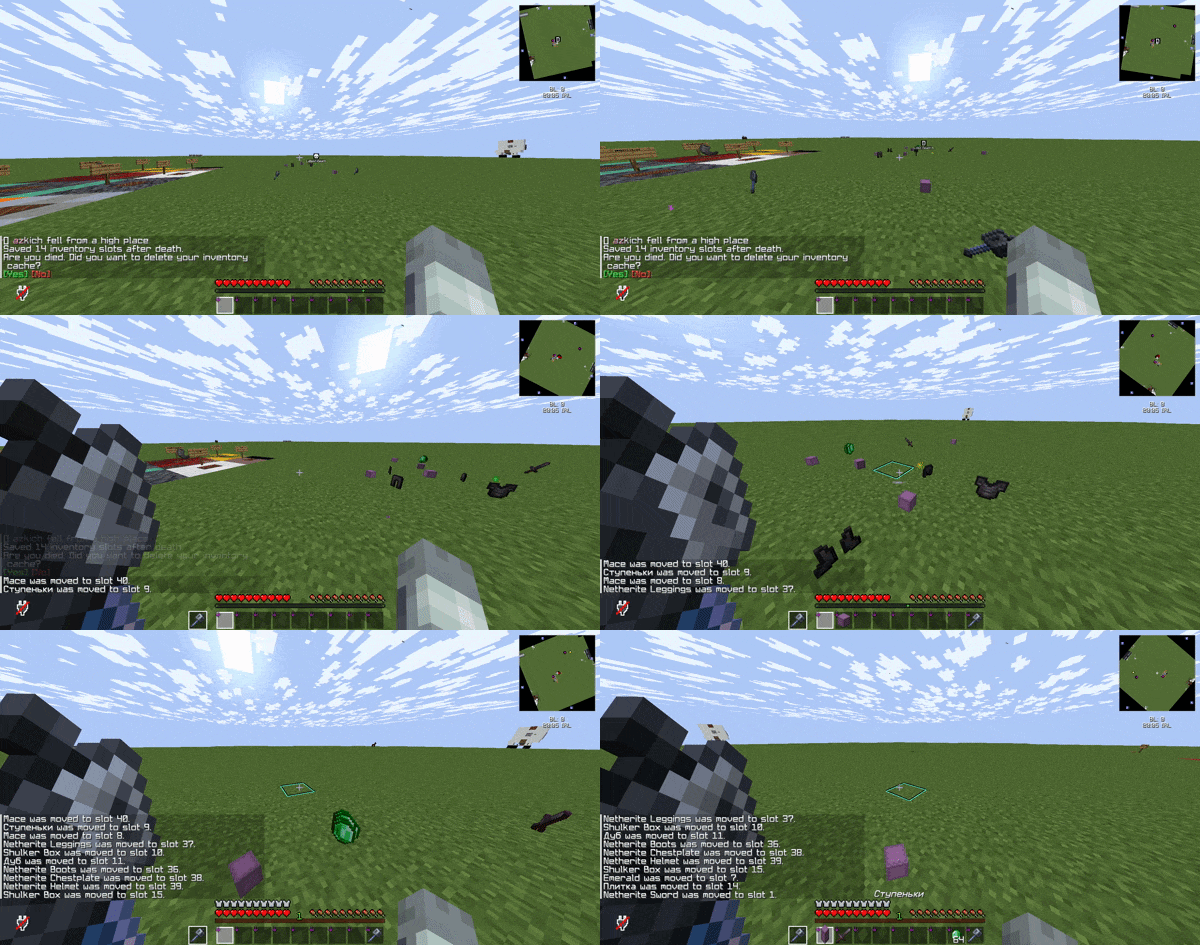
About this Mod
Death Inventory Sorter



🔅 Death Inventory Sorter — a client mod for Fabric: it remembers the layout of your inventory (main grid, armor, second arm) before death and after respawn gradually returns the selected items to the same slots as they were before death. It works only on the client — installation on the server is not necessary.
🔅 Death Inventory Sorter — клиентский мод для Fabric: он запоминает раскладку вашего инвентаря (основная сетка, броня, вторая рука) перед смертью и после респавна постепенно возвращает подобранные предметы в те же слоты, что были до гибели. Работает только на клиенте — установка на сервер не нужна.

༼ つ ◕_◕ ༽つ
🔆 Dependencies:
Русский
Клиентский мод: сохраняет снимок непустых слотов инвентаря в момент смерти и помогает вернуть предметы на прежние места после подбора, с учётом слияния стаков и одинаковых предметов в разных слотах.
🎯 Основные функции
💀 Снимок при смерти
Сохраняются только непустые слоты: хотбар и основной инвентарь, надетая броня и предмет во второй руке. После смерти в чат выводится напоминание с кликабельными [Да] / [Нет] — можно сразу сбросить кэш или оставить его для восстановления. Нажимать нет - необязательно, кэш продолжит хранится до выхода из игры, в крайнем случае будет напоминать о себе при перезаходе на сервер или другой мир.
🔄 Восстановление после респавна
После появления игрока мод ждёт настраиваемую паузу, затем пакетами (несколько слотов за тик) ищет в текущем инвентаре максимально подходящие предметы и перекладывает их в целевые слоты через те же действия, что и обычный клик по слоту (без «угадывания» по всему инвентарю — только по сохранённым парам слот → предмет).
Пример: до смерти сердце моря лежало в слоте 21 — после подбора мод постарается вернуть его именно туда, а не оставить всё в хотбаре.
🪵 Разделение стаков
Если после смерти одинаковые предметы склеились при подборе (например, два по 32 стали одним 64), мод умеет раскладывать количество по тем слотам, которые были в снимке.
🛡️ Порядок восстановления
В конфиге можно включить приоритет брони и второй руки — они обрабатываются раньше остальных слотов.
💬 Сообщения и кэш
- При входе в мир, если кэш уже есть — снова предложение удалить или оставить его.
- По ходу восстановления в чат(только для клиента) пишутся имена предметов и номер слота.
- По завершении — сообщение об успешном восстановлении всех сохранённых слотов.
- Команда
/deathclearочищает кэш; если кэша нет — выводится понятное сообщение.
🖥️ Обратная связь в чате
На экране можно видеть состояние процесса восстановления (очередь / прогресс).
📝 Команды
- 🗑️
/deathclear— удалить текущий кэш инвентаря после смерти (только клиент)
🌐 Languages
- Русский (Russian)
- English (EN)
Тексты в чате следуют языку игры.
🔧 Configuration
⚙️ Файл настроек создаётся у мода deathinventorysorter в каталоге конфигурации клиента. Там задаются задержки кликов, пауза после респауна и опция «сначала броня/off-hand».
English
Death Inventory Sorter is a Fabric client-side mod that snapshots your non-empty inventory layout (main grid, armor, offhand) at death and, after respawn, gradually moves picked-up items back into those same slots. No server install required.
🎯 Main Features
💀 Death snapshot
Only non-empty slots are saved. After you die, the mod shows a chat prompt with clickable [Yes] / [No] to discard the snapshot immediately or keep it for restoration.
🔄 Post-respawn restoration
After you respawn, the mod waits for a configurable delay, then processes batches of slots per tick. It finds the best matching stacks in your current inventory and moves them into the cached targets using normal slot clicks — slot-by-slot from the saved map, not by guessing from global inventory contents.
Example: if a Heart of the Sea lived in slot 21 before death, the mod tries to put it back there instead of leaving everything scattered in the hotbar.
🪵 Stack splitting
If identical items merged on pickup (e.g. two stacks of 32 became one 64), the mod can split counts back across the slots that were recorded in the snapshot.
🛡️ Restore order
Config option to prioritize armor and offhand so they are handled before main inventory slots.
💬 Chat & cache
- On world join, if a snapshot already exists, you get the same keep/delete prompt.
- During restoration, messages(only for your client) use item names and target slot numbers.
- When every cached slot is done, a completion message is shown.
/deathclearclears the snapshot; if there is nothing to clear, you get a clear “no cache” message.
🖥️ Chat feedback
Lightweight on-screen state for restoration progress.
📝 Commands
- 🗑️
/deathclear— delete the current post-death inventory cache (client only)
🌐 Languages
- Русский (Russian)
- English (EN)
Chat strings follow the game language.
🔧 Configuration
⚙️ Config file for mod id deathinventorysorter in the client config folder: click delays, post-respawn wait, and “armor/offhand first”.
❇️ Made with ❤️ — for players who want their inventory layout back after death pickups, without relying on server-side mods.
Available Versions
How to Install Death Inventory Sorter on Your Server
Order Server
Order a Minecraft Java server with at least 3 GB RAM (4 GB recommended).
Set fabric Loader
In the panel under "Egg", select the fabric loader and matching Minecraft version (1.21.8).
Install Mod
Open the mod browser in the dashboard and search for "Death Inventory Sorter". Click "Install" – done! Alternatively, upload the .jar via SFTP to the /mods folder.
Compatibility
Mod Loaders
Minecraft Versions
1.21.8
Server-side
✗ UnsupportedRecommended RAM
4 GB(min. 3 GB)Frequently Asked Questions
Death Inventory Sorter server crashes on startup – what to do?
Most common cause: wrong fabric version or insufficient RAM. Check the server log (latest.log) for "OutOfMemoryError" or "Mixin" errors. With Mado Hosting: ensure at least 3 GB RAM is allocated and the loader matches the mod version (1.21.8). You can switch loaders with one click in the panel.
Is Death Inventory Sorter compatible with fabric?
Death Inventory Sorter officially supports fabric for Minecraft 1.21.8. The Mado dashboard automatically detects incompatible loader combinations.
Server lagging with Death Inventory Sorter – how to optimize performance?
Recommended RAM: 4 GB (per 8 players). Use /spark profiler to check if Death Inventory Sorter consumes the most tick time. Common fixes: reduce server view-distance to 8-10, install "performant" or "starlight" as supplementary mods on Forge. With Mado Hosting, your server runs on NVMe SSDs with dedicated CPU cores for minimal latency.
Similar Mods




![[TaCZ] Timeless and Classics Zero](https://cdn.modrinth.com/data/SzzJttH8/fd27766d2bb8390d284696b1dbd358f87e081439_96.webp)

Rent Modded Server
Install Death Inventory Sorter with just one click on your server.