
DeckedOutOBS
A client-side Decked Out 2 OBS Browser Source companion to show your viewers the currently called out card in the dungeon
Screenshots
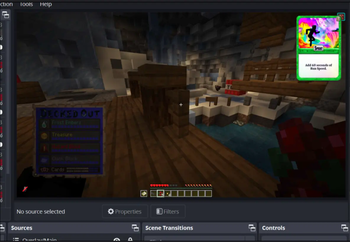
About this Mod
DeckedOutOBS (Fabric)
DeckedOutOBS is a client-side Minecraft mod that enhances the Decked Out 2 game that was built by
TangoTek on the Hermitcraft Season 9 server.
This mod provides card callouts directly into an OBS Browser Source, allowing your audience
to see the cards being played while you're running the dungeon.

Features
- Client-Side Only: No need to install the mod on servers.
- Card Callouts: Displays the cards being played in real-time through an OBS Browser Source.
- Flexible: You can resize and move the browser source card as you wish.
- Easy Calibration: Simple setup with in-game commands, no permissions needed.
- Customizable Port: Change the server port number if needed.
Installation
- Download the DeckedOutOBS mod and place it into your Minecraft
modsfolder. - If you don't have it yet, download the Fabric API mod and place it into your Minecraft
modsfolder. - Start your Minecraft client with the mod installed.
Setup
Calibration
To calibrate the mod, you need to set the key barrel position where you place the frozen shards to start Decked Out 2.
Use the following command in-game:
/deckedout dungeon set <key barrel position>
Replace <key barrel position> with the x, y, z coordinates of the barrel.
If you're looking at the barrel, Minecraft should automatically suggest the correct coordinates

Starting the Server
Once the dungeon is set, the mod will start the server automatically.
The port number and the Browser Source URL for OBS will be displayed on the screen.
By default, the url should be http://localhost:3002
Running the Dungeon
As you or anyone else runs the dungeon, and you are nearby, the cards will automatically
show up in the OBS Browser Source.
You can open up the OBS Browser Source URL in a normal browser too and use it as a dungeon companion.
Commands
Set Dungeon Key Barrel Position
/deckedout dungeon set <key barrel position>
<key barrel position>: The x, y, z coordinates of the key barrel.
Change Port Number
/deckedout port set <port>
<port>: The port number you want to set for the server.
Usage with OBS
- Add Browser Source: In OBS, add a new Browser Source.
- Enter URL: Use the URL displayed on your screen after starting the server.
- Adjust Settings: Set the width and height as needed.
For the best experience with a 1080p stream, try setting the width to 720 and the height to 1000.
Once that's set, you can adjust the position and scale of the Browser Source to fit your stream layout.

Troubleshooting
- Cards Not Showing: Ensure you are near the dungeon and that the mod is correctly calibrated.
- OBS URL Not Displayed: Make sure the server is running and check for any error messages in the game.
Contributing
If you encounter any issues or have suggestions for improvements, feel free to open an issue or pull request on the GitHub repository.
License
This project is licensed under the GPL-3 License.
Disclaimer
The card artwork has been created for TangoTek by CJ Moseley and has been
extracted from the world download of the Hermitcraft Season 9 server for this project.
Enjoy running the Decked Out dungeon with enhanced visuals for your audience!
Available Versions
How to Install DeckedOutOBS on Your Server
Order Server
Order a Minecraft Java server with at least 3 GB RAM (4 GB recommended).
Set fabric Loader
In the panel under "Egg", select the fabric loader and matching Minecraft version (1.21.11).
Install Mod
Open the mod browser in the dashboard and search for "DeckedOutOBS". Click "Install" – done! Alternatively, upload the .jar via SFTP to the /mods folder.
Compatibility
Mod Loaders
Minecraft Versions
1.21.11, 1.21.10, 1.21.9 (+15 more)
Server-side
✗ UnsupportedRecommended RAM
4 GB(min. 3 GB)Frequently Asked Questions
DeckedOutOBS server crashes on startup – what to do?
Most common cause: wrong fabric version or insufficient RAM. Check the server log (latest.log) for "OutOfMemoryError" or "Mixin" errors. With Mado Hosting: ensure at least 3 GB RAM is allocated and the loader matches the mod version (1.21.11). You can switch loaders with one click in the panel.
Is DeckedOutOBS compatible with fabric and quilt?
DeckedOutOBS officially supports fabric, quilt for Minecraft 1.21.11, 1.21.10, 1.21.9. The Mado dashboard automatically detects incompatible loader combinations.
Server lagging with DeckedOutOBS – how to optimize performance?
Recommended RAM: 4 GB (per 8 players). Use /spark profiler to check if DeckedOutOBS consumes the most tick time. Common fixes: reduce server view-distance to 8-10, install "performant" or "starlight" as supplementary mods on Forge. With Mado Hosting, your server runs on NVMe SSDs with dedicated CPU cores for minimal latency.
Similar Mods





Rent Modded Server
Install DeckedOutOBS with just one click on your server.