
Dedicated Applied Enegistics 2
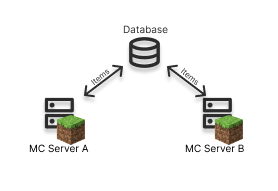
This mod aims to make Applied Energistics 2 work cross server.
Screenshots
About this Mod
Dedicated Applied Energistics
Table of Contents
About
This Minecraft mod aims to make Applied Energistics 2 work across multiple servers.
Why is there a need for this mod?
In large modpacks, servers can get extremely laggy because of large scale automation. A solution to this problem would be to connect multiple ME systems, on different servers together in order to spread the load.
How dose the mod do this?
Currently only the inventory is synchronised between servers. Meaning that cross server auto crafting doesn't work yet. The plan is to make the entire ME system work in the "cloud" with all features.
Items
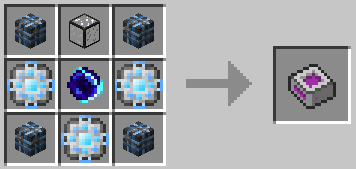
Inter Dimensional Storage Cell
The Inter Dimensional Storage Cell connects to the database and stores all items in it. It is optimised to work with as many item types as possible.

Quick Start
Install redis locally or get one for free here.
Use
/dae2 config set "<redis-url>"to configure the mod to use the database.
If you use a database on the same machine as your minecraft server you can use/dae2 config set "redis://localhost:6379".
If you need help with a cloud based database follow this GuideThen enable the virtual inventory
/dae2 virtual_inventory enable. This should only be enabled on ONE minecraft server that is running dae2.Enable autostart
/dae2 autostart enable.Start the mod
/dae2 startIf everrything has gone well it should look like this now.
/dae2 status
Now you can craft a Inter Dimenional storag Cell and go wild with your items. Yes it's nearly infinit...
Commands
Starting
/dae2 start/stop/restartStarts/Stops/Restart the mod./dae2 autostart enable/disableAutostarts the mod when the minecraft server starts.
Virtual Inventory
The virtual inventory must be enabled (default disabled) on only ONE server.
[!WARNING]
If multiple server have it enabled items might be lost or duplicated.
/dae2 virtual_inventory enable/disable
Downloads
Installation
I created this mod to be used with ATM-8, please keep that in mind.
Basic Install
Forge version
Install the correct version of Forge
Jars
Add these jars to the mod folder!
- dae2-1.19.2-0.0.2-all.jar
- appliedenergistics2-forge-12.9.4.jar
- appliedenergistics2-forge-12.9.4-api.jar
Issues
If you finde a bug or your game crashes please create a issue here!
Contacts
Credits
Thanks to everyone who contributed to AE2!
Donation
I am still a student and would appreciate a small donation. ;)
Available Versions
How to Install Dedicated Applied Enegistics 2 on Your Server
Order Server
Order a Minecraft Java server with at least 3 GB RAM (4 GB recommended).
Set forge Loader
In the panel under "Egg", select the forge loader and matching Minecraft version (1.19.4).
Install Mod
Open the mod browser in the dashboard and search for "Dedicated Applied Enegistics 2". Click "Install" – done! Alternatively, upload the .jar via SFTP to the /mods folder.
Compatibility
Mod Loaders
Minecraft Versions
1.19.4, 1.19.3, 1.19.2 (+2 more)
Server-side
✓ RequiredRecommended RAM
4 GB(min. 3 GB)Frequently Asked Questions
Dedicated Applied Enegistics 2 server crashes on startup – what to do?
Most common cause: wrong forge version or insufficient RAM. Check the server log (latest.log) for "OutOfMemoryError" or "Mixin" errors. With Mado Hosting: ensure at least 3 GB RAM is allocated and the loader matches the mod version (1.19.4). You can switch loaders with one click in the panel.
Is Dedicated Applied Enegistics 2 compatible with forge?
Dedicated Applied Enegistics 2 officially supports forge for Minecraft 1.19.4, 1.19.3, 1.19.2. The Mado dashboard automatically detects incompatible loader combinations.
Server lagging with Dedicated Applied Enegistics 2 – how to optimize performance?
Recommended RAM: 4 GB (per 8 players). Use /spark profiler to check if Dedicated Applied Enegistics 2 consumes the most tick time. Common fixes: reduce server view-distance to 8-10, install "performant" or "starlight" as supplementary mods on Forge. With Mado Hosting, your server runs on NVMe SSDs with dedicated CPU cores for minimal latency.
Similar Mods






Rent Modded Server
Install Dedicated Applied Enegistics 2 with just one click on your server.