
Defaults Commands Without Plugins
A simple Forge mod that adds essential /ban, /kick, and /warn commands.
Screenshots
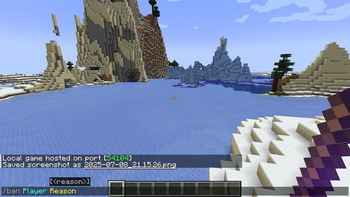
About this Mod
ENG:
What does this mod do?
Defaults Command Without Plugins adds basic admin commands (/ban, /kick, /warn) to your server as a simple Forge mod. No more searching for plugins - everything you need is already here
The mod also adds a unique tool - Moderator's Wand, which allows you to perform actions with one hit.
[IMPORTANT]
This is a server mod!
It must be installed only on the server (or in the host client). Other players do not need to download this mod to join the server.
How to use?
- To use commands, you must have operator rights
- Type
/getmodstickin the chat to get the Moderator's Wand. - Right mouse button (in the air): Toggles the wand mode (Kick -> Warn -> Ban).
- Left mouse button (hit a player): Applies the selected action to the player.
Commands
/getmodstick- Gives the Moderator Wand./kick <nick> [reason]- Kicks a player./warn <nick> <reason>- Sends a warning to a player./ban <nick> [reason]- Bans a player.
RU:
Что делает этот мод?
Defaults Command Without Plugins добавляет базовые команды администрирования (/ban, /kick, /warn) на ваш сервер в виде простого Forge мода. Больше не нужно искать плагины — все необходимое уже здесь
Также мод добавляет уникальный инструмент — Палочку Модератора, которая позволяет выполнять действия одним ударом.
[IMPORTANT]
Это серверный мод!
Устанавливать его нужно только на сервер (или в клиент хоста). Другим игрокам не нужно скачивать этот мод, чтобы зайти на сервер.
Как использовать?
- Чтобы использовать команды, у вас должны быть права оператора.
- Пропишите в чате
/getmodstick, чтобы получить Палочку Модератора. - Правая кнопка мыши (в воздухе): переключает режим палочки (Кик -> Варн -> Бан).
- Левая кнопка мыши (удар по игроку): применяет выбранное действие к игроку.
Команды
/getmodstick- Выдает Палочку Модератора./kick <ник> [причина]- Кикает игрока./warn <ник> <причина>- Отправляет игроку предупреждение./ban <ник> [причина]- Банит игрока.
Создано MrIceGreen.
Available Versions
How to Install Defaults Commands Without Plugins on Your Server
Order Server
Order a Minecraft Java server with at least 3 GB RAM (4 GB recommended).
Set forge Loader
In the panel under "Egg", select the forge loader and matching Minecraft version (1.20.1).
Install Mod
Open the mod browser in the dashboard and search for "Defaults Commands Without Plugins". Click "Install" – done! Alternatively, upload the .jar via SFTP to the /mods folder.
Compatibility
Mod Loaders
Minecraft Versions
1.20.1
Server-side
~ OptionalRecommended RAM
4 GB(min. 3 GB)Frequently Asked Questions
Defaults Commands Without Plugins server crashes on startup – what to do?
Most common cause: wrong forge version or insufficient RAM. Check the server log (latest.log) for "OutOfMemoryError" or "Mixin" errors. With Mado Hosting: ensure at least 3 GB RAM is allocated and the loader matches the mod version (1.20.1). You can switch loaders with one click in the panel.
Is Defaults Commands Without Plugins compatible with forge?
Defaults Commands Without Plugins officially supports forge for Minecraft 1.20.1. The Mado dashboard automatically detects incompatible loader combinations.
Server lagging with Defaults Commands Without Plugins – how to optimize performance?
Recommended RAM: 4 GB (per 8 players). Use /spark profiler to check if Defaults Commands Without Plugins consumes the most tick time. Common fixes: reduce server view-distance to 8-10, install "performant" or "starlight" as supplementary mods on Forge. With Mado Hosting, your server runs on NVMe SSDs with dedicated CPU cores for minimal latency.
Similar Mods






Rent Modded Server
Install Defaults Commands Without Plugins with just one click on your server.