
Detect AFK Players
AFK/idle detection that's extremely performant · Players go AFK after 3 minutes (configurable) without moving their mouse · Extend with plenty of add-ons!
Screenshots
About this Mod
Detect AFK Players
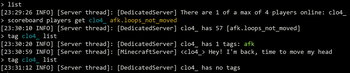
Detects player inactivity based on head rotation - simple, accurate, and fast. Intended as a dependency for datapacks and server operators.
This doesn't do much without add-ons (better performance), so you'll probably want to download one of those too.
Add-ons
- Pause Day Cycle - Pauses time when all players are AFK
- AFK Sleep - Allows sleeping when players are AFK, and handles dimensions + updates correctly unlike alternatives
- AFK Dim Names - Player names are dimmed when AFK
- AFK Message - Chat notifications for player status
- AFK Sit - Players sit down when they're AFK
Core Functionality
- Tags players as
afkafter 3 minutes - Detection based on head rotation, more accurate than position
- Significantly better performance than alternatives
- Modular (see above for add-ons)
To configure how long it takes to become AFK, use the command below.
By default, this is set to 3600 (which is 3 minutes).
/scoreboard players set .threshold afk.settings NUMBER_OF_TICKS
To enable players using /trigger afk, use the following command. No players are allowed to become AFK manually unless enabled by an admin.
/scoreboard players enable PLAYER afk
Performance
Common AFK detection methods check X/Y/Z, inventory changes, and block interactions - often on every tick. Instead, this data pack does a single head rotation NBT check per player every 1.5 seconds, resulting in a significantly less computation as compared to alternatives, sometimes by up to two orders of magnitude.
The head rotation method also eliminates false triggers from entity interactions (players attacking, explosions, etc) and anti-AFK automations such as water streams.
API
Two function tags are provided:
afk:away- Executed as player on AFKafk:back- Executed as player on return
Additional documentation is provided on GitHub, such as all the stable scoreboard objectives and how to use them.
Example implementation:
kick-afk-players/data/afk/tags/functions/away.json
{ "values": ["afk_kick:kick"] }
kick-afk-players/data/afk_kick/functions/kick.mcfunction
kick @s AFK
Available Versions
How to Install Detect AFK Players on Your Server
Order Server
Order a Minecraft Java server with at least 3 GB RAM (4 GB recommended).
Set datapack Loader
In the panel under "Egg", select the datapack loader and matching Minecraft version (1.21.8).
Install Mod
Open the mod browser in the dashboard and search for "Detect AFK Players". Click "Install" – done! Alternatively, upload the .jar via SFTP to the /mods folder.
Compatibility
Mod Loaders
Minecraft Versions
1.21.8, 1.21.7, 1.21.6 (+21 more)
Server-side
✓ RequiredRecommended RAM
4 GB(min. 3 GB)Frequently Asked Questions
Detect AFK Players server crashes on startup – what to do?
Most common cause: wrong datapack version or insufficient RAM. Check the server log (latest.log) for "OutOfMemoryError" or "Mixin" errors. With Mado Hosting: ensure at least 3 GB RAM is allocated and the loader matches the mod version (1.21.8). You can switch loaders with one click in the panel.
Is Detect AFK Players compatible with datapack and fabric and forge and neoforge and quilt?
Detect AFK Players officially supports datapack, fabric, forge, neoforge, quilt for Minecraft 1.21.8, 1.21.7, 1.21.6. Note: Forge and Fabric mods are NOT cross-compatible – pick one loader and stick with it. The Mado dashboard automatically detects incompatible loader combinations.
Server lagging with Detect AFK Players – how to optimize performance?
Recommended RAM: 4 GB (per 8 players). Use /spark profiler to check if Detect AFK Players consumes the most tick time. Common fixes: reduce server view-distance to 8-10, install "performant" or "starlight" as supplementary mods on Forge. With Mado Hosting, your server runs on NVMe SSDs with dedicated CPU cores for minimal latency.
Similar Mods



Rent Modded Server
Install Detect AFK Players with just one click on your server.