
Mine Mine no Mi: Devil Fruit Circulation Bot
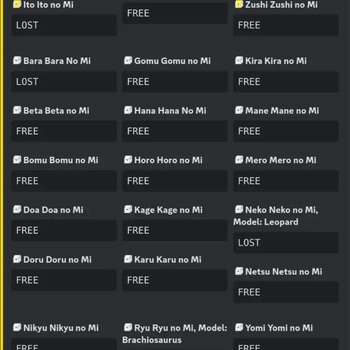
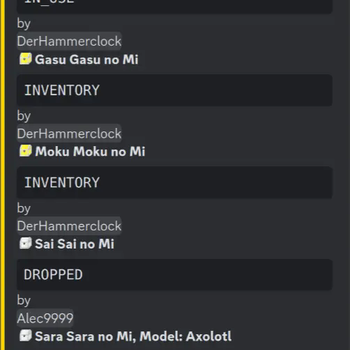
A must-have for every server owner. Shows devil fruit circulation in designated channels as beautifully formatted embeds. You can choose to show available and/or unavailable fruits.
Screenshots

About this Mod

Devil Fruit Circulation Bot
Devil Fruit Circulation Bot is a Minecraft Addon for the popular Mine Mine no Mi Mod mod.

Installation
git clone https://github.com/rathmerdominik/devilfruit-circulation-bot.git
cd devilfruit-circulation-bot
./gradlew build
From there you can take the jar out of the build/libs folder
Dependencies
This mod depends on the latest 1.16.5 version of Discord Integration therefore you must get and configure this addon as well!
Configuration Options
[EmbedDesign]
	#Color for the generated Embed in Hexadecimal
	"Color Hex" = "0xFFD700"
	#Sort Devil Fruits by Alphabet
	"Sort by Alphabet" = false
	#Sort Devil Fruits by their Tier
	"Sort By Tier" = true
	#The title of the Embed
	"Embed Title" = "Current Devilfruit Circulation"
	#The footer of the Embed
	"Embed Footer" = "Made by DerHammerclock | Last updated"
	#Show a date next to the footer when the embed has been updated
	"Show Last Updated" = true

[General]
	#Show the current Status of the Fruit as well if it has one
	"Show Fruit Status" = false
	#In which mode the Bot is supposed to work.
	#Allowed Values: ONLY_SHOW_AVAILABLE, SHOW_AVAILABLE_AND_UNAVAILABLE, ONLY_SHOW_UNAVAILABLE
	"Circulation Bot Mode" = "ONLY_SHOW_AVAILABLE"
	#Channel ID to where the Circulation Messages will be send. Please make sure the bot has write access!
	#Range: 0 ~ 9223372036854775807
	"Channel ID" = 0
	#DO NOT TOUCH. WILL BE GENERATED
	#Range: 0 ~ 9223372036854775807
	"Message ID" = 0
	#Show the player name if the fruit status is INVENTORY or IN_USE. Requires Show Fruit Status to be true
	"Show Player Name as Status" = false

[Emojis]
	#Discord Emoji ID to represent a Gold Box.
	#Range: 0 ~ 9223372036854775807
	"Gold Box Emoji ID" = 0
	#Discord Emoji ID to represent a Wooden Box.
	#Range: 0 ~ 9223372036854775807
	"Wooden Box Emoji ID" = 0
	#Use emojis to show the rarity of a fruit
	"Use Emojis" = false
	#Discord Emoji ID to represent an Iron Box.
	#Range: 0 ~ 9223372036854775807
	"Iron Box Emoji ID" = 0
Available Versions
How to Install Mine Mine no Mi: Devil Fruit Circulation Bot on Your Server
Order Server
Order a Minecraft Java server with at least 3 GB RAM (4 GB recommended).
Set forge Loader
In the panel under "Egg", select the forge loader and matching Minecraft version (1.16.5).
Install Mod
Open the mod browser in the dashboard and search for "Mine Mine no Mi: Devil Fruit Circulation Bot". Click "Install" – done! Alternatively, upload the .jar via SFTP to the /mods folder.
Compatibility
Mod Loaders
Minecraft Versions
1.16.5
Server-side
✓ RequiredRecommended RAM
4 GB(min. 3 GB)Frequently Asked Questions
Mine Mine no Mi: Devil Fruit Circulation Bot server crashes on startup – what to do?
Most common cause: wrong forge version or insufficient RAM. Check the server log (latest.log) for "OutOfMemoryError" or "Mixin" errors. With Mado Hosting: ensure at least 3 GB RAM is allocated and the loader matches the mod version (1.16.5). You can switch loaders with one click in the panel.
Is Mine Mine no Mi: Devil Fruit Circulation Bot compatible with forge?
Mine Mine no Mi: Devil Fruit Circulation Bot officially supports forge for Minecraft 1.16.5. The Mado dashboard automatically detects incompatible loader combinations.
Server lagging with Mine Mine no Mi: Devil Fruit Circulation Bot – how to optimize performance?
Recommended RAM: 4 GB (per 8 players). Use /spark profiler to check if Mine Mine no Mi: Devil Fruit Circulation Bot consumes the most tick time. Common fixes: reduce server view-distance to 8-10, install "performant" or "starlight" as supplementary mods on Forge. With Mado Hosting, your server runs on NVMe SSDs with dedicated CPU cores for minimal latency.
Similar Mods






Rent Modded Server
Install Mine Mine no Mi: Devil Fruit Circulation Bot with just one click on your server.