
Digitech
The best technology mod
Screenshots

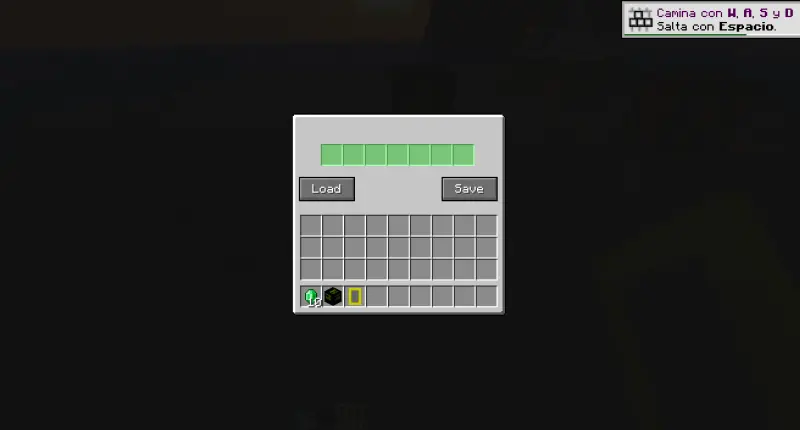
About this Mod

We've paused the Digitech project because we're converting it to Java code. Thank you very much for trying Digitech, but we'll be working on re-coding Digitech for a while to keep it more stable, funnier and with more features.
Mcreator page: https://mcreator.net/modification/110176/mobilecraft
Curseforge page: https://www.curseforge.com/minecraft/mc-mods/digitech
Do you want mobile phones and computers in Minecraft?
With Digitech, now you can enjoy both!
This mod is still in beta, and there’s much more to come. But first, let’s take a look at the essential features:
Main elements:
Digitech adds mobile phones and PCs with lots of useful functions.
You can use menus, open apps, customize your device, and more.
I hope you enjoy it a lot — and don’t confuse this mod with others, this one’s unique!
Available for:
Forge 1.20.1
NeoForge 1.21.1 / 1.21.4
Mobile and PC features
The Menu
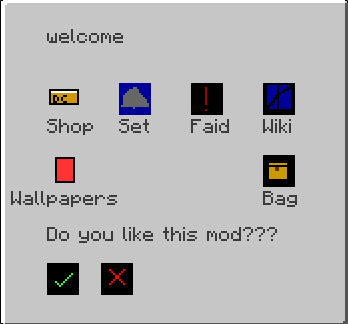
When you right-click your device, the main menu appears.
You can choose different apps here — and I’m planning to add even more soon!
The Functions:
Settings:
Right now, you can change your gamemode from here. More options are coming!
First Aid:
This feature can save your Minecraft life.
When you’re in danger, tap it — you’ll get an ender pearl and a totem of undying to escape quickly.
Wiki:
My favorite feature!
This adds a built-in wiki, available in English and Spanish (my language).
I’m also planning to release a separate mod to add more languages soon.
Shop:
A portable shop where you can buy items.
If you like mods that improve the Minecraft economy, this is also for you.
Ender Chest:
A secure place to store your valuable items — like a portable backpack!
Customization
You can customize your phones with cases and wallpapers.
Crafting and materials:
Wifi: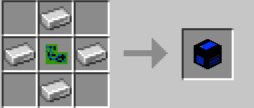
PC: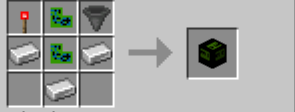
Phone: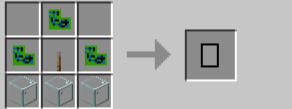
Also, don’t forget to craft the Wi-Fi block — without it, your devices won’t work!
Tutorial Mode
If you don’t understand something, there’s a Tutorial Mode just for you!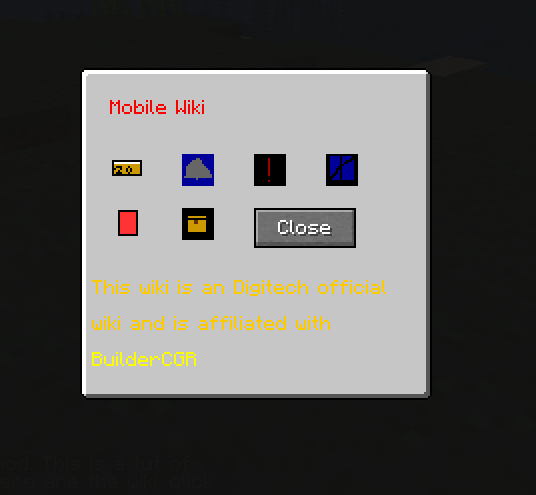
Thanks for checking out my mod!
Created by BuilderCGR.
Enjoy Digitech, and stay tuned for updates.
Available Versions
How to Install Digitech on Your Server
Order Server
Order a Minecraft Java server with at least 3 GB RAM (4 GB recommended).
Set forge Loader
In the panel under "Egg", select the forge loader and matching Minecraft version (1.21.4).
Install Mod
Open the mod browser in the dashboard and search for "Digitech". Click "Install" – done! Alternatively, upload the .jar via SFTP to the /mods folder.
Compatibility
Mod Loaders
Minecraft Versions
1.21.4, 1.21.1, 1.20.1
Server-side
✓ RequiredRecommended RAM
4 GB(min. 3 GB)Frequently Asked Questions
Digitech server crashes on startup – what to do?
Most common cause: wrong forge version or insufficient RAM. Check the server log (latest.log) for "OutOfMemoryError" or "Mixin" errors. With Mado Hosting: ensure at least 3 GB RAM is allocated and the loader matches the mod version (1.21.4). You can switch loaders with one click in the panel.
Is Digitech compatible with forge and neoforge?
Digitech officially supports forge, neoforge for Minecraft 1.21.4, 1.21.1, 1.20.1. The Mado dashboard automatically detects incompatible loader combinations.
Server lagging with Digitech – how to optimize performance?
Recommended RAM: 4 GB (per 8 players). Use /spark profiler to check if Digitech consumes the most tick time. Common fixes: reduce server view-distance to 8-10, install "performant" or "starlight" as supplementary mods on Forge. With Mado Hosting, your server runs on NVMe SSDs with dedicated CPU cores for minimal latency.
Similar Mods





Rent Modded Server
Install Digitech with just one click on your server.
Details
- License
- Creative Commons Attribution Non Commercial 4.0 International
- Server-side
- Required