Dimension Access Manager
Manager for the access to dimensions.
About this Mod
Version 4.X.X
For older versions of the mod, check the wiki.
This Mod adds, that access to dimensions can be granted or locked.
If a dimension is locked, you can stand in the portal to this dimension, but don't change to this dimension.
If a dimension is granted, you can stand in the portal to this dimension and change to this dimension.
Since Minecraft 1.19.1 the Mod is needed on the server and client side.
For 1.19 and before, the Mod is only needed on the server side, but can also be used on the client side.
You need a server to play with friends? You don't know how to set up one? Just rent an already configured server!
Click on the picture above, select a plan (with recommended at least 6 GB),
use my code **** to get 25% off your first month and enjoy playing with your friends!
Support
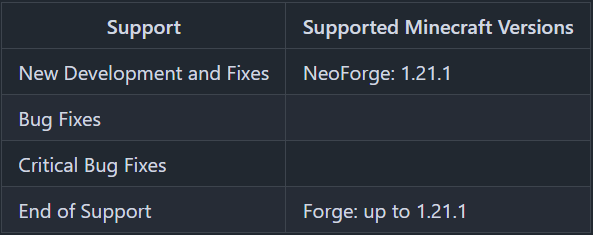
Minecraft versions, for which the mod is not released, are not supported.
You can find a text version here.
Granting / Locking
There is a general flag, a whitelist and a blacklist, to manage which players have access to a dimension.
Flag
For every dimension can be set, if the dimension access is granted or locked.
If a player is not on the white- or blacklist for the dimension, this flag is used to define, if the player can teleport to the dimension or not.
For non player entities, this flag is used to define, if they can teleport to the dimension or not.
Whitelist
The whitelist is only active, if the dimension access is locked.
Players on the whitelist, can teleport to the dimension, even if the dimension access is locked.
If the dimension access is locked and the whitelist is active, only players and no other entities can teleport to the dimension.
Blacklist
The blacklist is only active, if the dimension access is granted.
Players on the blacklist, cannot teleport to the dimension, even if the dimension access is granted.
Server Config
- default_dimension_access_type
Defines if new dimensions are GRANTED or LOCKED by default
Default = "GRANTED"
The access type for a dimension is set, if the dimension is generated for the first time.
I.E: This value should set before pre-generating the dimensions. - dimension_command_permission_level
Defines which permission level is required to run the /dimension command
Default = 3
Available values = 0, 1, 2, 3, 4
By default, only operators, that can change the whitelist, can change the dimension permissions.
If the commands shall be executed by a command block of i.e. HQM the permission level has to be 2 or less.
More details about minecraft permission levels, you can find here: https://minecraft.fandom.com/wiki/Permission_level
Commands
- /dimensions status
Shows the status of all dimension, if they are granted or locked. - /dimensions default defaultDimensionAccessType
Shows the value of the config option "default_dimension_access_type". - /dimensions default defaultDimensionAccessType <dimensionAccessType>
Sets the value of the config option "default_dimension_access_type".
dimensionAccessType values: GRANTED or LOCKED - /dimension <dimension> access status
Shows the status of the selected dimension, if it is granted or locked. - /dimension <dimension> access grant
Grants the selected Dimension. - /dimension <dimension> access lock
Locks the selected dimension. - /dimension <dimension> players list
Shows players on the whitelist and the blacklist of the selected dimension. - /dimension <dimension> players whitelist list
Shows players on the whitelist of the selected dimension. - /dimension <dimension> players whitelist add <targets>
Adds players (<targets>) to the whitelist of the selected dimension. - /dimension <dimension> players whitelist remove <targets>
Removes players (<targets>) from the whitelist of the selected dimension. - /dimension <dimension> players blacklist list
Shows players on the blacklist of the selected dimension. - /dimension <dimension> players blacklist add <targets>
Adds players (<targets>) to the blacklist of the selected dimension. - /dimension <dimension> players blacklist remove <targets>
Removes players (<targets>) from the blacklist of the selected dimension.
Thanks for the logo to Muse31.
You can use this mod in non-commercial modpacks without asking.
You can find more mods from me on CurseForge and Modrinth.

Available Versions
How to Install Dimension Access Manager on Your Server
Order Server
Order a Minecraft Java server with at least 3 GB RAM (4 GB recommended).
Set forge Loader
In the panel under "Egg", select the forge loader and matching Minecraft version (1.21.1).
Install Mod
Open the mod browser in the dashboard and search for "Dimension Access Manager". Click "Install" – done! Alternatively, upload the .jar via SFTP to the /mods folder.
Compatibility
Mod Loaders
Minecraft Versions
1.21.1, 1.21, 1.20.6 (+8 more)
Server-side
✓ RequiredRecommended RAM
4 GB(min. 3 GB)Frequently Asked Questions
Dimension Access Manager server crashes on startup – what to do?
Most common cause: wrong forge version or insufficient RAM. Check the server log (latest.log) for "OutOfMemoryError" or "Mixin" errors. With Mado Hosting: ensure at least 3 GB RAM is allocated and the loader matches the mod version (1.21.1). You can switch loaders with one click in the panel.
Is Dimension Access Manager compatible with forge and neoforge?
Dimension Access Manager officially supports forge, neoforge for Minecraft 1.21.1, 1.21, 1.20.6. The Mado dashboard automatically detects incompatible loader combinations.
Server lagging with Dimension Access Manager – how to optimize performance?
Recommended RAM: 4 GB (per 8 players). Use /spark profiler to check if Dimension Access Manager consumes the most tick time. Common fixes: reduce server view-distance to 8-10, install "performant" or "starlight" as supplementary mods on Forge. With Mado Hosting, your server runs on NVMe SSDs with dedicated CPU cores for minimal latency.
Similar Mods






Rent Modded Server
Install Dimension Access Manager with just one click on your server.