
Dimensional Depot
Cloud Storage for your simple items!
Screenshots


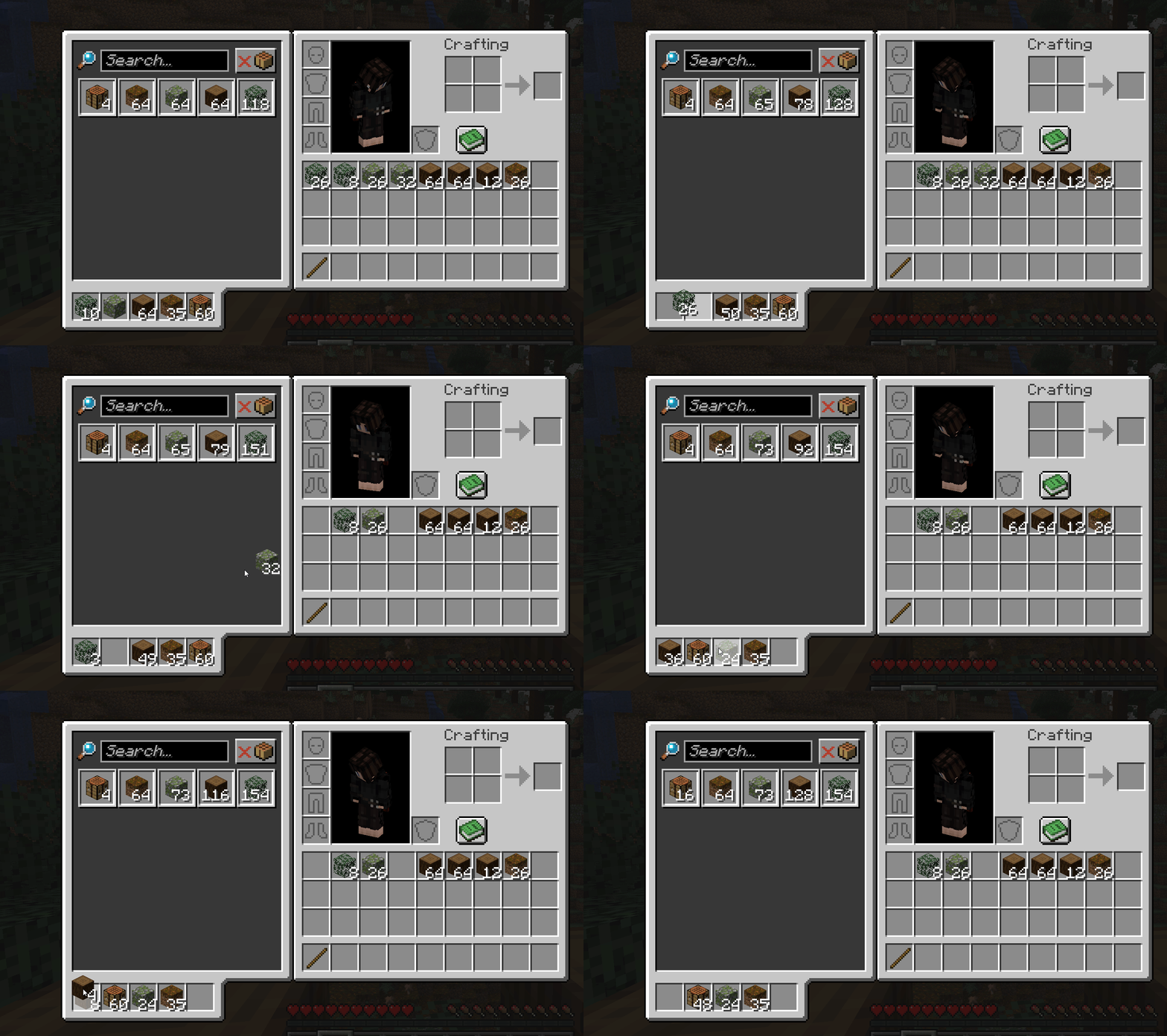

About this Mod
Cloud storage for your items!




Features
- Unlock ability to upload items to the cloud
- Upgradeable, so you can store more stacks of those items, and enjoy faster upload speeds.
- Instant download of items
- World generation, so you can find Mercer Cubes and Somersloops
- Multiblock depot for automating uploads.
- A proper research system (MaM)
- Team cloud storage - because sharing is caring. Use the command to invite your friends.
Dreams for the future
- Proper researching in a MaM block! Instead of a keybinding UI.
- Audio/Sound effects (consume)
- Integration with JEI for providing items to crafting recipes from your depot.
- More world generation, so that finding artifacts can be more varied
- PowerSlugs/Shards
FAQ
How do I unlock the depot?
Find a Mercer Cube in the world, then use the research keybinding to open the MaM. We'll change that when we get to the research update.
Where do I find Mercer Cubes and Somersloops?
They generate in the world. Look for strange structures.
How do I open the depot?
It should show automatically, so long as you aren't using the vanilla minecraft recipe book. Hopefully it doesn't conflict with other mods drawing stuff over inventory/crafting table/etc. Eventually I wanna let you move it about to wherever you want.
How do I upload items?
Craft a Depot! It accepts items from the front if you use a hopper for 'automation'.
Alternatively, if you've unlocked personal uploading, while the depot UI is open, drag items from your inventory into one of the depot upload slots below it.
How do I download items back from the depot?
While the depot UI is open in your inventory, click on an item in the depot storage area to instantly download it to your inventory. Left/Right click, as well as shift-clicking, all work as normal.
How do I upgrade my upload speed?
Research.
How do I increase my storage capacity?
Also research.
Why can't I upload certain items?
Is your depot full for your current stack upgrade level? Or maybe you're trying to upload something that couldn't be stacked with something already uploaded.
Got something to say?
Join us on Discord!
Available Versions
How to Install Dimensional Depot on Your Server
Order Server
Order a Minecraft Java server with at least 3 GB RAM (4 GB recommended).
Set fabric Loader
In the panel under "Egg", select the fabric loader and matching Minecraft version (1.21.1).
Install Mod
Open the mod browser in the dashboard and search for "Dimensional Depot". Click "Install" – done! Alternatively, upload the .jar via SFTP to the /mods folder.
Compatibility
Mod Loaders
Minecraft Versions
1.21.1, 1.21
Server-side
✓ RequiredRecommended RAM
4 GB(min. 3 GB)Frequently Asked Questions
Dimensional Depot server crashes on startup – what to do?
Most common cause: wrong fabric version or insufficient RAM. Check the server log (latest.log) for "OutOfMemoryError" or "Mixin" errors. With Mado Hosting: ensure at least 3 GB RAM is allocated and the loader matches the mod version (1.21.1). You can switch loaders with one click in the panel.
Is Dimensional Depot compatible with fabric and forge and neoforge?
Dimensional Depot officially supports fabric, forge, neoforge for Minecraft 1.21.1, 1.21. Note: Forge and Fabric mods are NOT cross-compatible – pick one loader and stick with it. The Mado dashboard automatically detects incompatible loader combinations.
Server lagging with Dimensional Depot – how to optimize performance?
Recommended RAM: 4 GB (per 8 players). Use /spark profiler to check if Dimensional Depot consumes the most tick time. Common fixes: reduce server view-distance to 8-10, install "performant" or "starlight" as supplementary mods on Forge. With Mado Hosting, your server runs on NVMe SSDs with dedicated CPU cores for minimal latency.
Similar Mods


Rent Modded Server
Install Dimensional Depot with just one click on your server.