
Donate Integrate
A Minecraft Forge mod that executes in-game commands based on donation amounts, creating real-time interaction between streamers and their audience.
Screenshots
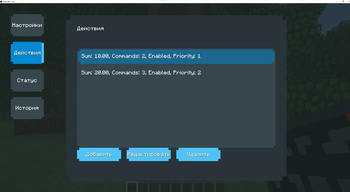
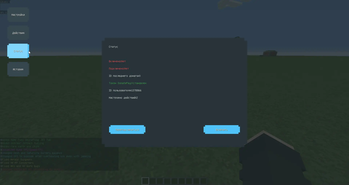
About this Mod
🪙 DonateIntegrate
Real-time donation integration for Minecraft 1.12.2.
Bring your stream into the game. Reward, react, and recognize your supporters — live.
🎯 Purpose
DonateIntegrate is a client-side Forge mod for Minecraft 1.12.2 that connects your game to your donation platform using WebSocket technology. It enables real-time reactions to donations directly inside the game — perfect for streamers who want to engage their audience in creative and interactive ways.
⚙️ Features
- 🔌 WebSocket connection to external donation systems
- ⚡ Live updates in-game when a donation is received
- 💬 Customizable in-game messages or events triggered by donations
- 🔐 Fully client-side — no server installation required
- 📝 YAML and JSON config support
- 📦 Built-in SLF4J logging for debugging
📦 Installation
- Install Minecraft Forge 1.12.2
- Place
DonateIntegrate-2.0.4.jarinto yourmods/folder - Start Minecraft and configure the mod via the generated config files (
.dintegrate/)
💡 This mod is client-only. Do not install it on a server!
🧩 Compatibility
| Feature | Supported |
|---|---|
| Minecraft | 1.12.2 |
| Forge | ✅ Yes |
| Fabric/NeoForge | ❌ Not supported |
| Multiplayer | ✅ Works (client only) |
| Serverside | ❌ Not required |
🧠 How it works
DonateIntegrate uses embedded libraries like:
Java-WebSocket— for persistent donation channelGson— to handle incoming JSON payloadsSnakeYAML— for clean config formattingSLF4J— lightweight logging
You can define reactions to donations via config files, such as in-game chat messages, sounds, or even triggering scripts using Minecraft commands.
📁 Configuration
After launching the mod once, it generates a folder (e.g., config/dintegrate/) with YAML and JSON files for:
- WebSocket URL and authentication
- Command templates or actions per donation tier
- Logging preferences
📺 Use Case Example
“When someone donates $5 or more, my Minecraft character says thanks in chat and fireworks go off in-game. It's a fun way to connect with viewers.”
— A streamer using DonateIntegrate
🛠️ License & Credits
- Developed by bogdan3000
- Powered by open-source libraries
- Open for community contributions (coming soon)
❤️ Support & Feedback
If you enjoy this mod, consider leaving a like or sharing feedback.
Feature requests and pull requests are welcome!
Available Versions
How to Install Donate Integrate on Your Server
Order Server
Order a Minecraft Java server with at least 3 GB RAM (4 GB recommended).
Set forge Loader
In the panel under "Egg", select the forge loader and matching Minecraft version (1.20.6).
Install Mod
Open the mod browser in the dashboard and search for "Donate Integrate". Click "Install" – done! Alternatively, upload the .jar via SFTP to the /mods folder.
Compatibility
Mod Loaders
Minecraft Versions
1.20.6, 1.20.5, 1.20.4 (+5 more)
Server-side
✗ UnsupportedRecommended RAM
4 GB(min. 3 GB)Frequently Asked Questions
Donate Integrate server crashes on startup – what to do?
Most common cause: wrong forge version or insufficient RAM. Check the server log (latest.log) for "OutOfMemoryError" or "Mixin" errors. With Mado Hosting: ensure at least 3 GB RAM is allocated and the loader matches the mod version (1.20.6). You can switch loaders with one click in the panel.
Is Donate Integrate compatible with forge?
Donate Integrate officially supports forge for Minecraft 1.20.6, 1.20.5, 1.20.4. The Mado dashboard automatically detects incompatible loader combinations.
Server lagging with Donate Integrate – how to optimize performance?
Recommended RAM: 4 GB (per 8 players). Use /spark profiler to check if Donate Integrate consumes the most tick time. Common fixes: reduce server view-distance to 8-10, install "performant" or "starlight" as supplementary mods on Forge. With Mado Hosting, your server runs on NVMe SSDs with dedicated CPU cores for minimal latency.
Similar Mods






Rent Modded Server
Install Donate Integrate with just one click on your server.