
Diorite
Diorite is an inventory utility for mass-dropping items deemed worthless. Trash loadouts are customizable, and the mod is fully-clientside.
Screenshots
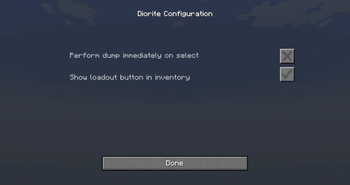
About this Mod
Diorite
About
Diorite is an inventory utility for mass-dropping items deemed worthless. Trash loadouts are customizable, and the mod is fully-clientside.
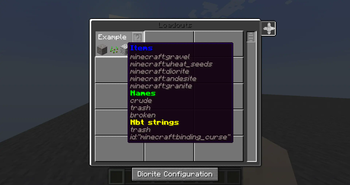
'Trash' can be defined in three ways:
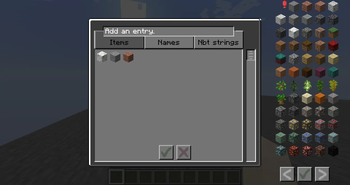
- By item: filter by registry name. Recommended for most vanilla and modded items.
- By name: filter specific items by their displayed name, ignoring capitals; this uses a 'contains' method, allowing you to also sort by prefixes, suffixes, etc. Useful for servers with custom or RPG items.
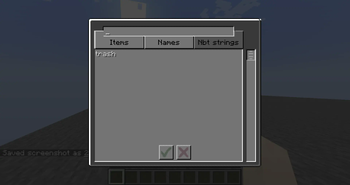
- By nbt string: remove items should their nbt (key or value) contain this string, at any point, ignoring capitals. Functions by determining if the whole nbt string contains the value; thus, it would provide more specific results if given both key and value.
Usage
The mod unfortunately is unable to properly filter from the hotbar without introducing bugs. If anyone knows a means, inform the author or make a pull request.
- Create or select a trash loadout via the button in your inventory, or the bound key (found in normal game settings). Loadouts persist until you leave the world, or select a new one.
- Press the relevant bound key to discard all items matching with the loadout. If dumping on switch is enabled, this will occur immediately.
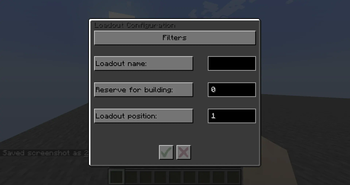
- Id determines position in the loadout menu.
- The value for "reserved building blocks" defines how many filtered blocks you wish to retain, if no other items in your main inventory block movement.
Available Versions
How to Install Diorite on Your Server
Order Server
Order a Minecraft Java server with at least 3 GB RAM (4 GB recommended).
Set fabric Loader
In the panel under "Egg", select the fabric loader and matching Minecraft version (1.19).
Install Mod
Open the mod browser in the dashboard and search for "Diorite". Click "Install" – done! Alternatively, upload the .jar via SFTP to the /mods folder.
Compatibility
Mod Loaders
Minecraft Versions
1.19, 1.18.2, 1.17.1
Server-side
✗ UnsupportedRecommended RAM
4 GB(min. 3 GB)Frequently Asked Questions
Diorite server crashes on startup – what to do?
Most common cause: wrong fabric version or insufficient RAM. Check the server log (latest.log) for "OutOfMemoryError" or "Mixin" errors. With Mado Hosting: ensure at least 3 GB RAM is allocated and the loader matches the mod version (1.19). You can switch loaders with one click in the panel.
Is Diorite compatible with fabric?
Diorite officially supports fabric for Minecraft 1.19, 1.18.2, 1.17.1. The Mado dashboard automatically detects incompatible loader combinations.
Server lagging with Diorite – how to optimize performance?
Recommended RAM: 4 GB (per 8 players). Use /spark profiler to check if Diorite consumes the most tick time. Common fixes: reduce server view-distance to 8-10, install "performant" or "starlight" as supplementary mods on Forge. With Mado Hosting, your server runs on NVMe SSDs with dedicated CPU cores for minimal latency.
Rent Modded Server
Install Diorite with just one click on your server.