
DiPrinter
A simple mod allowing users to build Diks faster
Screenshots
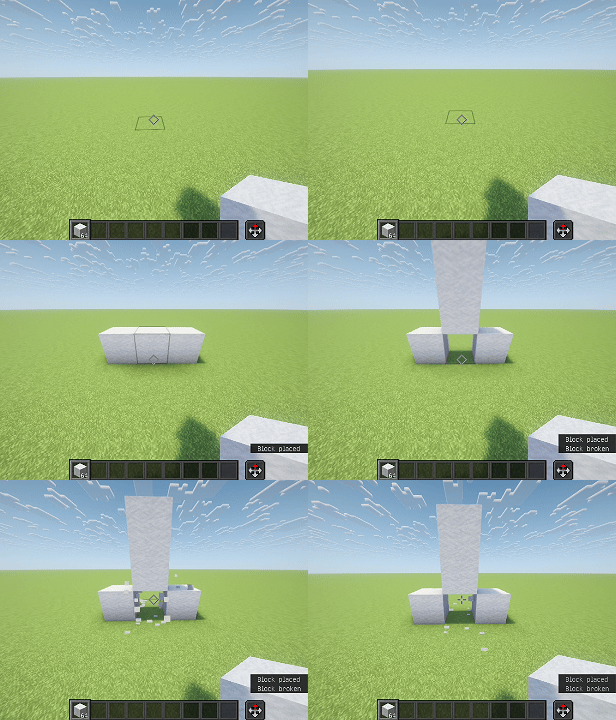
About this Mod
DIPrinter Mod Features
DIPrinter is a Fabric client-side mod for Minecraft that provides two automated building modes ("Dik" and "Beta"), along with aura‑based auto‑building, helper block management, preview rendering, and extensive configuration options.
🧱 Building Modes
Dik Mode
Builds a structure resembling a “Dik”:
Starts with a helper block (the base).
Adds two side blocks (“wings”) to the left and right.
Extends forward for a configurable length (default 3 blocks, max 4, min 2).
Triggered by right‑clicking on a block while holding a block item.
Can be enabled/disabled via hotkey.
Beta Mode
Builds a different multi‑block pattern:
A central column of building blocks (2 high).
Two side arms at the middle level.
Two side arms at the top level.
A top cap.
Triggered similarly with a right‑click.
Also togglable via hotkey.
✨ Aura (Auto‑Building)
Dik Aura and Beta Aura automatically scan the area around the player (configurable radius, 3–7 blocks).
When a valid placement spot is found, the corresponding structure is built automatically without manual clicking.
Scans once every 500 ms to avoid performance issues.
If both auras are enabled, you can choose which one takes priority.
🔧 Helper Blocks & Breaking Assistance
Some positions in the structures are marked as helper blocks (temporary).
After placing all building blocks, the helper blocks are automatically broken.
Softest‑block selection – the mod can automatically choose the easiest‑to‑break block from your inventory for helper blocks.
Best‑tool selection – when breaking helpers, the mod automatically switches to the most effective tool for that block.
Breaking is done with simulated player interactions (left‑click continues).
🎮 Configuration & Controls
GUI – press D + C (default) to open the full configuration screen, organised into three tabs:
Construction – enable/disable Dik/Beta modes and auras.
Misc – placement delay, player rotation, Dik length, aura radius, helper block preferences, etc.
Render – structure preview and aura preview toggles.
All hotkeys can be rebound through the in‑game controls menu (malilib integration).
👁️ Preview Rendering
Structure Preview – when aiming at a block and ready to build, a translucent overlay shows exactly where each block will be placed (building blocks and helpers).
Aura Preview – while an aura is active, the next structure to be built is shown transparently around the player until it is placed or cancelled.
🧠 Other Features
- Player Rotation – automatically rotates the player to face each placement position (can be disabled).
🛠️ Requirements
Fabric Loader
Fabric API
malilib (required for config GUI and keybindings)
📄 AI Generated Contents
This mod is totally generated by DeepSeek V4-Pro. (Including this document)
Available Versions
How to Install DiPrinter on Your Server
Order Server
Order a Minecraft Java server with at least 3 GB RAM (4 GB recommended).
Set fabric Loader
In the panel under "Egg", select the fabric loader and matching Minecraft version (1.21.4).
Install Mod
Open the mod browser in the dashboard and search for "DiPrinter". Click "Install" – done! Alternatively, upload the .jar via SFTP to the /mods folder.
Compatibility
Mod Loaders
Minecraft Versions
1.21.4
Server-side
✗ UnsupportedRecommended RAM
4 GB(min. 3 GB)Frequently Asked Questions
DiPrinter server crashes on startup – what to do?
Most common cause: wrong fabric version or insufficient RAM. Check the server log (latest.log) for "OutOfMemoryError" or "Mixin" errors. With Mado Hosting: ensure at least 3 GB RAM is allocated and the loader matches the mod version (1.21.4). You can switch loaders with one click in the panel.
Is DiPrinter compatible with fabric?
DiPrinter officially supports fabric for Minecraft 1.21.4. The Mado dashboard automatically detects incompatible loader combinations.
Server lagging with DiPrinter – how to optimize performance?
Recommended RAM: 4 GB (per 8 players). Use /spark profiler to check if DiPrinter consumes the most tick time. Common fixes: reduce server view-distance to 8-10, install "performant" or "starlight" as supplementary mods on Forge. With Mado Hosting, your server runs on NVMe SSDs with dedicated CPU cores for minimal latency.
Similar Mods





Rent Modded Server
Install DiPrinter with just one click on your server.