
Create: Direct Chute
Adds a new chute that transfers items directly from one container to another, without storing any item inside. Optimizes storage and performance
Screenshots


About this Mod
Create: Direct chutes adds a, guess what, new chute! This chute behaves a little different than normal chutes. It doesn't have any slot inside, but rather directly sends items from the container above to the one below. Direct chutes can be stacked on top, and will provide instant item transfer over long distances.
Imagine this scenario: Your chute has an emerald stuck inside of it and so it cannot transfer diamonds down in your chest, even though you only have 1 diamond inside your chest so it could still transfer 63 more... this can be solved with a direct chute!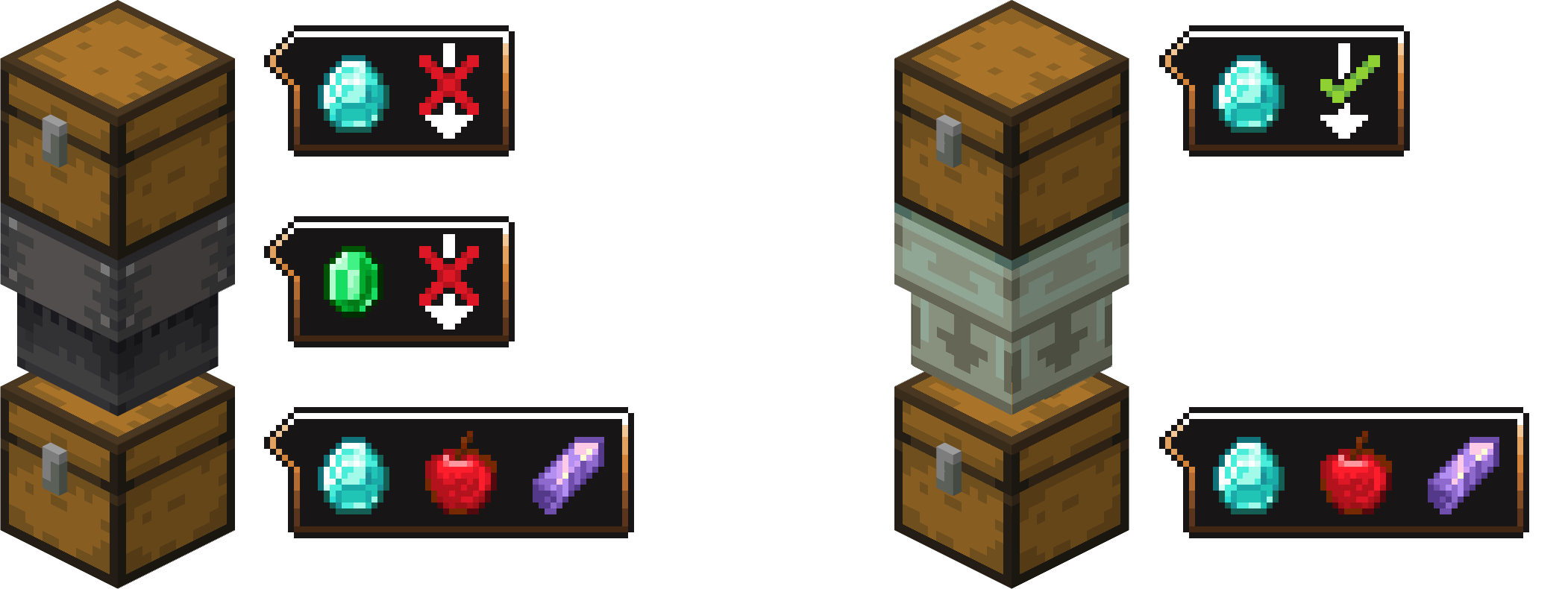
V1.1.0
Direct chutes are now made out of zinc instead of copper to bring consistency (copper is fluid related in create context). They also now allow diagonal connections and can be encased with a zinc block
Available Versions
How to Install Create: Direct Chute on Your Server
Order Server
Order a Minecraft Java server with at least 4 GB RAM (6 GB recommended).
Set forge Loader
In the panel under "Egg", select the forge loader and matching Minecraft version (1.21.11).
Install Mod
Open the mod browser in the dashboard and search for "Create: Direct Chute". Click "Install" – done! Alternatively, upload the .jar via SFTP to the /mods folder.
Compatibility
Mod Loaders
Minecraft Versions
1.21.11, 1.21.10, 1.21.9 (+15 more)
Server-side
✓ RequiredRecommended RAM
6 GB(min. 4 GB)Frequently Asked Questions
Create: Direct Chute server crashes on startup – what to do?
Most common cause: wrong forge version or insufficient RAM. Check the server log (latest.log) for "OutOfMemoryError" or "Mixin" errors. With Mado Hosting: ensure at least 4 GB RAM is allocated and the loader matches the mod version (1.21.11). You can switch loaders with one click in the panel.
Is Create: Direct Chute compatible with forge and neoforge?
Create: Direct Chute officially supports forge, neoforge for Minecraft 1.21.11, 1.21.10, 1.21.9. The Mado dashboard automatically detects incompatible loader combinations.
Server lagging with Create: Direct Chute – how to optimize performance?
Recommended RAM: 6 GB (per 5 players). Use /spark profiler to check if Create: Direct Chute consumes the most tick time. Common fixes: reduce server view-distance to 8-10, install "performant" or "starlight" as supplementary mods on Forge. With Mado Hosting, your server runs on NVMe SSDs with dedicated CPU cores for minimal latency.
Similar Mods






Rent Modded Server
Install Create: Direct Chute with just one click on your server.