
Discord: JustSync
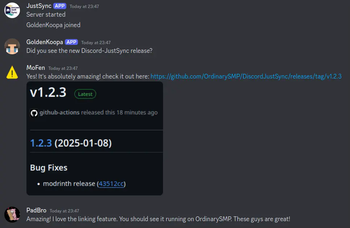
Discord Bridge. Sync your Discord Chat with Minecraft. The mod allows for additional features like whitelisting.
Screenshots

About this Mod
Discord: JustSync
If your bot can see a total of 10k members or more you will need to verify the bot through discord!
Easily migrate from ErdbeerbaerLP's Discord Integration with Scripts on our Website tronka.de.
Features
- Send minecraft chat messages to discord
- Send discord messages to the minecraft chat
- Custom whitelisting through discord roles
- Configure alt account usage
- Webhook and Embed support with configurable message formats
- Commands and command logging support
Integrations
The mod easily integrates with:
- Floodgate/Geyser
- Luckperms
- Vanish
More on our wiki page
Config
The config file is located in <minecraft-folder>/config/discord-js/discord-justsync.toml,
it will be created on first launch.
To use the mod you must configure botToken with you discord bot token andserverChatChannel with the id of the channel you want to use for the minecraft chat channel.
Without doing so minecraft will fail to start.
The Discord Bot
The bot will need following intents: SERVER_MEMBER, MESSAGE_CONTENT
and following permissions: Send Messages, View Channels, Manage Webhooks, Manage Nicknames, Embed Links
For a more detailed step-by-step tutorial refer to our wiki page.
Linking
By enabling the linking.enableLinking option (default: true) players will be required to link their minecraft account to a discord account.
You can control which players can join by configuring linking.requiredRoles with a role id required to join the server.
By default, a player's discord account will be renamed to their ingame name whenever they join (linking.renameOnJoin).
For this to work the manage roles permission is required.
Commands
Minecraft
/discord reloadreload the configs/discord unlinkremove the link of your minecraft account/discord unlink <player>remove a link from a discord user to a minecraft account (op required)
Discord
/link <code>used to link to your minecraft account/justsync getquery link data for yourself/justsync get <player>query link data for other players (moderate member permission required)/unlinkunlink yourself/justsync unlink <player>unlink a player (moderate members permission required)/listList the currently online players/reloadreload the config file (admin only)
Problems, Suggestions and general Questions
If you encounter any problems or bugs, have a suggestion or have a question for this mod feel free please join our Discord Server.
Available Versions
How to Install Discord: JustSync on Your Server
Order Server
Order a Minecraft Java server with at least 3 GB RAM (4 GB recommended).
Set fabric Loader
In the panel under "Egg", select the fabric loader and matching Minecraft version (26.1.2).
Install Mod
Open the mod browser in the dashboard and search for "Discord: JustSync". Click "Install" – done! Alternatively, upload the .jar via SFTP to the /mods folder.
Compatibility
Mod Loaders
Minecraft Versions
26.1.2, 26.1.1, 26.1 (+8 more)
Server-side
✓ RequiredRecommended RAM
4 GB(min. 3 GB)Frequently Asked Questions
Discord: JustSync server crashes on startup – what to do?
Most common cause: wrong fabric version or insufficient RAM. Check the server log (latest.log) for "OutOfMemoryError" or "Mixin" errors. With Mado Hosting: ensure at least 3 GB RAM is allocated and the loader matches the mod version (26.1.2). You can switch loaders with one click in the panel.
Is Discord: JustSync compatible with fabric?
Discord: JustSync officially supports fabric for Minecraft 26.1.2, 26.1.1, 26.1. The Mado dashboard automatically detects incompatible loader combinations.
Server lagging with Discord: JustSync – how to optimize performance?
Recommended RAM: 4 GB (per 8 players). Use /spark profiler to check if Discord: JustSync consumes the most tick time. Common fixes: reduce server view-distance to 8-10, install "performant" or "starlight" as supplementary mods on Forge. With Mado Hosting, your server runs on NVMe SSDs with dedicated CPU cores for minimal latency.
Similar Mods






Rent Modded Server
Install Discord: JustSync with just one click on your server.