
Discord-MC-Chat
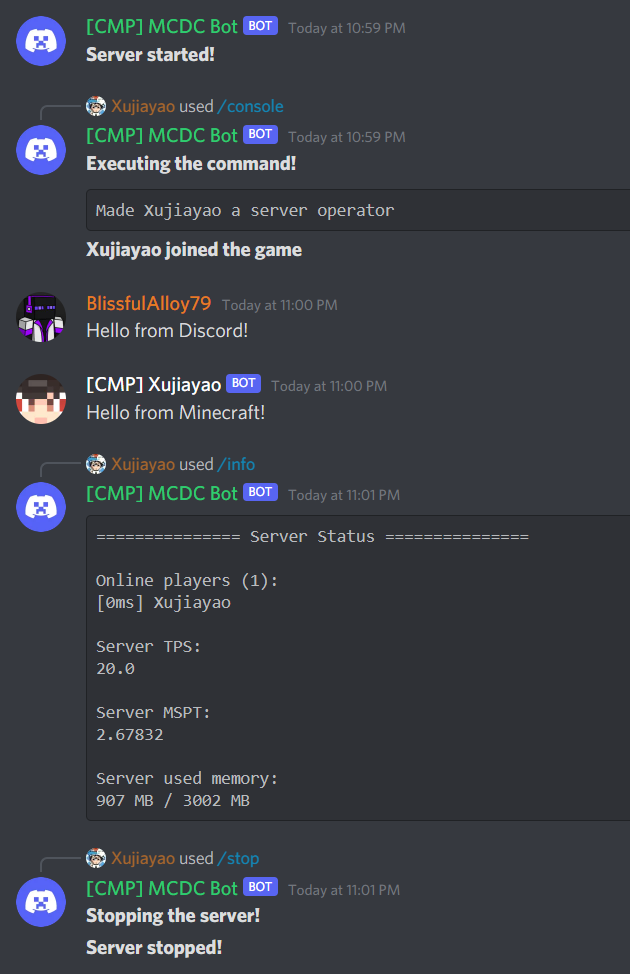
Discord-MC-Chat (DMCC), formerly known as MC-Discord-Chat and MCDiscordChat (MCDC), is a practical and powerful Fabric and Quilt Minecraft <> Discord chat bridge inspired by BRForgers/DisFabric
About this Mod
Language: English 中文

Discord-MC-Chat






Discord-MC-Chat (DMCC), formerly known as MC-Discord-Chat and MCDiscordChat (MCDC), is a practical and powerful Fabric and Quilt Minecraft <> Discord chat bridge inspired by BRForgers/DisFabric
More information + Docs: Discord-MC-Chat Docs | Xujiayao's Blog
DMCC Discord Server is now public! Join now through: https://discord.gg/kbXkV6k2XU
Introduction
Discord-MC-Chat (DMCC), formerly known as MC-Discord-Chat and MCDiscordChat (MCDC), is a practical and powerful Fabric and Quilt Minecraft <> Discord chat bridge inspired by BRForgers/DisFabric.

Download
All releases can be downloaded at the following sites:
You can find the latest build JAR files at GitHub Actions.
Support
If there is a bug or suggestion, or something you don't understand, you can submit an issue on GitHub.
DMCC Discord Server is now public! Join now through: https://discord.gg/kbXkV6k2XU
Contributing
You are welcome to contribute to DMCC!
If you are interested in contributing to DMCC, you can submit a pull request on GitHub.
For code contributions, the build file is located in the /build/ folder.
For translation contributions, language files are located in the /wrapper/src/main/resources/lang/ folder. Copy en_us.json and rename the new one to your language code to get started. Please provide translations for the entire file for all keys.
Features
- Full multi-language support
- Support multi-server mode (running more than one Minecraft server with DMCC in the same Discord guild)
- Minecraft <> Discord cross server chat
- Support disabling Discord and in-game chat broadcasts
- Support displaying server status using Discord channel topic feature
- Support displaying server status and player count using voice channels
- Support displaying server status in bot's Discord online status
- Support displaying server player count in bot's Discord activity status
- Support Discord Webhook feature
- Dynamic-created DMCC Webhook
- Customizable Webhook Avatar API that is compatible with mods and plugins for real-time skin changes
- Use the bot itself to send chat messages when Webhook is disabled
- Support in-game Markdown parsing
- Support highlighting and using default Unicode and server custom emoji in-game
- Support highlighting stickers in-game
- Support highlighting and mentions (@) in-game
- Customizable scope of allowed mentions (@) in-game
- Support disabling mentions (@) in-game
- Support highlighting and opening hyperlinks and GIFs in-game
- Support disabling all parsing
- Support in-game display of Discord user role colour
- Support in-game display of response messages
- Support limiting the number of newlines for Discord messages
- Broadcast player command execution
- Players who execute commands can also see the commands themselves
- Exclude broadcasts for execution of specific commands (support regular expression)
- Support broadcasting messages sent using /tellraw and /say command
- Send all console log messages to Discord
- Discord Commands available
- Use Discord to manage channels that can execute DMCC commands
- Notify in-game players when someone executes an DMCC command
- /console command supports Minecraft command auto-completion
- Normal Commands
- /help | Get a list of available commands
- /info | Query server running status
- /stats <type> <name> | Query the scoreboard of a statistic
- /update | Check for update
- Admin Commands
- /console <command> | Execute a command in the server console (admin only)
- /log <file> | Get the specified server log (admin only)
- /reload | Reload Discord-MC-Chat config file (admin only)
- /stop | Stop the server (admin only)
- Commands with Adjustable Permissions
- /whitelist <player> | Add a player to the server whitelist
- Minecraft Commands available
- Admin-only commands require a level 4 operator at minimum
- Normal Commands
- /dmcc help | Get a list of available commands
- /dmcc info | Query server running status
- /dmcc stats <type> <name> | Query the scoreboard of a statistic
- /dmcc update | Check for update
- Admin Commands
- /dmcc reload | Reload Discord-MC-Chat config file (admin only)
- Commands with Adjustable Permissions
- /dmcc whitelist <player> | Add a player to the server whitelist
- Fully customizable message format
- Sending specific server messages to Discord can be disabled
- In-game
- Chat messages from Discord
- Response messages from Discord
- Messages from other DMCC servers
- Discord
- Server started
- Server stopped
- Player joined server
- Player left server
- Player reached a progress / achieved a goal / completed a challenge
- Multilingual support
- Support displaying descriptions for task/challenge/goal messages
- Player died
- Multilingual support
- Server MSPT is higher than a certain value
- Use admin list to configure user permissions to use special commands
- Support Hot Reloading of the config file
- Backup every time the config file is loaded
- Check for updates regularly
- Push DMCC version updates accurately by checking server Minecraft version compatibility
- Customizable update notification channel
- Check for updates can be disabled
- Prompt when the user runs the JAR as an application instead of a Minecraft mod
Languages currently available:
| Code | Language |
|---|---|
de_de |
Deutsch (Deutschland) |
en_us |
English (US) |
es_es |
Español (España) |
fr_fr |
Français (France) |
it_it |
Italiano (Italia) |
ja_jp |
日本語(日本) |
ko_kr |
한국어(대한민국) |
no_no |
Norsk Bokmål (Norge) |
pl_pl |
Polski (Polska) |
pt_br |
Português (Brasil) |
ru_ru |
Русский (Россия) |
tr_tr |
Türkçe (Türkiye) |
zh_cn |
简体中文(中国大陆) |
zh_hk |
繁體中文(香港特別行政區) |
zh_tw |
繁體中文(台灣) |
Contributors
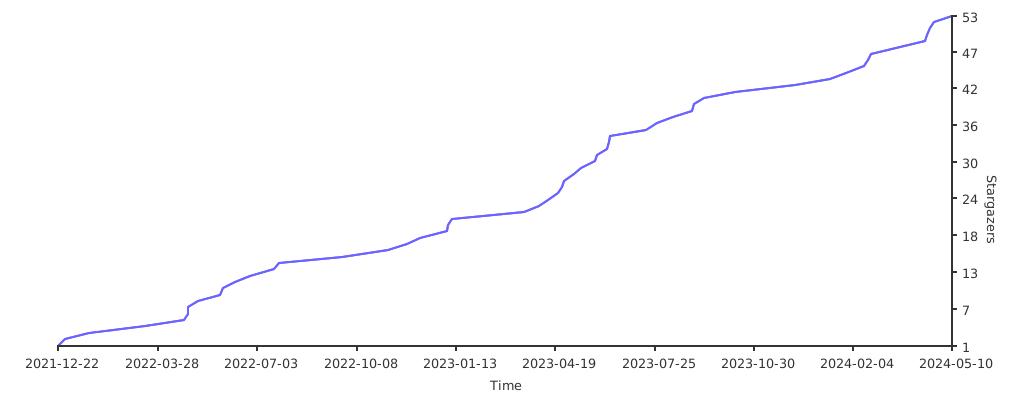
Stargazers over time
License
This project is licensed under the MIT license.
Exceptionally, the src/main/java/com/xujiayao/discord_mc_chat/utils/MarkdownParser.java file was obtained from BRForgers/DisFabric on December 31, 2020, licensed under the Mozilla Public License 2.0 (MPL-2.0).
More details of the
src/main/java/com/xujiayao/discord_mc_chat/utils/MarkdownParser.javafile:Author: allanf181 (Allan Fernando)
Link to the original source:
https://github.com/BRForgers/DisFabric/blob/e0c7601405ee1b3f1de3c3168bc4ddd520501565/src/main/java/br/com/brforgers/mods/disfabric/utils/MarkdownParser.javaLink to the license:
https://github.com/BRForgers/DisFabric/blob/e0c7601405ee1b3f1de3c3168bc4ddd520501565/LICENSENote that the "Don't Be a Jerk" license used in the newly created project BRForgers/DisFabric-and-DisForge is separate from the old project BRForgers/DisFabric.
- Any recent changes in the project name and license do not retroactively affect the license terms of the code obtained at a specific moment before, that is, December 31, 2020.
- Any files obtained from BRForgers/DisFabric continue to be subject to the terms of the MPL-2.0 license only.
Link to the "Don't Be a Jerk" license:
https://github.com/BRForgers/DisFabric-and-DisForge/blob/d1468a6c9b50ba24a250ec370cf645d58dccdfd1/LICENSE.md
Available Versions
How to Install Discord-MC-Chat on Your Server
Order Server
Order a Minecraft Java server with at least 3 GB RAM (4 GB recommended).
Set fabric Loader
In the panel under "Egg", select the fabric loader and matching Minecraft version (26.1.2).
Install Mod
Open the mod browser in the dashboard and search for "Discord-MC-Chat". Click "Install" – done! Alternatively, upload the .jar via SFTP to the /mods folder.
Compatibility
Mod Loaders
Minecraft Versions
26.1.2, 26.1.1, 26.1 (+33 more)
Server-side
✓ RequiredRecommended RAM
4 GB(min. 3 GB)Frequently Asked Questions
Discord-MC-Chat server crashes on startup – what to do?
Most common cause: wrong fabric version or insufficient RAM. Check the server log (latest.log) for "OutOfMemoryError" or "Mixin" errors. With Mado Hosting: ensure at least 3 GB RAM is allocated and the loader matches the mod version (26.1.2). You can switch loaders with one click in the panel.
Is Discord-MC-Chat compatible with fabric and quilt?
Discord-MC-Chat officially supports fabric, quilt for Minecraft 26.1.2, 26.1.1, 26.1. The Mado dashboard automatically detects incompatible loader combinations.
Server lagging with Discord-MC-Chat – how to optimize performance?
Recommended RAM: 4 GB (per 8 players). Use /spark profiler to check if Discord-MC-Chat consumes the most tick time. Common fixes: reduce server view-distance to 8-10, install "performant" or "starlight" as supplementary mods on Forge. With Mado Hosting, your server runs on NVMe SSDs with dedicated CPU cores for minimal latency.
Similar Mods






Rent Modded Server
Install Discord-MC-Chat with just one click on your server.