
Discord Unleashed
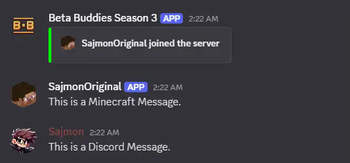
Discord Unleashed is a mod for Minecraft Beta 1.7.3 that bridges the gap between your Minecraft server and Discord. This mod relays chat messages bidirectionally, announces player join and even broadcasts server start message
Screenshots

About this Mod
Discord Unleashed
Discord Unleashed is a lightweight mod for Minecraft Beta 1.7.3 that seamlessly integrates your Minecraft server with Discord via webhooks. Enjoy real-time chat relays, automatic join/leave notifications, and server status updates—all without significant performance overhead.
Features
Bidirectional Chat Relay
- Minecraft → Discord: Regular in-game chat (excluding commands) is sent directly to your designated Discord channel.
- Discord → Minecraft: Messages from your Discord channel appear on the Minecraft server console.
Player Join/Leave Notifications
- Automatically sends embedded messages to Discord when players join or disconnect from your server.
Server Notifications
- Receive alerts when the server starts or stops so your community always stays informed.
Fully Configurable
- Customize the server name, avatar, webhook URL, and other settings easily with a simple configuration file.
Installation
- Download the Mod
- Grab the latest release from our releases page or the provided Modrinth download link.
- Setup
- Place the mod JAR file into your
modsfolder. - Ensure you have Fabric (or Babric for Beta 1.7.3) installed.
- Place the mod JAR file into your
- Configuration
- Open the
discord_unleashed.jsonfile found in your config directory. - Set
discord_enabletotrue. - Input your:
discord_webhook_url(Discord webhook URL)discord_channel(Channel ID where messages should appear)discord_token(Optional: if using advanced features)discord_serverpfp_url(Optional: URL for the server's profile picture)discord_servername
- Save your changes and launch the server.
- Open the
Usage
Minecraft Chat → Discord:
Player chat messages (except commands starting with/) are relayed to Discord via your webhook.Discord Chat → Minecraft:
Discord messages are displayed in the server console, keeping both communities connected.Notifications:
Receive automatic notifications for player join/leave events as well as when the server starts and stops.
Compatibility
- Minecraft Version: Beta 1.7.3 (using official mappings)
- Loader: Babric
- Java Version: 8
License
Discord Unleashed is distributed under the MIT License.
Available Versions
How to Install Discord Unleashed on Your Server
Order Server
Order a Minecraft Java server with at least 3 GB RAM (4 GB recommended).
Set babric Loader
In the panel under "Egg", select the babric loader and matching Minecraft version (b1.7.3).
Install Mod
Open the mod browser in the dashboard and search for "Discord Unleashed". Click "Install" – done! Alternatively, upload the .jar via SFTP to the /mods folder.
Compatibility
Mod Loaders
Minecraft Versions
b1.7.3
Server-side
✓ RequiredRecommended RAM
4 GB(min. 3 GB)Frequently Asked Questions
Discord Unleashed server crashes on startup – what to do?
Most common cause: wrong babric version or insufficient RAM. Check the server log (latest.log) for "OutOfMemoryError" or "Mixin" errors. With Mado Hosting: ensure at least 3 GB RAM is allocated and the loader matches the mod version (b1.7.3). You can switch loaders with one click in the panel.
Is Discord Unleashed compatible with babric?
Discord Unleashed officially supports babric for Minecraft b1.7.3. The Mado dashboard automatically detects incompatible loader combinations.
Server lagging with Discord Unleashed – how to optimize performance?
Recommended RAM: 4 GB (per 8 players). Use /spark profiler to check if Discord Unleashed consumes the most tick time. Common fixes: reduce server view-distance to 8-10, install "performant" or "starlight" as supplementary mods on Forge. With Mado Hosting, your server runs on NVMe SSDs with dedicated CPU cores for minimal latency.
Similar Mods






Rent Modded Server
Install Discord Unleashed with just one click on your server.