
Discord Verifier
A convenient way for Minecraft server admins to restrict access to a limited group of individuals, without having to deal with the hassle of a whitelist.
Screenshots

About this Mod
DiscordVerifier: Gatekeep your Minecraft server!
DiscordVerifier is a convenient way for Minecraft server admins to restrict access to a limited group of individuals without having to deal with the hassle of a whitelist.
Some example use cases include hosting a Minecraft server for members of a patrons-only Discord server, or for a school club.
Usage
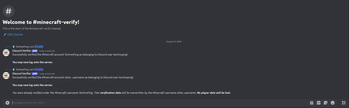
For a user to gain access to the server, they simply need to use the /verify {username} Discord command with their Minecraft username. Each Discord user can only have one Minecraft account.
DiscordVerifier is a purely server-side mod, so no changes to the Vanilla client will be necessary to join a server running DiscordVerifier. Installing it on the client is unsupported and may cause data loss.
Setup
Download the appropriate mod version and place it in your server's mods folder.
The mod depends on the Fabric API, so be sure that is also installed.
Next, register a new Discord app through the Discord developer portal.
You may want to make the bot private, so that server members cannot add it to arbitrary other servers which you do not run.
Copy the bot token from the Bot subsection and paste it into the config file on the server.
Until you do this, DiscordVerifier will not work. The bot will appear as offline on Discord until the server is running and the token is valid.
Be sure never to share this token where anyone else can see it, or anyone will be able to take control of your bot.
Users will now be required to verify on the Discord server using the /verify {username} command before they are allowed to access the Minecraft server.
See the GitHub README for more details on configuration and limitations.
Available Versions
How to Install Discord Verifier on Your Server
Order Server
Order a Minecraft Java server with at least 3 GB RAM (4 GB recommended).
Set fabric Loader
In the panel under "Egg", select the fabric loader and matching Minecraft version (1.21.1).
Install Mod
Open the mod browser in the dashboard and search for "Discord Verifier". Click "Install" – done! Alternatively, upload the .jar via SFTP to the /mods folder.
Compatibility
Mod Loaders
Minecraft Versions
1.21.1, 1.21
Server-side
✓ RequiredRecommended RAM
4 GB(min. 3 GB)Frequently Asked Questions
Discord Verifier server crashes on startup – what to do?
Most common cause: wrong fabric version or insufficient RAM. Check the server log (latest.log) for "OutOfMemoryError" or "Mixin" errors. With Mado Hosting: ensure at least 3 GB RAM is allocated and the loader matches the mod version (1.21.1). You can switch loaders with one click in the panel.
Is Discord Verifier compatible with fabric?
Discord Verifier officially supports fabric for Minecraft 1.21.1, 1.21. The Mado dashboard automatically detects incompatible loader combinations.
Server lagging with Discord Verifier – how to optimize performance?
Recommended RAM: 4 GB (per 8 players). Use /spark profiler to check if Discord Verifier consumes the most tick time. Common fixes: reduce server view-distance to 8-10, install "performant" or "starlight" as supplementary mods on Forge. With Mado Hosting, your server runs on NVMe SSDs with dedicated CPU cores for minimal latency.
Similar Mods






Rent Modded Server
Install Discord Verifier with just one click on your server.