
DiscordLogin
This plugin/mod adds so players can authenticate with their Discord accounts
Screenshots
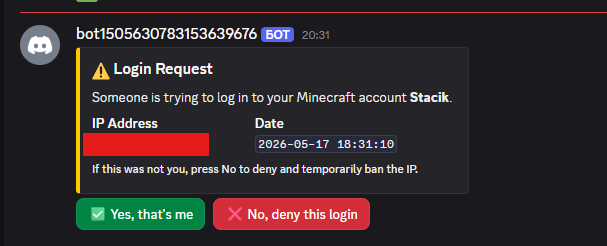


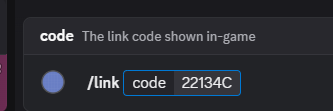
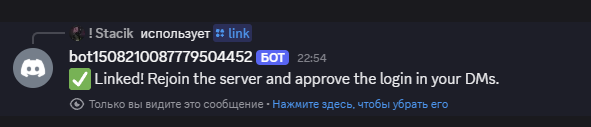
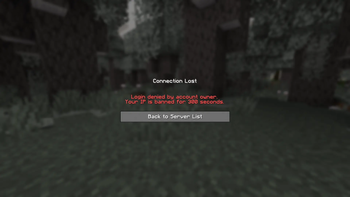
About this Mod
Discord Login
Allows your members to log in with discord
Configuration:
Config file
# DiscordLogin Configuration

# Your Discord bot token
bot-token: "discord_token"

# Your Discord server (guild) ID
guild-id: 43902483920

# How long (in seconds) to IP-ban a user when they press No (default: 300 = 5 minutes)
ip-ban-duration-seconds: 900

# How long (in seconds) a player has to approve the login before being kicked
login-timeout-seconds: 60

# Chat message prefix (supports & color codes)
message-prefix: "&8[&bDiscordLogin&8]&r "
How to get guild-id?
https://support.discord.com/hc/en-us/articles/206346498-Where-can-I-find-my-User-Server-Message-ID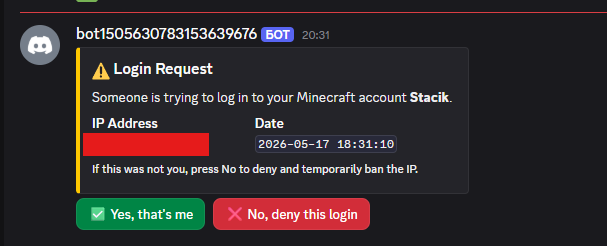
Faq
Where do I see how the plugin works?
Check the gallery tab
How do I unlink mine/a member account
Go into the data file (plugins/DiscordLogin/data.yml for Paper or config/DiscordLogin_data.json), and find the UUID of the person (formatted UUID: DiscordID) and remove the whole line, then restart the server
If you are a member, ask a staff member to do these steps
I wanna suggest an idea/report a problem
Add me on discord: stacik_
How to exclude members?
That's coming soon
Can players chat during the verification?
No
What can players do during verification?
Absolutely nothing
Why did you create this plugin?
To prevent the problem with of forgetting passwords (if using a normal login system) and also to prevent people from accessing your account without your permission
How do I know this plugin won't compromise my Minecraft or Discord account?
It can't. Here's why:
-The plugin never asks for your password, email, or any credentials
-It only sends a one-time code in-game that you paste into a Discord bot command
-The bot only knows your Discord user ID (a public number) and your Minecraft UUID, the same info any server already has
What if I don't put my server guild id?
You will have to wait an hour for discord to register the commands globally
Is there any discord bot commands, like in DMs?
No not yet, but I am absolutely thinking of adding that
Current ideas:
- !account kick - Kicks your account if its online
- !account unlink - Unlinks your account with 2 confirmations
- !account info - Returns some basic account info and possibly the player skin
Available Versions
How to Install DiscordLogin on Your Server
Order Server
Order a Minecraft Java server with at least 3 GB RAM (4 GB recommended).
Set fabric Loader
In the panel under "Egg", select the fabric loader and matching Minecraft version (1.21.11).
Install Mod
Open the mod browser in the dashboard and search for "DiscordLogin". Click "Install" – done! Alternatively, upload the .jar via SFTP to the /mods folder.
Compatibility
Mod Loaders
Minecraft Versions
1.21.11, 1.21.10, 1.21.9 (+9 more)
Server-side
✓ RequiredRecommended RAM
4 GB(min. 3 GB)Frequently Asked Questions
DiscordLogin server crashes on startup – what to do?
Most common cause: wrong fabric version or insufficient RAM. Check the server log (latest.log) for "OutOfMemoryError" or "Mixin" errors. With Mado Hosting: ensure at least 3 GB RAM is allocated and the loader matches the mod version (1.21.11). You can switch loaders with one click in the panel.
Is DiscordLogin compatible with fabric and paper?
DiscordLogin officially supports fabric, paper for Minecraft 1.21.11, 1.21.10, 1.21.9. The Mado dashboard automatically detects incompatible loader combinations.
Server lagging with DiscordLogin – how to optimize performance?
Recommended RAM: 4 GB (per 8 players). Use /spark profiler to check if DiscordLogin consumes the most tick time. Common fixes: reduce server view-distance to 8-10, install "performant" or "starlight" as supplementary mods on Forge. With Mado Hosting, your server runs on NVMe SSDs with dedicated CPU cores for minimal latency.
Similar Mods






Rent Modded Server
Install DiscordLogin with just one click on your server.