
DiscordRPC
A fully customizable Discord Rich Presence mod for Minecraft 1.8.9 that lets you show off your server status, player info, and current activity right on your Discord profile.
Screenshots
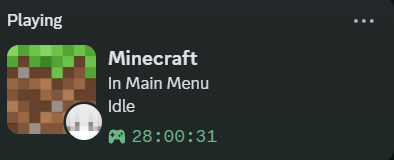
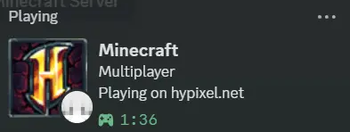
About this Mod
🎮 Custom Discord RPC
Custom Discord RPC is a lightweight, fully customizable Rich Presence mod for Minecraft 1.8.9 Forge. It lets you show off exactly what you are doing in Minecraft directly on your Discord profile with style!
Whether you're grinding on Hypixel, relaxing in a Singleplayer world, or playing on a private SMP, this mod will dynamically update your Discord status with real-time information—and let your friends join in on the fun!
✨ Key Features
- 🖼️ Fully Customizable: Change the Discord RPC text, images, and tooltips to whatever you want.
- ⚙️ In-Game GUI Config: No need to mess with confusing text files! Just press
R(default keybind) in-game to open a clean, easy-to-use configuration menu. - 🌍 Dynamic Server Stats: Automatically displays the Server IP, Server Icon, and live Player Counts when playing on multiplayer servers.
- 👤 Player Details: Shows off your Minecraft username and a dynamic 2D image of your player's head.
- 🔗 Interactive Buttons: Add a clickable "Join Server" button to your profile! You can set it to the current server IP or any custom URL you want.
- ⏱️ Session Timers: Track how long you've been playing with custom timers (Time Elapsed).
🛠️ How to Use
- Drop the
.jarfile into your/.minecraft/mods/folder. - Launch Minecraft 1.8.9 with Forge.
- Once in-game, press the
Rkey on your keyboard to open the Custom Discord RPC settings menu. - Customize your text, images, and button links however you want. Your Discord status will update in real-time!
🔌 Compatibility
- Version: Minecraft 1.8.9
- Mod Loader: Forge
- Side: 💻 Client-Side Only. You can install this on your client to play on ANY vanilla or modded server. (Do not install this on a dedicated server).
- Dependencies: None! It works perfectly completely on its own.
Available Versions
How to Install DiscordRPC on Your Server
Order Server
Order a Minecraft Java server with at least 3 GB RAM (4 GB recommended).
Set forge Loader
In the panel under "Egg", select the forge loader and matching Minecraft version (1.8.9).
Install Mod
Open the mod browser in the dashboard and search for "DiscordRPC". Click "Install" – done! Alternatively, upload the .jar via SFTP to the /mods folder.
Compatibility
Mod Loaders
Minecraft Versions
1.8.9
Server-side
✗ UnsupportedRecommended RAM
4 GB(min. 3 GB)Frequently Asked Questions
DiscordRPC server crashes on startup – what to do?
Most common cause: wrong forge version or insufficient RAM. Check the server log (latest.log) for "OutOfMemoryError" or "Mixin" errors. With Mado Hosting: ensure at least 3 GB RAM is allocated and the loader matches the mod version (1.8.9). You can switch loaders with one click in the panel.
Is DiscordRPC compatible with forge?
DiscordRPC officially supports forge for Minecraft 1.8.9. The Mado dashboard automatically detects incompatible loader combinations.
Server lagging with DiscordRPC – how to optimize performance?
Recommended RAM: 4 GB (per 8 players). Use /spark profiler to check if DiscordRPC consumes the most tick time. Common fixes: reduce server view-distance to 8-10, install "performant" or "starlight" as supplementary mods on Forge. With Mado Hosting, your server runs on NVMe SSDs with dedicated CPU cores for minimal latency.
Rent Modded Server
Install DiscordRPC with just one click on your server.