
Screenshots
About this Mod

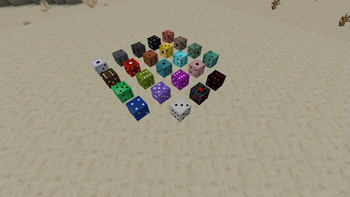
Minecraft Dice!
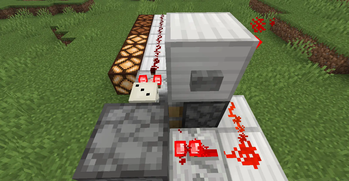
That's it, I added dice in Minecraft. You can place it and it'll have a random side upwards, that's the number you're looking for. Now you can use it to play games in a very analog way or use a comparator to see the result as a redstone signal. It can also be placed by dispensers and broke down with pistons, so you have a new and easy randomizer at your hands. There's also the Fatal and Nihilo Dice, that deals infinite damage if you roll an 1.
How do I Do It Myself a Die?
Simple, since the first dice were made using bones, that's the material of choice here too!
You'll need to put Bone Blocks in the crafting grid as the 6 dots of the dice plus the single dot from the opposite side to be able to craft lucky number 7 dice. Or you can just put the Bone Block in the Stone Cutter to get snake eye die from one block.
The Copper Die is a shapeless recipe from a Die and a Copper Ingot, you can guess how to get all the following variations of it.
The Fatal Die is a shapeless recipe from a Die and a Wither Skeleton Skull, the Nihilo one uses End Stone instead.
D6 Recipe Shape
"# #""###"
"# #"
Yes, it looks like an "H" or a Ladder recipe
That's really all of it?
Maybe, maybe not. I plan to add numbered and runic versions of them and even sets of non-transitive dice, for all your non-transitive dice needs. Also, more kinds of Fatal die, maybe one for each damage type? Maybe a way to duel with them as well.
D6 only?
Well, I really don't know how I would make other shapes of dice in Minecraft, and anything past D15 would be strange to interact with comparators
Available Versions
How to Install DIY-Die on Your Server
Order Server
Order a Minecraft Java server with at least 3 GB RAM (4 GB recommended).
Set fabric Loader
In the panel under "Egg", select the fabric loader and matching Minecraft version (1.21.8).
Install Mod
Open the mod browser in the dashboard and search for "DIY-Die". Click "Install" – done! Alternatively, upload the .jar via SFTP to the /mods folder.
Compatibility
Mod Loaders
Minecraft Versions
1.21.8
Server-side
✓ RequiredRecommended RAM
4 GB(min. 3 GB)Frequently Asked Questions
DIY-Die server crashes on startup – what to do?
Most common cause: wrong fabric version or insufficient RAM. Check the server log (latest.log) for "OutOfMemoryError" or "Mixin" errors. With Mado Hosting: ensure at least 3 GB RAM is allocated and the loader matches the mod version (1.21.8). You can switch loaders with one click in the panel.
Is DIY-Die compatible with fabric?
DIY-Die officially supports fabric for Minecraft 1.21.8. The Mado dashboard automatically detects incompatible loader combinations.
Server lagging with DIY-Die – how to optimize performance?
Recommended RAM: 4 GB (per 8 players). Use /spark profiler to check if DIY-Die consumes the most tick time. Common fixes: reduce server view-distance to 8-10, install "performant" or "starlight" as supplementary mods on Forge. With Mado Hosting, your server runs on NVMe SSDs with dedicated CPU cores for minimal latency.
Similar Mods





Rent Modded Server
Install DIY-Die with just one click on your server.