
DJ Villager
This mod adds the DJ Villager profession!
About this Mod
DJ Villager Mod
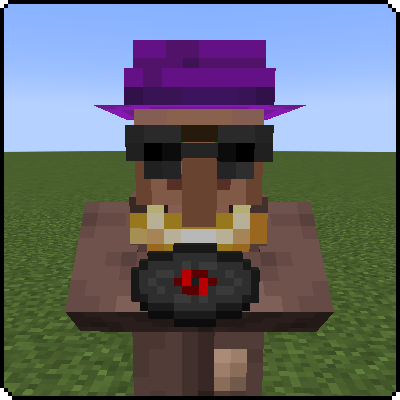
Bring the beats to your village with the DJ Villager Mod!
Looking to add some rhythm to your Minecraft world? The DJ Villager Mod introduces a new profession that brings music to life in your village. Transform a regular villager into a DJ Villager by placing a jukebox nearby and enjoy the musical benefits!
Features:
- DJ Villager Profession: Convert a villager into a DJ Villager by placing a jukebox nearby.
- Music Disc Sales: The DJ Villager will sell a variety of music discs, allowing you to expand your in-game music collection.
- Note Block Purchases: Occasionally, the DJ Villager will buy note blocks from you, adding another layer to your trading options.
Interactive and Fun:
- Enhance the ambiance of your village with music.
- Adds a unique and engaging profession to your villager ecosystem.
Easy Integration:
- Seamlessly integrates with the existing villager system, making it simple to add to your game.
With the DJ Villager Mod, you can bring a whole new level of entertainment to your Minecraft villages. It's a fun and dynamic addition that will have you dancing to the beat in no time.
Download now and let the music play with the DJ Villager Mod!
Compatibility:
The DJ Villager mod is compatible with the following Minecraft versions for Fabric:
Explore More at ExlineMods!
Thank you for using our mods! For the best experience, visit our official website, Exline Mods.
Why Visit Our Website?
- Early Updates: Get the latest updates faster than other sites.
- Exclusive Tools: Download our mod setup program, also available on Nexus Mods.
- Crafting Recipes: Find detailed crafting recipes for our mods.
- Join the Community: Connect with fellow modders and get support via our Discord server.
- Direct Support and Feedback: Reach out directly for support and share feedback on Discord.
Get Started!
Visit Exline Mods now and join our Discord Server to be part of our community. We look forward to seeing you there!
Promotional Message:
Why Choose Bisect Hosting?
- Easy Setup: Get your server up and running in minutes.
- 24/7 Support: Reliable assistance whenever you need it.
- Customizable: Tailor your server settings to your liking.
Visit Bisect Hosting now and take your Minecraft adventures to the next level!
Available Versions
How to Install DJ Villager on Your Server
Order Server
Order a Minecraft Java server with at least 3 GB RAM (4 GB recommended).
Set fabric Loader
In the panel under "Egg", select the fabric loader and matching Minecraft version (1.21).
Install Mod
Open the mod browser in the dashboard and search for "DJ Villager". Click "Install" – done! Alternatively, upload the .jar via SFTP to the /mods folder.
Compatibility
Mod Loaders
Minecraft Versions
1.21, 1.20.6, 1.20.5 (+5 more)
Server-side
✓ RequiredRecommended RAM
4 GB(min. 3 GB)Frequently Asked Questions
DJ Villager server crashes on startup – what to do?
Most common cause: wrong fabric version or insufficient RAM. Check the server log (latest.log) for "OutOfMemoryError" or "Mixin" errors. With Mado Hosting: ensure at least 3 GB RAM is allocated and the loader matches the mod version (1.21). You can switch loaders with one click in the panel.
Is DJ Villager compatible with fabric?
DJ Villager officially supports fabric for Minecraft 1.21, 1.20.6, 1.20.5. The Mado dashboard automatically detects incompatible loader combinations.
Server lagging with DJ Villager – how to optimize performance?
Recommended RAM: 4 GB (per 8 players). Use /spark profiler to check if DJ Villager consumes the most tick time. Common fixes: reduce server view-distance to 8-10, install "performant" or "starlight" as supplementary mods on Forge. With Mado Hosting, your server runs on NVMe SSDs with dedicated CPU cores for minimal latency.
Similar Mods




![CobbleDollars [Cobblemon Addon]](https://cdn.modrinth.com/data/s7N7AsqL/684040a264fc1d7f9b856ec5d2da39767398c7ad.png)
Rent Modded Server
Install DJ Villager with just one click on your server.