
Damage Number Particles
Minecraft mod that displays floating number particles whenever an entity takes damage or receives healing
About this Mod
Damage Number Particles
Damage Number Particles is a lightweight Minecraft mod that displays floating number particles whenever an entity takes damage or receives healing.
This feature provides real-time visual feedback, helping players easily track combat effectiveness or healing output during gameplay.
Requirements
This mod requires the following dependencies to work properly:
For versions below 0.0.5+1.21.9
| Modrinth | Curseforge |
|---|---|
| Smootheez Config Lib (scl) | Smootheez Config Lib (scl) |
For versions 0.0.5+1.21.9 and above
| Modrinth | Curseforge |
|---|---|
| Smoothiez API | Smoothiez API |
| Fabric API | Fabric API |
Preview
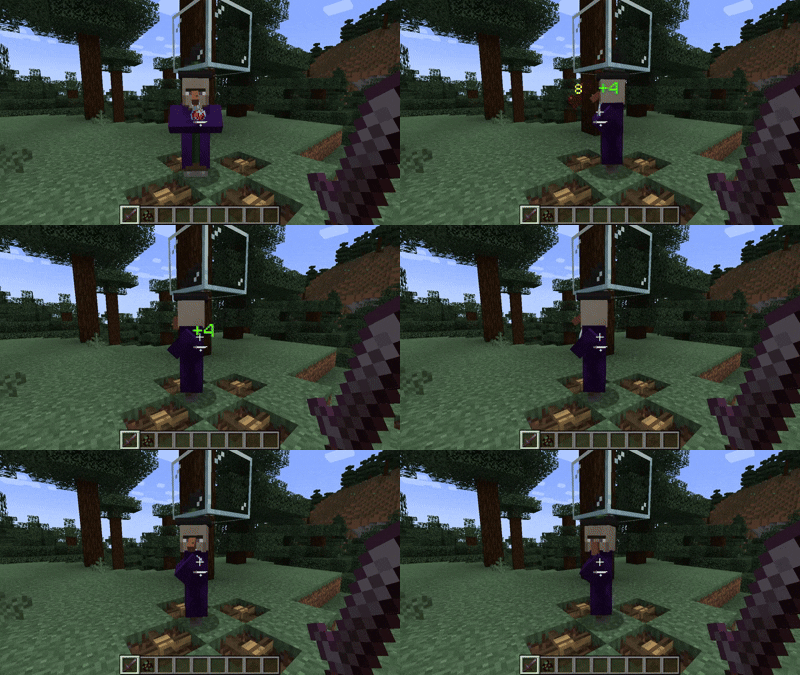
Experience floating numbers that dynamically appear above entities as they take damage or receive healing — all rendered smoothly in real time.
Configuration
Damage Number Particles can be fully customized to match your preferences.
You can modify settings either in-game (via Mod Menu) or manually through the config file.
Available Options
- Toggle particle visibility
- Adjust display radius and minimum damage threshold
- Manage an entity blacklist to prevent certain mobs from displaying particles
To blacklist an entity, add its identifier in the following format:
id:entity_identifier
Example:
minecraft:allay
Download
Get the latest version from your preferred platform:
| Modrinth | Curseforge |
|---|---|
| Damage Number Particles | Damage Number Particles |
Reporting Issues
Found a bug or want to suggest a new feature?
Please open an issue on GitHub: GitHub Issues
Support My Work
If you enjoy this mod and want to support future development, consider donating:


Available Versions
How to Install Damage Number Particles on Your Server
Order Server
Order a Minecraft Java server with at least 3 GB RAM (4 GB recommended).
Set fabric Loader
In the panel under "Egg", select the fabric loader and matching Minecraft version (1.21.11).
Install Mod
Open the mod browser in the dashboard and search for "Damage Number Particles". Click "Install" – done! Alternatively, upload the .jar via SFTP to the /mods folder.
Compatibility
Mod Loaders
Minecraft Versions
1.21.11, 1.21.10, 1.21.9 (+15 more)
Server-side
✗ UnsupportedRecommended RAM
4 GB(min. 3 GB)Frequently Asked Questions
Damage Number Particles server crashes on startup – what to do?
Most common cause: wrong fabric version or insufficient RAM. Check the server log (latest.log) for "OutOfMemoryError" or "Mixin" errors. With Mado Hosting: ensure at least 3 GB RAM is allocated and the loader matches the mod version (1.21.11). You can switch loaders with one click in the panel.
Is Damage Number Particles compatible with fabric?
Damage Number Particles officially supports fabric for Minecraft 1.21.11, 1.21.10, 1.21.9. The Mado dashboard automatically detects incompatible loader combinations.
Server lagging with Damage Number Particles – how to optimize performance?
Recommended RAM: 4 GB (per 8 players). Use /spark profiler to check if Damage Number Particles consumes the most tick time. Common fixes: reduce server view-distance to 8-10, install "performant" or "starlight" as supplementary mods on Forge. With Mado Hosting, your server runs on NVMe SSDs with dedicated CPU cores for minimal latency.
Similar Mods




Rent Modded Server
Install Damage Number Particles with just one click on your server.