
DonutSmp Reverse Update
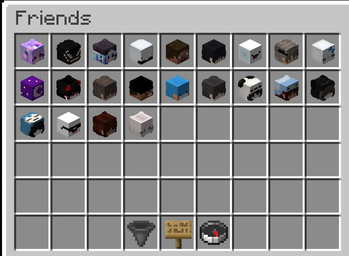
Bring back DonutSMP's classic chest menus. Reverse update re-skins the new dialog UI Friends, Orders, Homes, Settings & more into the clean GUIs you knew. Client-side only, nothing changes but the look.
Screenshots
About this Mod
Reverse Update re-skins DonutSMP’s reworked server menus into the tidy double-chest GUIs you already know — with real item icons, player heads, and proper tooltips.
Client-side only: every click still talks to the server exactly as before. Nothing about gameplay changes — it just looks right again.
Features
Main Menu
- Clean 5×2 chest-style icon grid
- Replaces the long button list
- Open with
G
Friends
- Real player heads with skins
- Oak-sign search UI
- Clean glass-pane accept/decline buttons
Orders
Choose Item
Paginated chest GUI
True item icons
Correctly tinted:
- Potions
- Tipped arrows
- Bottles
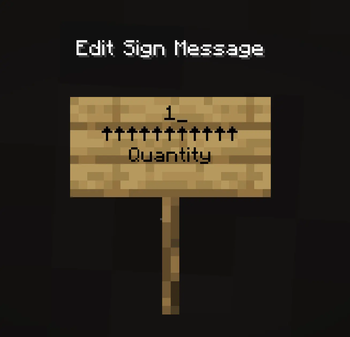
Search
- Familiar sign editor input
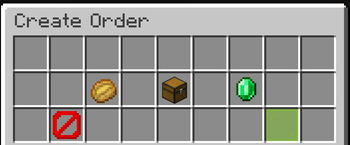
Create Order
Item, quantity, and price on one screen
Single confirm button
Supports:
KMB
amount formats
Minimum price enforced automatically
Enchantments
- Selected using enchanted books
- Grouped by enchantment type
Review
- Clean order summary
- Displays item enchantments properly
Homes
Beds for set homes
Your chosen home icons displayed correctly
Black glass for empty slots
Red glass for locked slots
Tidy manage screen with:
- Teleport
- Rename
- Delete
Home renaming uses a sign editor
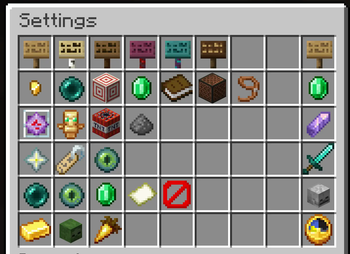
Settings
- Every option on a single screen
- Thematic icons
- Clear ON/OFF states
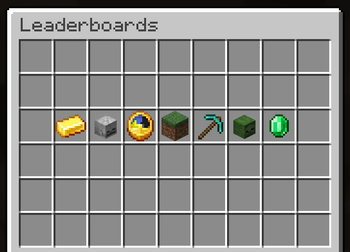
Stats & Leaderboards
- Baltop-style player heads
- Relevant stat/value shown directly
Compatibility
- Minecraft:
1.21.6 - 1.21.11 - Mod Loader: Fabric
- Requires: Fabric API
Installation
- Install Fabric Loader
- Install Fabric API
- Drop Reverse Update into your
modsfolder
That’s it — the re-skins apply automatically whenever a supported menu opens.
No setup. No config. No server install required.
Disclaimer
DonutSmp Reverse Update is an unofficial, fan-made mod. It is not affiliated with, endorsed by, or associated with DonutSMP.
This mod only changes how menus look on your own client.
Available Versions
How to Install DonutSmp Reverse Update on Your Server
Order Server
Order a Minecraft Java server with at least 3 GB RAM (4 GB recommended).
Set fabric Loader
In the panel under "Egg", select the fabric loader and matching Minecraft version (26.1.2).
Install Mod
Open the mod browser in the dashboard and search for "DonutSmp Reverse Update". Click "Install" – done! Alternatively, upload the .jar via SFTP to the /mods folder.
Compatibility
Mod Loaders
Minecraft Versions
26.1.2, 26.1.1, 26.1 (+6 more)
Server-side
✗ UnsupportedRecommended RAM
4 GB(min. 3 GB)Frequently Asked Questions
DonutSmp Reverse Update server crashes on startup – what to do?
Most common cause: wrong fabric version or insufficient RAM. Check the server log (latest.log) for "OutOfMemoryError" or "Mixin" errors. With Mado Hosting: ensure at least 3 GB RAM is allocated and the loader matches the mod version (26.1.2). You can switch loaders with one click in the panel.
Is DonutSmp Reverse Update compatible with fabric?
DonutSmp Reverse Update officially supports fabric for Minecraft 26.1.2, 26.1.1, 26.1. The Mado dashboard automatically detects incompatible loader combinations.
Server lagging with DonutSmp Reverse Update – how to optimize performance?
Recommended RAM: 4 GB (per 8 players). Use /spark profiler to check if DonutSmp Reverse Update consumes the most tick time. Common fixes: reduce server view-distance to 8-10, install "performant" or "starlight" as supplementary mods on Forge. With Mado Hosting, your server runs on NVMe SSDs with dedicated CPU cores for minimal latency.
Similar Mods




![CobbleDollars [Cobblemon Addon]](https://cdn.modrinth.com/data/s7N7AsqL/684040a264fc1d7f9b856ec5d2da39767398c7ad.png)
Rent Modded Server
Install DonutSmp Reverse Update with just one click on your server.