
DonutSMP Shard Displayer
Displays DonutSMP player shard counts above their heads in real time. Fully client-side Fabric mod with customizable label appearance.
Screenshots
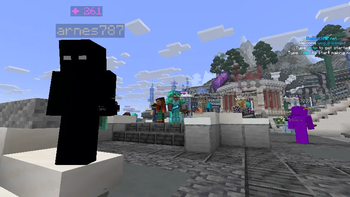
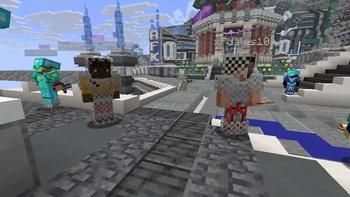
About this Mod
Shard Displayer
Displays DonutSMP player shard counts above their heads in real time, fetched from donutstats.net.
Fully client-side Fabric mod with customizable label appearance.
🎯 Features
Automatic shard parsing from donutstats.net for all visible players
In-game label above players showing ✦ 12.5K (auto‑formatted with K, M, B, T suffixes)
Fully customizable display:
- Text color and scale
- Vertical offset above the player
- Background toggle
- Show/hide your own shards
- Debug mode – shows loading states (loading, err, waiting) to troubleshoot issues
- Smart caching: fast updates (every 15s) while active, relaxed (every 3min) in the background
- No API keys required – all data is taken from the public stats page
📋 Commands
All commands start with /shardslabel (tab completion works).
Command Description
/shardslabel on / off ==== Enable / disable shard labels
/shardslabel toggle ==== Toggle visibility
/shardslabel self on / off ==== Show / hide your own shard count
/shardslabel background on / off ==== Enable / disable background behind the label
/shardslabel scale <30..200> ==== Set text size in percent (default 70)
/shardslabel y
/shardslabel color <#RRGGBB> ==== Text color in HEX, e.g. #FFAA00
/shardslabel debug on / off ==== Enable debug mode
/shardslabel clearcache ==== Clear the stats cache
/shardslabel reload ==== Reload config from file
⚙️ Configuration
Settings are stored in config/shards.properties and created automatically on first launch.
📦 Installation
Install Fabric Loader for Minecraft 1.21.10 / 1.21.11
Download Fabric API and place it in your mods folder
Download the latest Shard Displayer jar and put it in mods as well
Available Versions
How to Install DonutSMP Shard Displayer on Your Server
Order Server
Order a Minecraft Java server with at least 3 GB RAM (4 GB recommended).
Set fabric Loader
In the panel under "Egg", select the fabric loader and matching Minecraft version (1.21.11).
Install Mod
Open the mod browser in the dashboard and search for "DonutSMP Shard Displayer". Click "Install" – done! Alternatively, upload the .jar via SFTP to the /mods folder.
Compatibility
Mod Loaders
Minecraft Versions
1.21.11, 1.21.10
Server-side
✗ UnsupportedRecommended RAM
4 GB(min. 3 GB)Frequently Asked Questions
DonutSMP Shard Displayer server crashes on startup – what to do?
Most common cause: wrong fabric version or insufficient RAM. Check the server log (latest.log) for "OutOfMemoryError" or "Mixin" errors. With Mado Hosting: ensure at least 3 GB RAM is allocated and the loader matches the mod version (1.21.11). You can switch loaders with one click in the panel.
Is DonutSMP Shard Displayer compatible with fabric?
DonutSMP Shard Displayer officially supports fabric for Minecraft 1.21.11, 1.21.10. The Mado dashboard automatically detects incompatible loader combinations.
Server lagging with DonutSMP Shard Displayer – how to optimize performance?
Recommended RAM: 4 GB (per 8 players). Use /spark profiler to check if DonutSMP Shard Displayer consumes the most tick time. Common fixes: reduce server view-distance to 8-10, install "performant" or "starlight" as supplementary mods on Forge. With Mado Hosting, your server runs on NVMe SSDs with dedicated CPU cores for minimal latency.
Similar Mods




![CobbleDollars [Cobblemon Addon]](https://cdn.modrinth.com/data/s7N7AsqL/684040a264fc1d7f9b856ec5d2da39767398c7ad.png)
Rent Modded Server
Install DonutSMP Shard Displayer with just one click on your server.