
Donut money display
A sleek, client-side mod that seamlessly integrates live DonutSMP player statistics—such as balances and kill counts—directly below player nametags. Features a premium, easy-to-use in-game configuration menu.
Screenshots
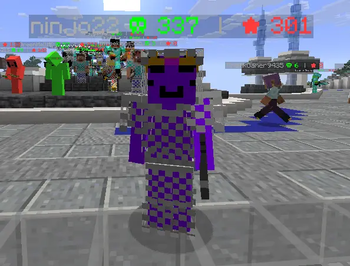
About this Mod
🍩 Donutstats: Live DonutSMP Player Statistics
Donutstats is a sleek, lightweight, client-side Minecraft mod designed specifically for DonutSMP players. It seamlessly integrates the public DonutSMP API to display live player statistics directly below their nametags in-game!
No more typing commands to check someone's balance or kill count. With Donutstats, the information you need is always visible right above their head.
✨ Features
- Live Nametag Stats: Displays up to two customizable player statistics (e.g., Money, Kills, Deaths, Playtime) directly under the player's nametag.
- Premium In-Game Configuration: Press the
Insertkey at any time while in-game to open a beautifully designed, modern neon-themed configuration menu. - Highly Customizable: Choose exactly which stats you want to display on the left and right sides of the nametag.
- Client-Side Only: This mod runs entirely on your client. It does not need to be installed on the server to work.
⚙️ How to Use
- Install the mod and launch Minecraft.
- Join a server and press the
Insertkey on your keyboard to open the Donutstats Menu. - Paste your personal DonutSMP API Key into the text field.
- Select which stats you want to see using the Left/Right toggle buttons.
- Click "Save & Close" and enjoy real-time statistics floating under players' names!
🔒 Privacy & API
This mod connects directly to the official DonutSMP API to fetch player data. Your API key is stored securely in your local configuration file and is never shared or transmitted anywhere else.
Note: You must have a valid DonutSMP API key for the mod to fetch and display data.
Available Versions
How to Install Donut money display on Your Server
Order Server
Order a Minecraft Java server with at least 3 GB RAM (4 GB recommended).
Set fabric Loader
In the panel under "Egg", select the fabric loader and matching Minecraft version (1.21.11).
Install Mod
Open the mod browser in the dashboard and search for "Donut money display". Click "Install" – done! Alternatively, upload the .jar via SFTP to the /mods folder.
Compatibility
Mod Loaders
Minecraft Versions
1.21.11, 1.21.4
Server-side
✓ RequiredRecommended RAM
4 GB(min. 3 GB)Frequently Asked Questions
Donut money display server crashes on startup – what to do?
Most common cause: wrong fabric version or insufficient RAM. Check the server log (latest.log) for "OutOfMemoryError" or "Mixin" errors. With Mado Hosting: ensure at least 3 GB RAM is allocated and the loader matches the mod version (1.21.11). You can switch loaders with one click in the panel.
Is Donut money display compatible with fabric?
Donut money display officially supports fabric for Minecraft 1.21.11, 1.21.4. The Mado dashboard automatically detects incompatible loader combinations.
Server lagging with Donut money display – how to optimize performance?
Recommended RAM: 4 GB (per 8 players). Use /spark profiler to check if Donut money display consumes the most tick time. Common fixes: reduce server view-distance to 8-10, install "performant" or "starlight" as supplementary mods on Forge. With Mado Hosting, your server runs on NVMe SSDs with dedicated CPU cores for minimal latency.
Similar Mods




![CobbleDollars [Cobblemon Addon]](https://cdn.modrinth.com/data/s7N7AsqL/684040a264fc1d7f9b856ec5d2da39767398c7ad.png)
Rent Modded Server
Install Donut money display with just one click on your server.