
DOOM SG
A mod that adds Doom Eternal's shoulder-mounted weapon system to Minecraft.
Screenshots
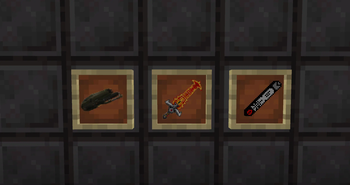
About this Mod
This mod solves the problem of not being able to use DOOM's signature shoulder‑mounted equipment in Minecraft.
It encourages an aggressive, fight‑to‑sustain playstyle, allowing you to thrive even in high‑pressure situations.
The mod adds the following features to Minecraft:
- A highly practical shoulder cannon;
- A brand‑new armor value mechanic;
- DOOM's iconic Blood Punch;
- An overpowered Crucible Sword.
The shoulder cannon can now be crafted in a crafting table using a fire charge, a netherite ingot, a blaze rod, a diamond, and three gold ingots.
Shoulder Cannon: Has 3 slots, each with its own dedicated trigger key. You can load up to 3 different ammo types (out of 5 supported) at once. It can be equipped in any bauble slot.
Blood Punch (default key: V): Deals 18 + 200% of the player's current damage in a large area. It's the primary offensive tool available from the start. Mobs killed by Blood Punch drop Life Shards, which restore 20% of your current health when picked up – great for healing and clearing out weak mobs.
Frag Grenade: Load a fire charge into the cannon to use. Launches a grenade with an explosion radius of 3, dealing 15 + 100% of the player's current attack damage. Initial magazine capacity: 1. Perfect for supplementary damage and mopping up fodder.
Ice Bomb: Load a block of blue ice to use. Launches a frost bomb with an effect radius of 3 (no direct damage). Affected entities receive Slowness V, Weakness V, and Vulnerability for 5 seconds each. Excellent for crowd control, emergency rescues, and creating offensive openings. It may also have additional magical effects on certain cold‑sensitive mobs.
Flamethrower: Load a lava bucket to use. Releases a cone of fire 11 blocks long with a 15‑degree angle, dealing 10 direct damage and setting targets on fire. Burning targets drop 1 Armor Shard per second while ablaze. Entities killed under the flamethrower's burning effect drop 10 Armor Shards instantly. This is a core mechanic of the mod, used for building up armor and providing supplementary damage. It may be particularly effective against fire‑vulnerable creatures.
Ender Pearl: Load an ender pearl to use. Launches a pearl at twice the normal speed; upon landing, it deals 10 + 100% of the player's current attack damage in a 2‑block radius. Useful for assaults and surprise attacks – though, of course, the most common use is for quick travel.
Dragon's Breath: Load a dragon's breath bottle to use. Releases a lingering cloud that stays on the ground for 10 seconds, dealing 5 + 100% of the player's current attack damage per second. Entities inside the cloud receive Slowness II and Wither III until 1.5 seconds after they leave the cloud. Great for area denial and providing cover.
Armor: Based on 100% of the player's maximum health. Each point of armor reduces 1 point of incoming damage. Armor can only be gained by absorbing Armor Shards; each shard restores 1% of maximum armor by default (values are precise to two decimal places). This acts as a damage‑absorption layer and an extra health bar.
Life Shards: Dropped exclusively by mobs killed with Blood Punch. Each shard restores 20% of your maximum health – your primary means of recovery.
Vulnerability debuff: Affected entities are completely immobilized and take 25% more damage per level.
Q: Your mod is too overpowered – it breaks game balance.
A: All damage values and mechanics can be fine‑tuned through the mod's configuration options.
Q: The HUD blocks my view – what can I do?
A: You can adjust the HUD position in the config.
Q: The upgrade items are too expensive / too cheap.
A: You can tweak the costs and availability of upgrade items in the config to your liking.
Q: There's not enough ammo – it's not fun.
A: You can adjust reserve ammo and cooldown times in the config.
Q: Isn't it too strong that items aren't consumed?
A: You can configure whether items are consumed or not in the config.
Q: Can everything be modified in the config?
A: Yes – about 90% of the content is fully customizable.
Finally, if you encounter any bugs, please contact the author. Suggestions and clever ideas are also always welcome!
Available Versions
How to Install DOOM SG on Your Server
Order Server
Order a Minecraft Java server with at least 3 GB RAM (4 GB recommended).
Set forge Loader
In the panel under "Egg", select the forge loader and matching Minecraft version (1.20.1).
Install Mod
Open the mod browser in the dashboard and search for "DOOM SG". Click "Install" – done! Alternatively, upload the .jar via SFTP to the /mods folder.
Compatibility
Mod Loaders
Minecraft Versions
1.20.1
Server-side
✓ RequiredRecommended RAM
4 GB(min. 3 GB)Frequently Asked Questions
DOOM SG server crashes on startup – what to do?
Most common cause: wrong forge version or insufficient RAM. Check the server log (latest.log) for "OutOfMemoryError" or "Mixin" errors. With Mado Hosting: ensure at least 3 GB RAM is allocated and the loader matches the mod version (1.20.1). You can switch loaders with one click in the panel.
Is DOOM SG compatible with forge?
DOOM SG officially supports forge for Minecraft 1.20.1. The Mado dashboard automatically detects incompatible loader combinations.
Server lagging with DOOM SG – how to optimize performance?
Recommended RAM: 4 GB (per 8 players). Use /spark profiler to check if DOOM SG consumes the most tick time. Common fixes: reduce server view-distance to 8-10, install "performant" or "starlight" as supplementary mods on Forge. With Mado Hosting, your server runs on NVMe SSDs with dedicated CPU cores for minimal latency.
Similar Mods




Rent Modded Server
Install DOOM SG with just one click on your server.