
Doze
The only bed mod you need. Sleep regenerates health and cures effects, but costs hunger. Option to disable exploding beds, make checking for nearby monsters smarter, and require beds to be placed indoors. Fully configurable and built for compatibility.
Screenshots

About this Mod



Doze introduces a few new features to Minecraft's sleeping system, and provides additional configuration options for vanilla features that give you full control over your game.
Features
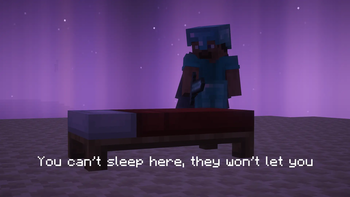
"You can't sleep outside."
By default, beds must be placed indoors and well-lit before sleeping. Doze checks a 3x3 area above the bed for a roof, ignoring naturally generated leaves. You can adjust the minimum light level required in the config, or disable this feature entirely.This feature only checks vanilla beds. Use alongside mods like Comforts for camping solutions!
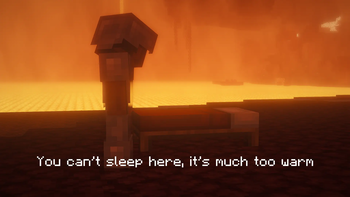
"You can't sleep here, it's much too warm."
A less destructive alternative to [Intentional Game Design]. Exploding bed behavior is replaced by vanilla-style error messages, with built-in support for modded dimensions. This feature is disabled by default.Sleep Regenerates Health
Sleeping regenerates health, but costs hunger. The longer you sleep, the more you heal. Fully configurable, with built-in support for time-altering mods.Time Heals All... Effects
Sleeping for at least 6 hours will cure the player of all effects. You can whitelist specific effects to be ignored in the config, and adjust the minimum hours of sleep required.Nearby Monsters
Doze provides three options on how to handle nearby monsters when attempting to sleep.Vanilla: Nearby mobs prevent sleep.
Pathfinding: Nearby mobs prevent sleep only if they have a valid path to the player.
Disabled: Nearby mobs won't prevent sleep.
Compatibility
Time-Altering Mods
For its time related features, Doze assumes one relative hour is equal to 1000 ticks (based on a vanilla 24000 tick day/night cycle). If you use a mod such as Better Days that alters the length of this cycle, you'll want to adjust the Tick Hour setting to match.Frequently Asked
"Is this compatible with..."
Probably! I built this baby to be indestructible but if you have any issues let me know!"Will you port to..."
Nope! But you're welcome to take a crack at it yourself."Can I use this in my..."
Go for it.Have an idea? Join the conversation on Discord!
Available Versions
How to Install Doze on Your Server
Order Server
Order a Minecraft Java server with at least 3 GB RAM (4 GB recommended).
Set neoforge Loader
In the panel under "Egg", select the neoforge loader and matching Minecraft version (26.1.2).
Install Mod
Open the mod browser in the dashboard and search for "Doze". Click "Install" – done! Alternatively, upload the .jar via SFTP to the /mods folder.
Compatibility
Mod Loaders
Minecraft Versions
26.1.2, 26.1.1, 26.1
Server-side
✓ RequiredRecommended RAM
4 GB(min. 3 GB)Frequently Asked Questions
Doze server crashes on startup – what to do?
Most common cause: wrong neoforge version or insufficient RAM. Check the server log (latest.log) for "OutOfMemoryError" or "Mixin" errors. With Mado Hosting: ensure at least 3 GB RAM is allocated and the loader matches the mod version (26.1.2). You can switch loaders with one click in the panel.
Is Doze compatible with neoforge?
Doze officially supports neoforge for Minecraft 26.1.2, 26.1.1, 26.1. The Mado dashboard automatically detects incompatible loader combinations.
Server lagging with Doze – how to optimize performance?
Recommended RAM: 4 GB (per 8 players). Use /spark profiler to check if Doze consumes the most tick time. Common fixes: reduce server view-distance to 8-10, install "performant" or "starlight" as supplementary mods on Forge. With Mado Hosting, your server runs on NVMe SSDs with dedicated CPU cores for minimal latency.
Rent Modded Server
Install Doze with just one click on your server.