
DPS Meter
A real-time DPS tracking with configurable HUD and auto-reset functionality.
Screenshots
About this Mod
DPS Meter ⚔️
DPS Meter is a lightweight, highly customizable combat analysis tool for Minecraft. It provides real-time feedback on your damage output, helping you optimize your gear and playstyle.
✨ Features
📊 Real-Time Statistics
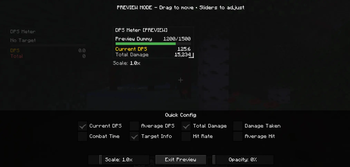
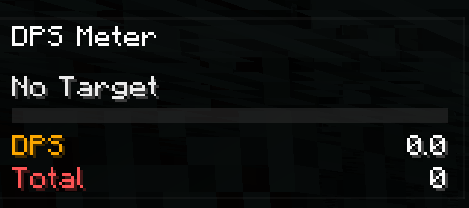
Get instant feedback on your combat performance with a sleek data overlay:
- Current & Average DPS: Know your burst and sustained damage.
- Total Damage: Track cumulative damage over a fight.
- Combat Timer: See exactly how long you've been fighting.
- Hit Rate: Attacks per second tracking.
- Damage Taken: Monitor your survivability.
💥 Floating Combat Text
Experience RPG-style numbers popping off your enemies!
- Standard Hits: Crisp Red numbers.
- Critical Hits: Animated Gold numbers that scale and bob for satisfying feedback.
🛠️ Complete Customization
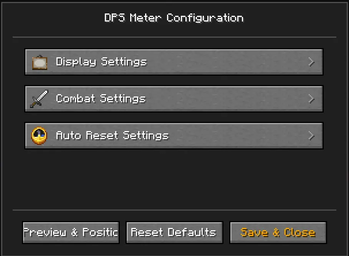
Access the in-game menu (Default Key: O) to tweak everything:
- HUD Editor: Drag the status panel to any position on your screen.
- Visual Control: Scale the UI size (
0.5x-3.0x) and adjust background opacity. - Selective Display: Toggle specific metrics on/off to keep your screen clean.
- Pet Tracking: Choose whether to include your pets' damage in your DPS (Summoners rejoice!).
🎮 Usage
- Start Fighting: Valid attacks automatically start a combat session.
- Auto-Reset: The meter resets automatically after a configurable timeout (default 10s) or when you switch dimensions/die.
- Manual Control: Use keybinds to Reset Stats (
P) or Toggle the Overlay completely.

Available Versions
How to Install DPS Meter on Your Server
Order Server
Order a Minecraft Java server with at least 3 GB RAM (4 GB recommended).
Set forge Loader
In the panel under "Egg", select the forge loader and matching Minecraft version (1.20.6).
Install Mod
Open the mod browser in the dashboard and search for "DPS Meter". Click "Install" – done! Alternatively, upload the .jar via SFTP to the /mods folder.
Compatibility
Mod Loaders
Minecraft Versions
1.20.6, 1.20.5, 1.20.4 (+3 more)
Server-side
✓ RequiredRecommended RAM
4 GB(min. 3 GB)Frequently Asked Questions
DPS Meter server crashes on startup – what to do?
Most common cause: wrong forge version or insufficient RAM. Check the server log (latest.log) for "OutOfMemoryError" or "Mixin" errors. With Mado Hosting: ensure at least 3 GB RAM is allocated and the loader matches the mod version (1.20.6). You can switch loaders with one click in the panel.
Is DPS Meter compatible with forge?
DPS Meter officially supports forge for Minecraft 1.20.6, 1.20.5, 1.20.4. The Mado dashboard automatically detects incompatible loader combinations.
Server lagging with DPS Meter – how to optimize performance?
Recommended RAM: 4 GB (per 8 players). Use /spark profiler to check if DPS Meter consumes the most tick time. Common fixes: reduce server view-distance to 8-10, install "performant" or "starlight" as supplementary mods on Forge. With Mado Hosting, your server runs on NVMe SSDs with dedicated CPU cores for minimal latency.
Similar Mods



![[TaCZ] Timeless and Classics Zero](https://cdn.modrinth.com/data/SzzJttH8/fd27766d2bb8390d284696b1dbd358f87e081439_96.webp)


Rent Modded Server
Install DPS Meter with just one click on your server.