
Dragon Mounts 2
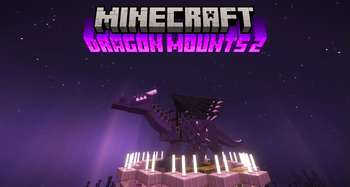
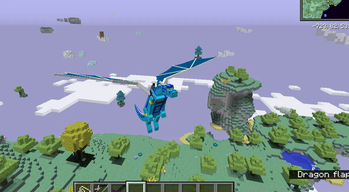
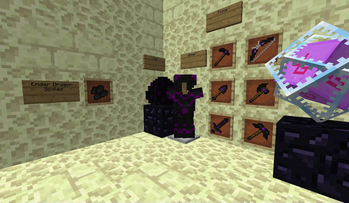
A mod that adds fire breathing dragons, new equipments and armor, and adds nest structures all over your world, including The Nether and The End.
Screenshots


About this Mod

Recommended to include the recipe viewer: Just Enough Items (1.11 to 1.12)
Support Dragon Mounts 2
Discord: https://discord.gg/Ewm8aTTJ3K
QQ: https://qm.qq.com/q/iGfH75Ldsc - (Code: 974797002)
Overview
Dragon Mounts 2 is a mod that adds fire breathing dragons, nests structures, new tools and armor!
It is a different mod compared to it's prequel Dragon Mounts. The premise of this version is to expand the original Dragon Mounts by adding in an rpg adventure-styled experience.
- To hatch a dragon egg, you'll need to find a good place for it first. If you found one, place the egg block and simply right click it. The egg will then start to hatch, which will take a while.
- Once grown up, you can tame the dragon with any meat. It will then follow and protect you like other pets.
- You can command tamed dragons to lay down or stand up with the whistle or in the inventory.
- To ride a tamed dragon, use a saddle on it, then right click it without holding an action item.
- To heal injured dragons, feed it with any raw fish, chicken, beef or porkchop (four hearts) or with rotten flesh (two hearts).
- You can control the dragon with W, A, S and D keys.
For a beta 1.21.4 port, see our GitHub: https://github.com/DragonMounts-Team/NeoDragonMounts
Cheats
The Dragon Mounts 2 mod offers two cheats, the player can use when cheats are enabled:
/dragon state <State>: This will set the dragon the player is looking at to a different state. "egg", "hatchling", "juvenile" or "adult" can be used on the dragon the player is looking at.
Ownership of Dragon Mounts 2
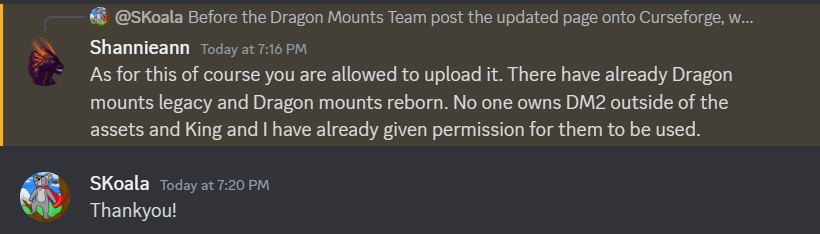
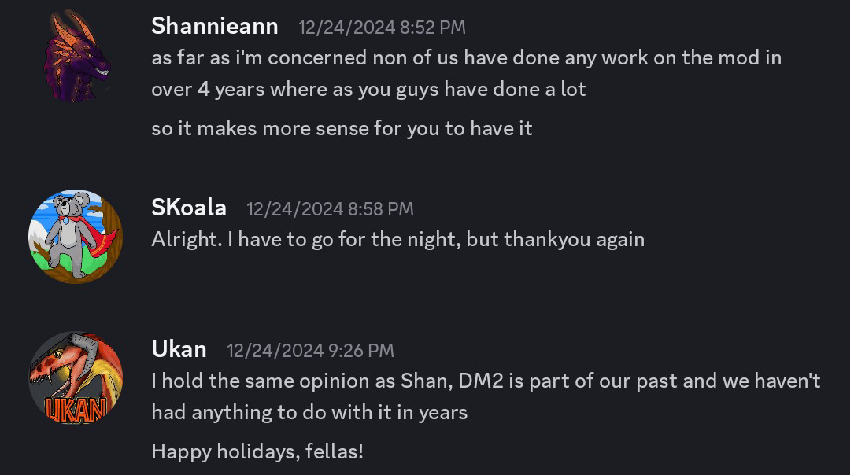
After the original development of the mod ended back in 2019, I (Tomanex) and SKoala have revived and own Dragon Mounts 2 with permissions from the original authors that was left uncredited by a different mod developer.
Dragon Mounts 2 is fully endorsed by the original former authors. Any projects created by unauthorized developers are unofficial works and fake.
Permissions granted by Kingdomall, Ukan and Shannieann for Dragon Mounts 2.
Dependencies
Post 1.12.2 (v1.6.3)
- None
Pre 1.12.2 (v1.6.2)
- Requires LLibrary
Issues / Bug Reports
If you found something that doesn't look right, is probably a bug, please head over to our Github to report it! Your bugs are most likely to be seen there versus our Discord server.
Credits
Development Team (2024-present)
Dragon Mounts 2 (since v2.0.0) - 1.12 and onwards
- Tomanex - Owner; Artist
- Skoala - Co-Owner; Beta Tester
- 2190303755 - Developer; Forge, Fabric - NeoForge
- Moaswies - Developer; Forge and Fabric
- YuanShine - Developer; Fabric (Kotlin)
- glyceryl6 - Developer; Forge
- EquinoxTheWingedWolf - Lead Texture Artist & Model Designer
- TheRPGAdventurer - Original author of the mod
- BarracudaATA - Original author; code, textures, ideas
- See contributors on GitHub for a full list of contributors
Legacy Development Team (2018-2019)
Dragon Mounts 2 (v1.6.3 and below) - 1.11 and 1.12
- TheRPGAdventurer - Lead Developer
- Kingdomall - Lead Texture Artist
- Shannieann - Texture Artist
- UkanGundan - Texture Artist
- Kay9Unit (WolfSh0tz) - Developer
- BarracudaATA - Original author; code, textures, ideas
- See contributors on GitHub for a full list of legacy contributors
How to Install Dragon Mounts 2 on Your Server
Order Server
Order a Minecraft Java server with at least 3 GB RAM (4 GB recommended).
Set forge Loader
In the panel under "Egg", select the forge loader and matching Minecraft version (1.12.2).
Install Mod
Open the mod browser in the dashboard and search for "Dragon Mounts 2". Click "Install" – done! Alternatively, upload the .jar via SFTP to the /mods folder.
Compatibility
Mod Loaders
Minecraft Versions
1.12.2, 1.12.1, 1.12 (+1 more)
Server-side
✓ RequiredRecommended RAM
4 GB(min. 3 GB)Frequently Asked Questions
Dragon Mounts 2 server crashes on startup – what to do?
Most common cause: wrong forge version or insufficient RAM. Check the server log (latest.log) for "OutOfMemoryError" or "Mixin" errors. With Mado Hosting: ensure at least 3 GB RAM is allocated and the loader matches the mod version (1.12.2). You can switch loaders with one click in the panel.
Is Dragon Mounts 2 compatible with forge?
Dragon Mounts 2 officially supports forge for Minecraft 1.12.2, 1.12.1, 1.12. The Mado dashboard automatically detects incompatible loader combinations.
Server lagging with Dragon Mounts 2 – how to optimize performance?
Recommended RAM: 4 GB (per 8 players). Use /spark profiler to check if Dragon Mounts 2 consumes the most tick time. Common fixes: reduce server view-distance to 8-10, install "performant" or "starlight" as supplementary mods on Forge. With Mado Hosting, your server runs on NVMe SSDs with dedicated CPU cores for minimal latency.
Similar Mods




Rent Modded Server
Install Dragon Mounts 2 with just one click on your server.