
Drinking Flask
Potions & stews don't stack? Put them all in a flask!
Screenshots
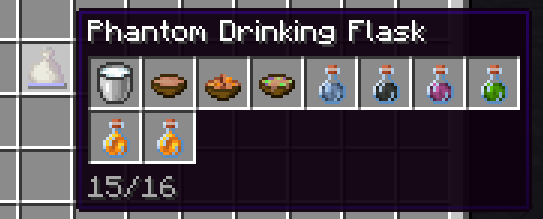
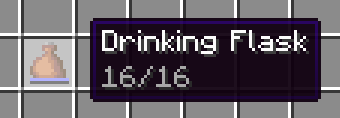
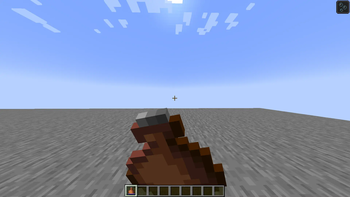
About this Mod
The Drinking Flask is an item that can store up to 16 drinks. When you drink from the flask, the effects of a random drink from inside will be applied.
Useful for carrying many potions or stews, or playing Russian roulette!
The Phantom Drinking Flask is more expensive, but you can view its contents. Drinking from it still applies a random drink though.
Usage
To add a drink to the flask, you can either:
- Hold the flask in your main hand and a drink in your offhand, then use (default: right click)
- Left click a drink on the flask in the inventory
- Left click the flask on a drink in the inventory
The behavior is similar to a bundle.
For balancing, potions take up 2 of the 16 slots each (configurable through datapack).
More information
Drinks include:
- Potions
- Water Bottle
- Milk
- Honey Bottle
- Soups & Stews
When you pour the drink into a bundle, you get the container back immediately even though it displays in the phantom tooltip.
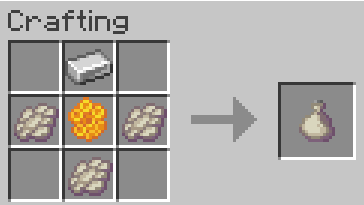
Recipes
Drinking Flask
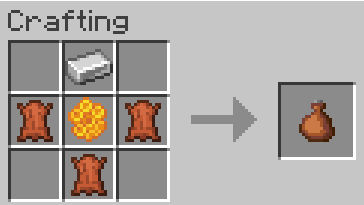
You can use leather or rabbit hide interchangeably.
Phantom Drinking Flask
Compatability
1.20.1 (outdated)
Compatability has been reworked in 2.0.0. Support for other mods must be done explicitly in either this mod or the other mod, through tags and optionally an API. If you're a developer or datapacker, see the wiki page for more information.
1.21.1
Compatability needs to be added manually by adding the mod item to one of the following tags, or defining a new remainder tag and recipe. See the mod data for examples.
#drinkingflask:can_pour_into_flask(no remainder set)#drinkingflask:remainder/bottle(glass bottle)#drinkingflask:remainder/bowl(bowl)#drinkingflask:remainder/bucket(bucket)
Current supported mods
- Create
- Farmer's Delight
- My Nether's Delight
- Brewin' and Chewin'
- Enderscape
If there's a mod you'd like support for, feel free to open a github isue or PR
1.21.6+
Most mods should work out-of-the-box, as long as the drink has a minecraft:consumable component with the drink animation. Items can also be flask-enabled by adding them to the #drinkingflask:can_pour_into_flask tag. Remainders are determined by looking at the minecraft:use_remainder component or the recipe remainder if absent.
Available Versions
How to Install Drinking Flask on Your Server
Order Server
Order a Minecraft Java server with at least 3 GB RAM (4 GB recommended).
Set fabric Loader
In the panel under "Egg", select the fabric loader and matching Minecraft version (26.2).
Install Mod
Open the mod browser in the dashboard and search for "Drinking Flask". Click "Install" – done! Alternatively, upload the .jar via SFTP to the /mods folder.
Compatibility
Mod Loaders
Minecraft Versions
26.2, 26.2-rc-2, 26.2-rc-1 (+15 more)
Server-side
✓ RequiredRecommended RAM
4 GB(min. 3 GB)Frequently Asked Questions
Drinking Flask server crashes on startup – what to do?
Most common cause: wrong fabric version or insufficient RAM. Check the server log (latest.log) for "OutOfMemoryError" or "Mixin" errors. With Mado Hosting: ensure at least 3 GB RAM is allocated and the loader matches the mod version (26.2). You can switch loaders with one click in the panel.
Is Drinking Flask compatible with fabric and quilt?
Drinking Flask officially supports fabric, quilt for Minecraft 26.2, 26.2-rc-2, 26.2-rc-1. The Mado dashboard automatically detects incompatible loader combinations.
Server lagging with Drinking Flask – how to optimize performance?
Recommended RAM: 4 GB (per 8 players). Use /spark profiler to check if Drinking Flask consumes the most tick time. Common fixes: reduce server view-distance to 8-10, install "performant" or "starlight" as supplementary mods on Forge. With Mado Hosting, your server runs on NVMe SSDs with dedicated CPU cores for minimal latency.
Similar Mods




![[TaCZ] Timeless and Classics Zero](https://cdn.modrinth.com/data/SzzJttH8/fd27766d2bb8390d284696b1dbd358f87e081439_96.webp)

Rent Modded Server
Install Drinking Flask with just one click on your server.