
Drive-By-Wire:Typewriter
Drive-By-Wire Addon, add Linked Typewriter style control, making each key a wire signal channel.
Screenshots
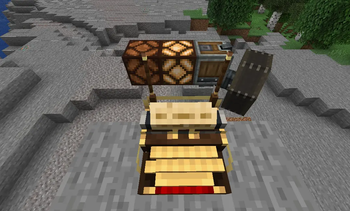
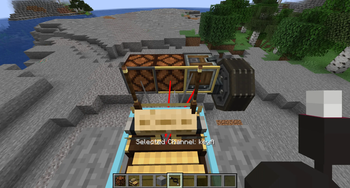
About this Mod
Drive By Wire — Typewriter
A NeoForge addon for Minecraft 1.21.1 that adds a keyboard-driven wire source to the Drive By Wire (Sable) network, using Create Aeronautics's typewriter mechanics.
What it does
Adds a Typewriter Hub block. Right-click it with an empty hand to start typing — your keypresses are broadcast as redstone signals on the Drive By Wire network, one channel per key. Right-click again to stop.
Blocks
| Block | Description |
|---|---|
| Typewriter Hub | A typewriter and multi-channel wire source in one block. |
Key channels
The hub exposes a channel for every key:
- Letters
A–Z - Digits
0–9 - Symbols: Space,
',,,-,.,/,;,=,[,],\ - Control: Enter, Tab, Backspace, Delete, Caps Lock
- Navigation: Arrow keys, Page Up/Down, Home, End
- Modifiers: Shift, Ctrl, Alt, Super, Menu
Each channel is active (1) while the key is held and inactive (0) when released. Only one player can use a hub at a time; disconnecting or losing window focus resets all channels.
Requirements
| Mod | Version |
|---|---|
| NeoForge | 21.1.228+ |
| Simulated (Create: Simulated) | 1.1.3+ |
| Drive By Wire | 0.2.9+ |
| Create | 6.0.10+ |
Usage
- Place a Typewriter Hub in the world.
- Connect wire from it to whatever you want to control.
- Right-click the hub with an empty hand — your keypresses now drive the network.
- Right-click again to disconnect.


About This Project
This project was developed almost entirely by ClaudeCode (Anthropic's AI assistant). It was built iteratively on
top of the official NeoForge mod project template(mod-generator).
Beyond the initial template setup, all code contributions, feature implementations, refactors, and bug fixes were
autonomously generated and refined by ClaudeCode in a collaborative loop.
License
This project is licensed under the MIT License
Available Versions
How to Install Drive-By-Wire:Typewriter on Your Server
Order Server
Order a Minecraft Java server with at least 3 GB RAM (4 GB recommended).
Set neoforge Loader
In the panel under "Egg", select the neoforge loader and matching Minecraft version (1.21.1).
Install Mod
Open the mod browser in the dashboard and search for "Drive-By-Wire:Typewriter". Click "Install" – done! Alternatively, upload the .jar via SFTP to the /mods folder.
Compatibility
Mod Loaders
Minecraft Versions
1.21.1
Server-side
✓ RequiredRecommended RAM
4 GB(min. 3 GB)Frequently Asked Questions
Drive-By-Wire:Typewriter server crashes on startup – what to do?
Most common cause: wrong neoforge version or insufficient RAM. Check the server log (latest.log) for "OutOfMemoryError" or "Mixin" errors. With Mado Hosting: ensure at least 3 GB RAM is allocated and the loader matches the mod version (1.21.1). You can switch loaders with one click in the panel.
Is Drive-By-Wire:Typewriter compatible with neoforge?
Drive-By-Wire:Typewriter officially supports neoforge for Minecraft 1.21.1. The Mado dashboard automatically detects incompatible loader combinations.
Server lagging with Drive-By-Wire:Typewriter – how to optimize performance?
Recommended RAM: 4 GB (per 8 players). Use /spark profiler to check if Drive-By-Wire:Typewriter consumes the most tick time. Common fixes: reduce server view-distance to 8-10, install "performant" or "starlight" as supplementary mods on Forge. With Mado Hosting, your server runs on NVMe SSDs with dedicated CPU cores for minimal latency.
Similar Mods





Rent Modded Server
Install Drive-By-Wire:Typewriter with just one click on your server.